How to Block Porn Sites on Your Teen’s Phone: 7 Techniques Parents Can Rely On

The complete monitoring experience for your phone
Get XNSPY and start tracking calls, texts, multimedia, locations and more on any phone!
Get Started Now Live DemoYou might assume that your child is too mature to seek out explicit sites or use them. But that illusion is mostly shattered one way or another.
The implication here is not that they are going out of their way to find porn, but rather that the internet is full of it. At one point, it can become almost impossible for your kid to escape it.
Now, would you wait for that moment to arrive or take preventive measures beforehand? Regardless of the choice you make, you will eventually need to look up how to block inappropriate websites on your kid’s phone.
And we will provide you with an answer in the form of 7 tried and tested methods discussed in this article.
Quick Overview of Everything Important
- Children can be exposed to adult content accidentally or out of curiosity; therefore, early preventive measures matter.
- Behavioral signs like objectifying others, secrecy around devices, following adult accounts, and deleting history may indicate porn exposure.
- Xnspy provides device-level monitoring to track browsing, app usage, and block explicit content remotely.
- DNS-level filters block adult websites across all devices on your home network.
- Browser-based tools like porn blocker extensions and Google SafeSearch reduce exposure to porn, too.
- Built-in parental controls, such as Screen Time for iPhone and Google Family Link for Android, allow site-specific blocking and custom restrictions.
- Combining multiple methods offers the most comprehensive protection against inappropriate content.
5 Signs Your Kid May Be Accessing 18+ Content
Now, you might wonder, “How would I even know if my child is visiting inappropriate websites?” The answer lies in the behaviors and patterns they start to display over time. Here are 5 key signs parents should watch for:
1. Objectification of Women or Men
Children who are frequently exposed to pornography may begin to imitate unhealthy behaviors, like treating people as objects rather than individuals.
2. Knowledge of Mature Topics Beyond Their Age
If your child suddenly demonstrates understanding of sexual behaviors or terms that are not appropriate for their developmental stage, it may indicate exposure to explicit material.
3. Excessive Secrecy Around Devices
Teens may insist on using devices in private and hide screens when around others to prevent parents from seeing their activity.
4. Following Adult Actors on Social Media
If they begin following adult actors or accounts with sexualized content on platforms like Instagram or TikTok, it can signal curiosity sparked by 18+ content.
5. Deletion of Browsing History
Regular clearing of internet history and search queries from browsers and apps can indicate attempts to hide visits to adult websites. To be honest, while clearing history is not always suspicious, a consistent pattern of hiding activity warrants attention.
Now equipped with these red flags in your teen’s behavior, you can continue to find out how to limit porn on their phone.
More Resources to Explore

⛔  7 Best Porn Blocking Apps for Teens Tested & Ranked
🎛️  How to Limit Screen Time for Kids: 7 Proven Tips
🔞  Spotify Porn: How Explicit Audio Bypasses Restrictions & Reaches Teens
🗨️  How to Block Porn on X (Twitter): Guide for Parents
How to Block Adult Websites on Your Child’s Phone: 7 Methods That Work
Porn blocking, while necessary, is challenging to do, especially for parents who are not tech-savvy. To help you evade such issues, we have collected 7 ways on how to block inappropriate websites on your kid’s phone below.
1. Install Xnspy on Their Phone
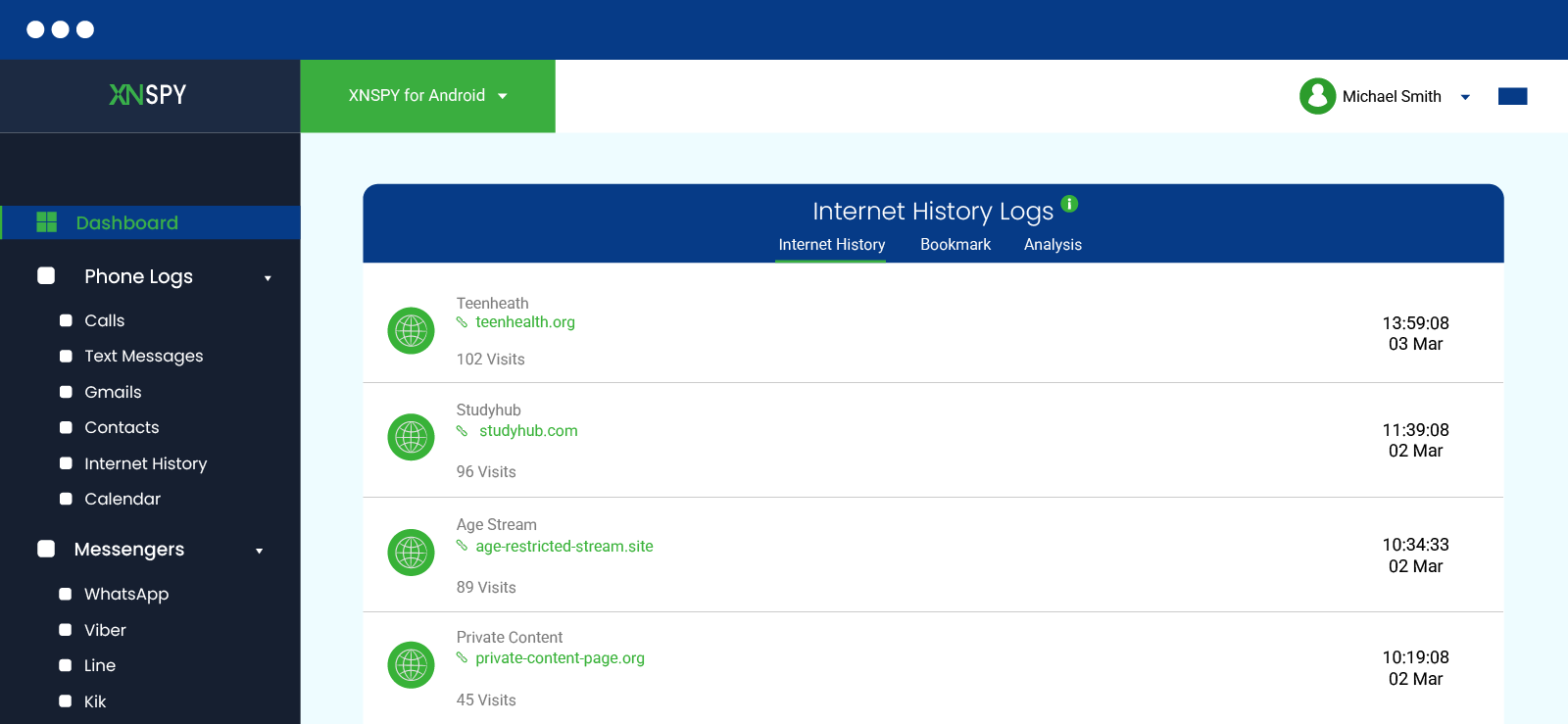
Xnspy is a child monitoring solution that can also help parents counter porn addiction and excessive exposure.
The app is installed directly on the target phone and runs on the device level. By doing so, Xnspy provides you with access to everything happening on your kid’s phone, including pornographic content consumption, adult site visits, explicit app installation, and more.
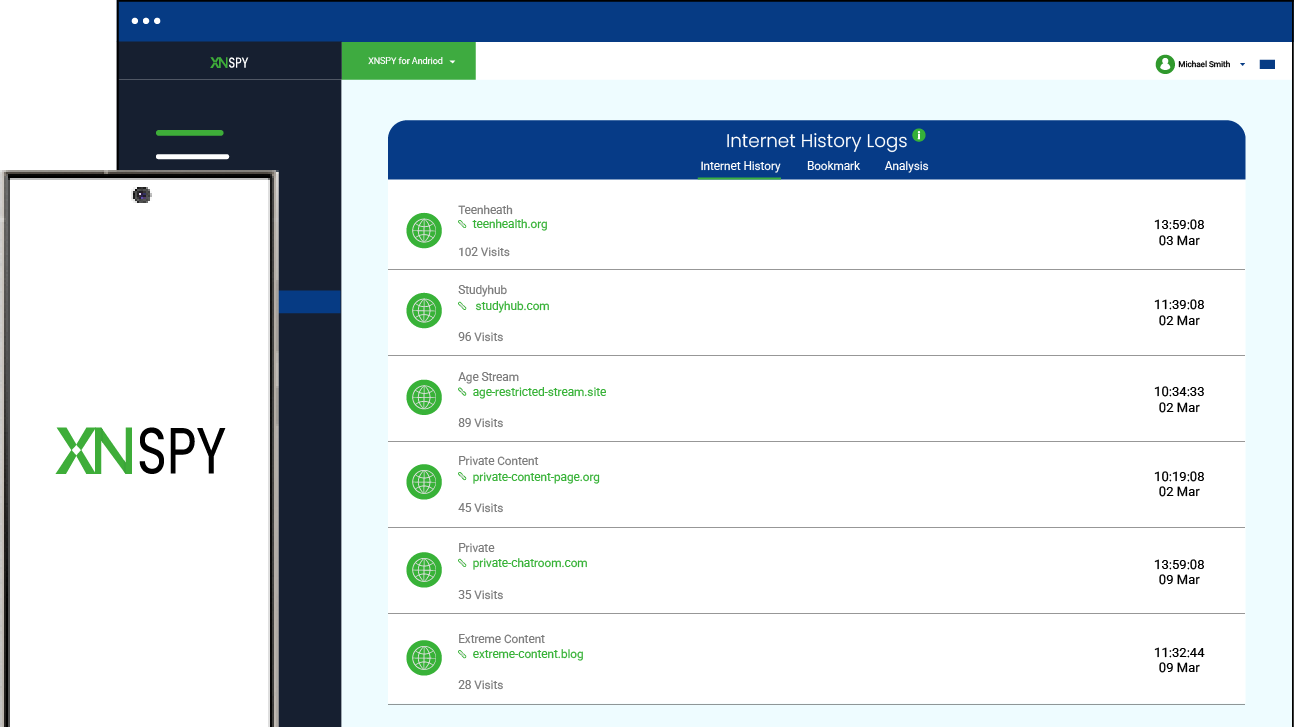
For starters, you can see whether your child is searching for explicit sites using the keylogs that Xnspy collects from their phone. Not only that, you can then further look for the 18+ sites they actually visited via the browser history, along with the frequency of visits, timestamp, and clickable URL.
To then see what they are up to on these porn sites, you can check their screen records that Xnspy captures periodically every 5-10 seconds.
Equipped with all this information, you can find yourself better prepared to have an honest conversation with your child and instill media literacy in them.
On the other hand, you can also use Xnspy to see if they are being exposed to pornography through adult apps, which ones are installed, how they are using them, etc. Once done monitoring that, you can then block them remotely using Xnspy’s app blocker.
What adds more value to the app are its general functionalities like stealth mode, real-time updates, consistent activity logs, and minimal impact on the target device.
So, here’s how to ban porn on your kid’s phone using Xnspy:
- Subscribe to Xnspy and wait for a confirmation email.
- Once received, install and set up Xnspy on the target phone.
- Wait for the app to sync previous and new activity on its web dashboard.
- Monitor logs across porn sites and apps along with blocking options.

Monitor and Block Porn Remotely
Physical supervision can only take you so far; use Xnspy instead.
– See their browser searches with keylogs.
– Find out their browsing history across adult sites.
– Monitor explicit app installation and usage.
– Block/unblock remotely using the dashboard.
2. Implement DNS-Level Filters
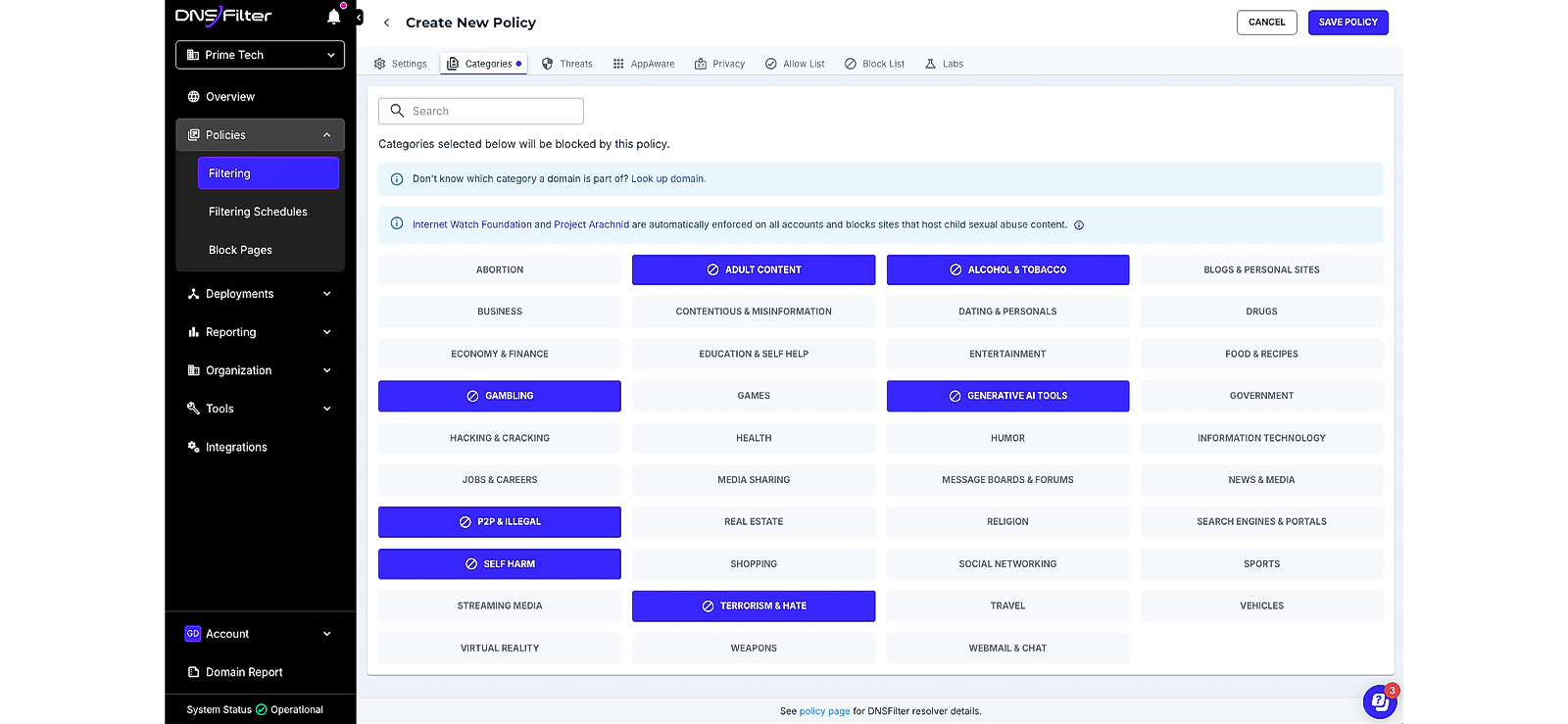
Every time your child types a website into a browser, their device first asks a DNS server for the site’s “address” so it can load the page.
A DNS-level filter works by intercepting these requests and checking the website against a pre-defined blocklist of adult websites, maintained by family-safe DNS providers like CleanBrowsing or NextDNS. If the site is on the blocklist, the DNS server refuses to provide the address, and it does not load.
Moreover, many advanced DNS providers also offer category-based filtering and activity reports, allowing parents to block entire categories of content, such as pornography or gambling.
However, a clear drawback of this method is that DNS filters set on your home router only apply to devices connected to that Wi-Fi, so they won’t block content when your child uses mobile data.
Let’s see how to block porn sites on your teen’s phone with DNS filters:
- Log in to your home Wi-Fi router settings via a browser.
- Find the section labeled DNS Settings or Network Settings.
- Replace the existing DNS numbers with the ones provided by a family-safe DNS service.
- Save your changes and restart the router so the new settings take effect.
- Set a router password to prevent your child from changing the DNS settings.
3. Try Out Porn Blocker Extensions
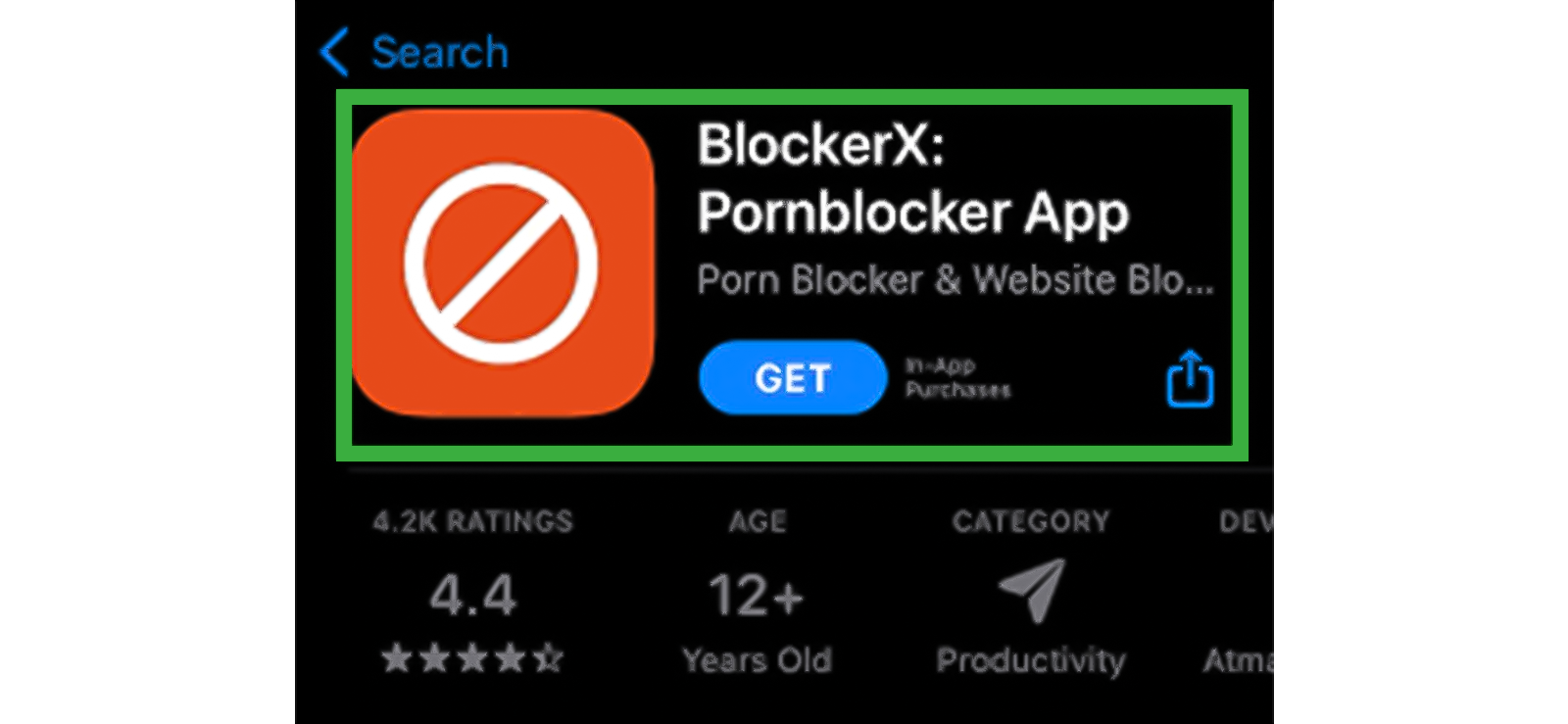
Porn blocker web extensions are browser add-ons designed to filter 18+ sites in real time.
To block explicit sites, these extensions scan web pages as they load in the browser and detect adult content using keyword matching and URL blacklists.
When a blocked website is detected, the page is replaced with a “blocked” message to prevent exposure.
Parents can further customize filters, add specific websites to either allow or block, and, in some cases, receive logs of attempted access using an advanced extension.
Nonetheless, it is evident that web extensions are browser-specific; therefore, only filter restricted sites on the browser they are installed on. Not only that, but tech-savvy kids can also uninstall extensions or evade them using incognito mode.
Well, to begin using porn blocker web extensions to protect your kid from exposure to inappropriate sites:
- Open your child’s browser and go to the browser’s add-on store.
- Search for a reputable pornography blocker extension and install it.
- Grant the necessary permissions for page monitoring.
- Open the extension settings and enable explicit site blocking.
4. Use Google SafeSearch
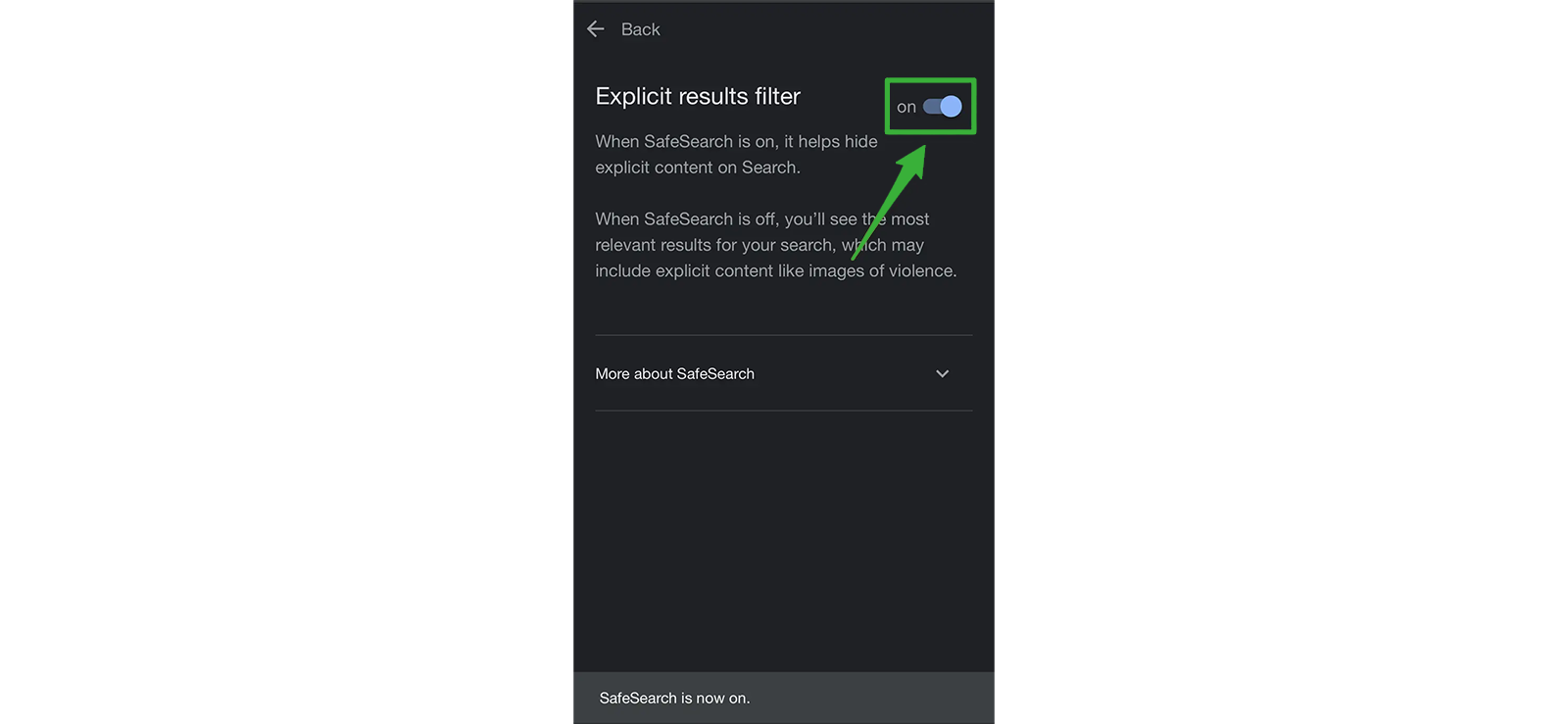
Google SafeSearch helps reduce exposure to adult content by filtering explicit websites, images, and videos from search results. It uses AI-based classification models to identify inappropriate sites and blocks 18+ autocomplete suggestions when your child is searching online.
But because SafeSearch operates at the search engine level, it affects only Google searches, not the entire internet. This means it cannot directly block access to a restricted website if your child types the URL directly or uses other search engines.
Regardless, here’s how to block restricted sites using Google SafeSearch:
- Open Google.com on your child’s phone.
- Tap Settings in the menu.
- Select SafeSearch filters.
- Turn “Filter Explicit Results” ON.
- Save the settings to apply the filter.
5. Find a VPN with Controls
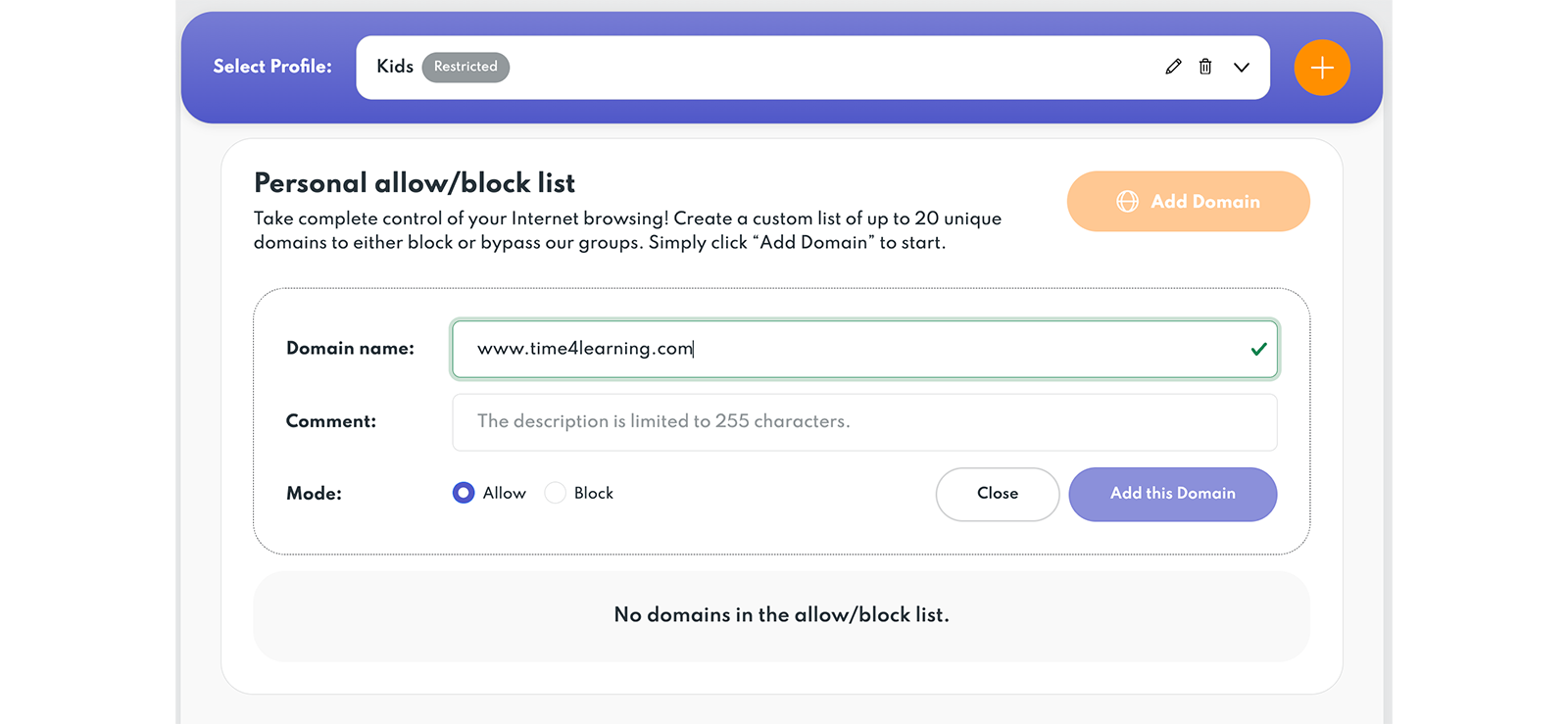
A filtering VPN works by routing all device traffic through a secure server while applying category-based blocking. By encrypting traffic and filtering domain requests, a VPN acts as both a DNS filter and a firewall, providing an extra layer of protection across all apps and browsers.
When installed on your child’s phone as a VPN configuration profile, it can enforce system-wide filtering, apply filters on both Wi-Fi and cellular networks, and prevent access to pornography in real time.
But remember that most of the VPNs with such controls require a subscription and can be easily turned off by your child if not restricted. Moreover, some apps might have a problem functioning properly due to the reduced connection speed.
Let’s see how to block explicit sites on your kid’s phone using a VPN app:
- Download a reputable parental-control VPN app from the App Store or Google Play.
- Create a parent account within the app for monitoring and control.
- Install and approve the VPN profile on your child’s device.
- Enable filtering categories or custom blocklists.

Did You Know?
Apart from regular browsing, you can also see what they do during incognito sessions.

6. Set Up Google Family Link (Built-In Android Restriction)
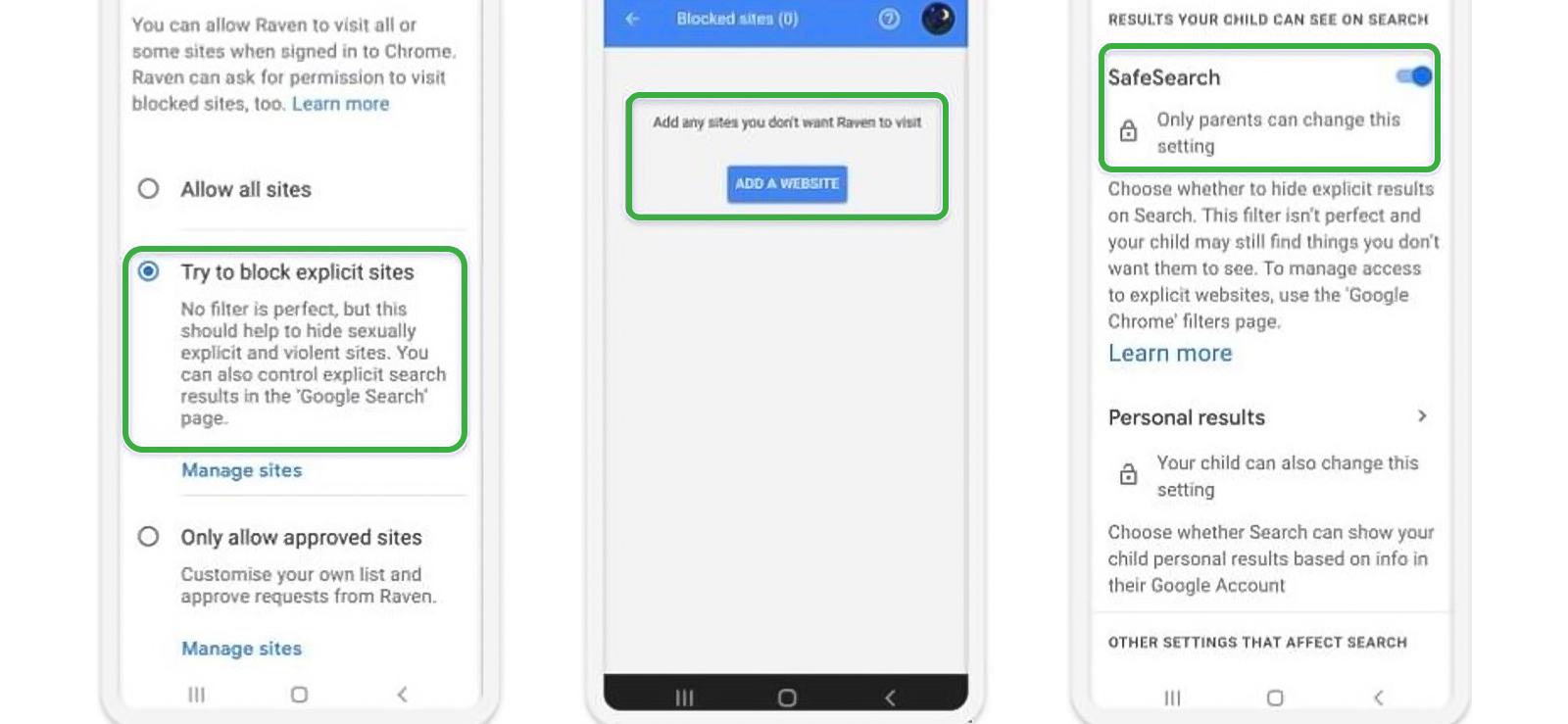
Google Family Link is a built-in tool for Android that allows parents to manage their child’s device. For remote phone management, one of its core features is site blocking, which prevents access to inappropriate websites in Google Chrome.
To do so, it filters URLs against Google’s database of explicit content and enforces real-time restrictions on websites from inappropriate categories.
But remember that Google Family Link’s site-blocking applies only to Google Chrome on the child’s device. Other browsers or in-app web views are not filtered. Therefore, kids can access blocked sites using alternate accounts or unsupported browsers.
To use Google Family Link for effective porn blocking, follow the steps below:
- Install the Google Family Link app on your device and create a parent account.
- Link your child’s Google account to Family Link and their Android device.
- Open the child’s profile in Family Link and go to settings.
- In “Filters on Google Chrome,” enable “Block Explicit Sites” to prevent access to adult websites.
7. Try Out Screen Time (Built-In iPhone Restriction)
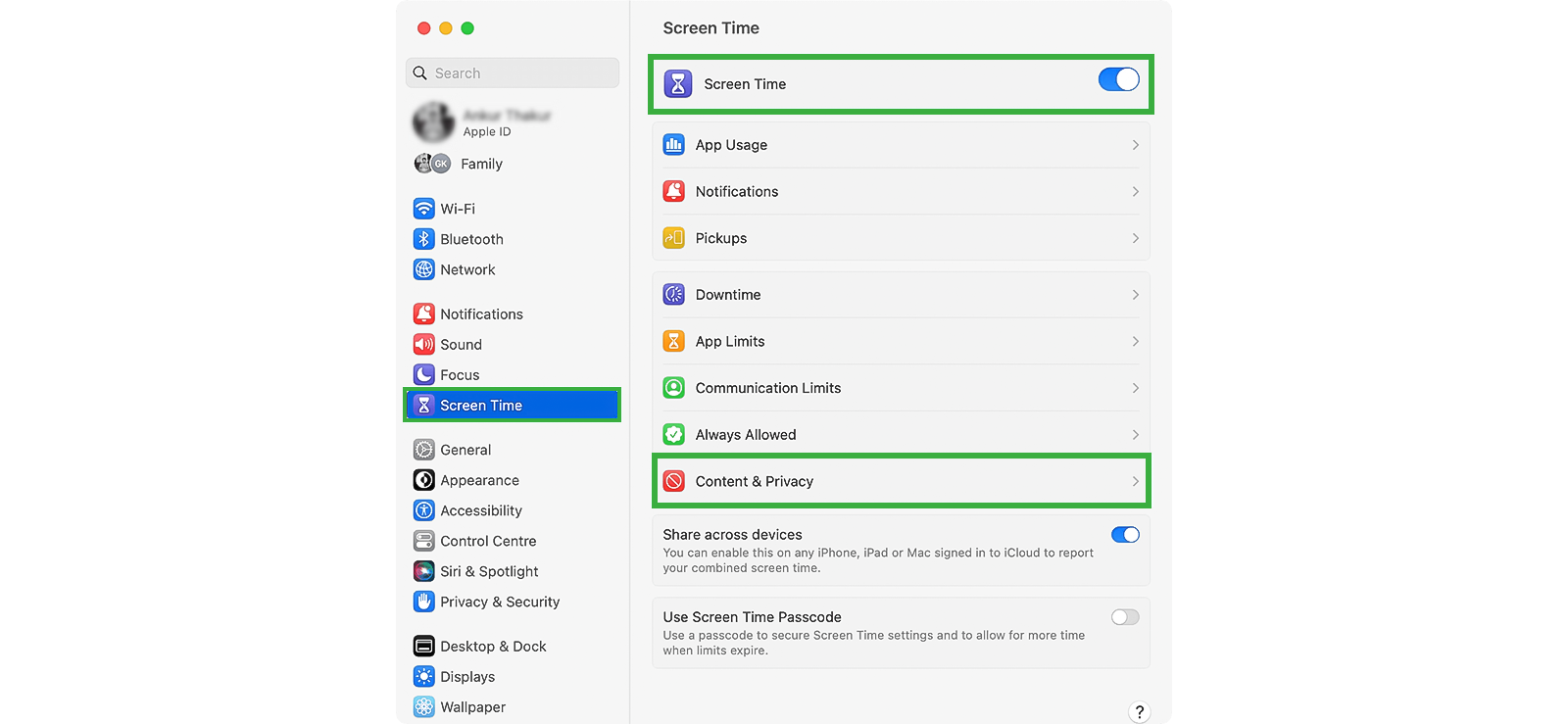
Screen Time is Apple’s built-in feature for iPhone that allows parents to restrict access to adult websites.
Its site-blocking feature works by comparing web requests in Safari against Apple’s database of inappropriate sites. When a restricted website is requested, the child sees a “Website Blocked” page.
Parents can further customize protections by adding websites to an Always Block list to ensure certain 18+ sites are never accessible.
Moreover, because Screen Time operates at the OS level, it applies to Safari and supported in-app browsers, giving parents broad control.
Regardless, its feature may not catch every newly created adult website. Not only that, but since the system relies on Apple’s content database, it does not use AI-based filtering.
Stop wondering how to block 18+ websites and use Screen Time with these steps instead:
- Open settings on your child’s iPhone and tap Screen Time.
- Turn on Screen Time and choose This is My Child’s iPhone.
- Go to “Content & Privacy Restrictions” and click “Limit Adult Websites.”
FAQs
How to block porn websites on your child’s phone if they use multiple browsers?
If your child uses multiple browsers, relying on browser-specific tools alone may not be effective. Instead, opt for system-wide solutions like using a VPN with filters on their phone to prevent explicit sites from loading. You can further combine this with device-level restrictions offered by Screen Time for iPhone and Google Family for Android.
How to limit porn on your kid’s phone across multiple devices?
Limiting porn across multiple devices requires protection that goes beyond a single browser or phone setting. A DNS-level filter works at the network layer by blocking adult domains before they load, meaning any device connected to your home Wi-Fi automatically inherits the same restrictions. For protection outside the home network, though, a monitoring solution like Xnspy can help. Once installed directly on your child’s device, it allows parents to monitor browsing activity and block inappropriate apps even on cellular data.
How to restrict porn on your child’s phone if they use multiple Google or Apple accounts?
If you are wondering how to block adult websites on your child’s phone when they use multiple Google or Apple accounts, combining device monitoring with browser-level filters can help. For example, monitoring solutions like Xnspy can block explicit apps and monitor browsing activity across adult sites regardless of which account is active on the device. Alternatively, you can also add porn-blocking web extensions to the accounts your child uses.
How to ban porn on your teen’s phone if they use VPNs or private networks?
If your teen uses VPNs or private networks, traditional filters like SafeSearch or DNS blocking may be bypassed. In this case, built-in restrictions like Screen Time on iPhone or Google Family Link on Android are more effective. These tools operate at the device level, meaning they block access to adult websites directly on the phone, regardless of the network used.
How to block explicit sites on your kid’s phone if they are using mobile data?
If you are exploring how to block porn on kid’s phone while they are using mobile data, methods like Google SafeSearch and browser extensions can help since they do not rely on Wi-Fi. Enabling Google SafeSearch ensures that explicit websites and media are filtered out of Google search results. Likewise, porn-blocking web extensions scan web pages and block access to known adult domains in real time to reduce exposure.
Everything on Their Phone is Now Within Your Reach
Use Xnspy to access complete phone activity without touching their phone.

3 Comments
Leave a reply:
Your email address will not be published. Required fields are marked*



Nicole Dougherty
May 11, 2026 at 2:52 pmWHY ARE PORN SITES EVEN THERE??? I AM SO SO FRUSTRATED
Chandler Garza
July 1, 2026 at 12:23 pmMy son has been objectifying women and being too misogynistic towards them, what can I do to change his perspective?
Jericho Dudley
July 3, 2026 at 1:43 pmPorn blocker extensions work on all browsers or only the browsers that it is added to?