
The complete monitoring experience for your phone
Get XNSPY and start tracking calls, texts, multimedia, locations and more on any phone!
Get Started Now Live DemoYou wake up from a nightmare, drenched in sweat, only to find another one unfolding before your eyes. In the corner of the room, slightly out of sight, is your kid still using their phone. “Mom, I just picked it up. I forgot to send my streak on Snapchat,” they say casually.
At some point, most parents have found themselves in this exact situation, and that response rarely brings any relief. Instead, it leaves you with more doubts, more questions, and one pressing concern: How can I monitor my child’s Snapchat without them knowing?
To help you find that answer, we have outlined seven practical methods in this guide.
Here’s Everything You Need to Know In Under a Minute
– Snapchat’s disappearing messages, Streaks, and Spotlight features can encourage risky behavior, FOMO, and exposure to inappropriate content.
– Snap Map and Quick Add increase the risk of predation and catfishing.
– Xnspy offers full visibility into Snapchat activity, including messages, shared media, searches, and account settings.
– Family Center lets parents see friends lists, recent contacts, and report history for one primary account.
– Manual check-ins rely on conversations and guided app reviews, but their effectiveness depends entirely on the child’s honesty.
– Frequently used devices, browser history, and cache files reveal login activity and traces of use.
– iCloud backup can recover past app data and saved media, but does not show real-time activity.
Can I Monitor My Child’s Snapchat?
Yes, you can track your child’s Snapchat. However, it is not always as straightforward as this “yes.”
You need to understand that Snapchat uses strong encryption and privacy systems to limit third-party access. While good for users’ protection, parents worried for their teens tend to take the brunt of it.
However, monitoring Snapchat being difficult does not equate to it being impossible. When using the right methods and tools, parents can gain meaningful insights into their kids’ Snapchat activity.
All you need to do is choose a method that aligns with your child’s age and your specific needs.
Why Do You Need to Monitor Snapchat?
Parents might consider Snapchat harmless because of its privacy-focused features. However, that very design is what makes children engage in riskier behavior. Here’s why it is important for you to track your child’s Snapchat.
- If privacy settings do not restrict location sharing, Snap Map can expose the real-time location of kids to strangers, which can further result in stalking.
- The Quick Add feature increases the risk of users connecting with predators, catfishes, groomers, and scammers.
- Disappearing messages and Snaps normalize sexting among teens under the belief that nothing can be saved.
- Features like Streaks create FOMO and pressure for users to stay online.
- Spotlight content can push inappropriate material on the user’s feed.
More Snapchat Guides You Should Read

⛔  How to Know If Someone Blocked You on Snapchat: 6 Quick Checks
👻  How to View Someone’s Snapchat Story Anonymously: 6 Ways
🏅  How to See Someone’s Best Friends List on Snapchat: 5 Best Ways
How to Monitor Kids’ Snapchat: 6 Practical Ways That Actually Work
There are various ways to track Snapchat activity depending on different parental needs. Below, you will find 7 easy-to-execute methods that might work for you and offer you the insights you need.
1. Install Xnspy App
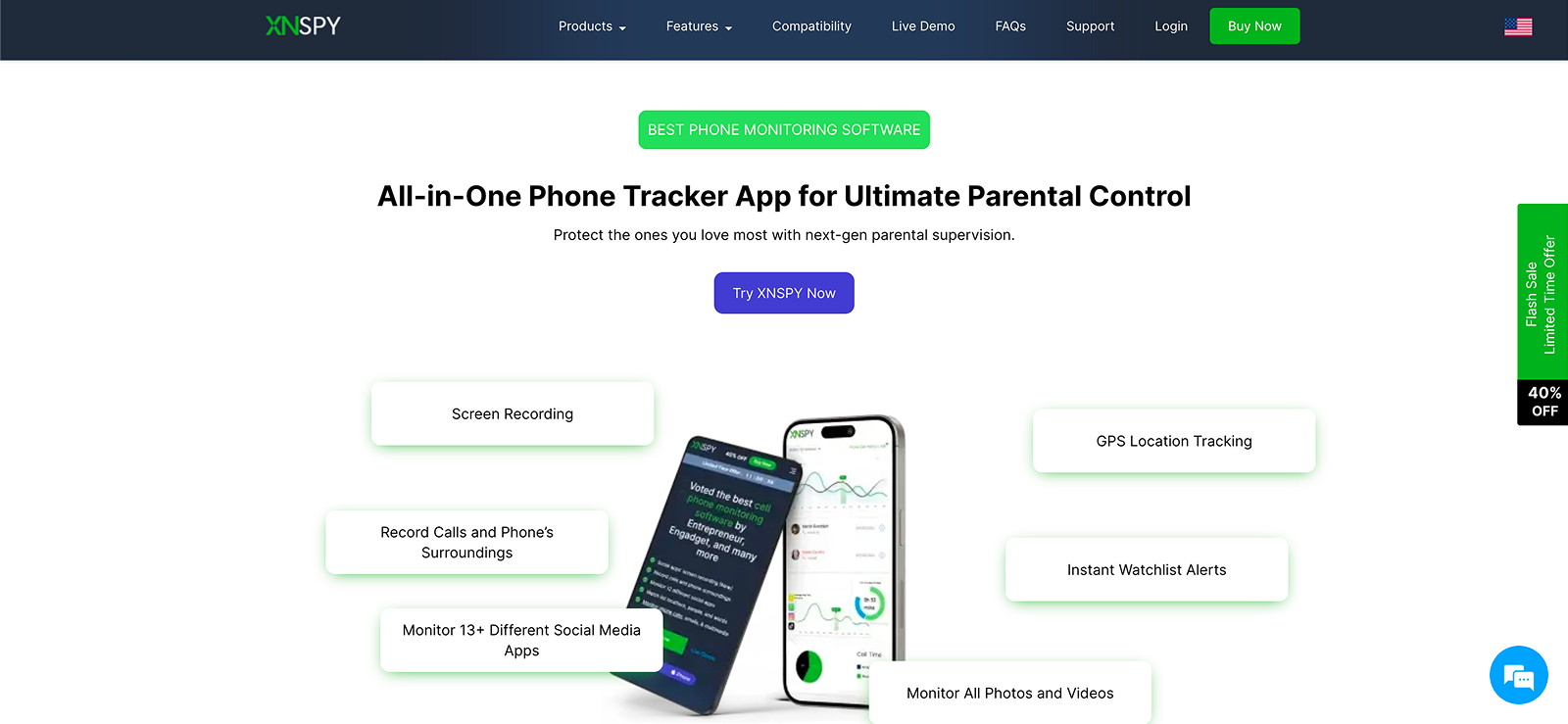
Xnspy is a Snapchat tracker that offers extensive features to record Snapchat-specific activity. When you install Xnspy on your kid’s phone, you can get complete visibility into their Snapchat.
For starters, you can find out whether they have Snapchat installed or not from their app list, then overall app usage using screen time collected by Xnspy. Moreover, you can keep tabs on the consumed content, interactions, shared Snaps, account settings, etc., with the periodic screenshot Xnspy captures every 5-10 seconds.
To add to the detail of insights, the app also offers keylogs like Snapchat searches, passwords, typed messages, story replies, and more. Not only that, but if the child saves any media, like photos or videos, on their phone from Snapchat, you can also view it within the dashboard.
Xnspy also includes keyword alerts that trigger a notification anytime a flagged word is detected in Snapchat activity logs. As far as control is concerned, Xnspy meets parents’ needs for remote app control in times of crisis. Its app blocker can be used to restrict access to Snapchat with a single click.
If needed, you can follow the given steps to employ Xnspy:
- From the Xnspy official website, subscribe to a plan that meets your needs.
- Wait for the confirmation email after your purchase is through.
- Upon receiving the mail, install Xnspy in the target phone.
- Once the setup is complete, go to the user dashboard and view Snapchat activity.

Check Out Everything Your Child Hides on Their Snapchat
Use Xnspy to see what manual oversight can’t show you.
– See periodic screenshots for overall activity insights
– Check typed searches, replies, and more with keylogs
– Keep tabs on consumed content and downloaded media
– Set up keyword alerts and app blocking as needed
2. Use Snapchat Family Center
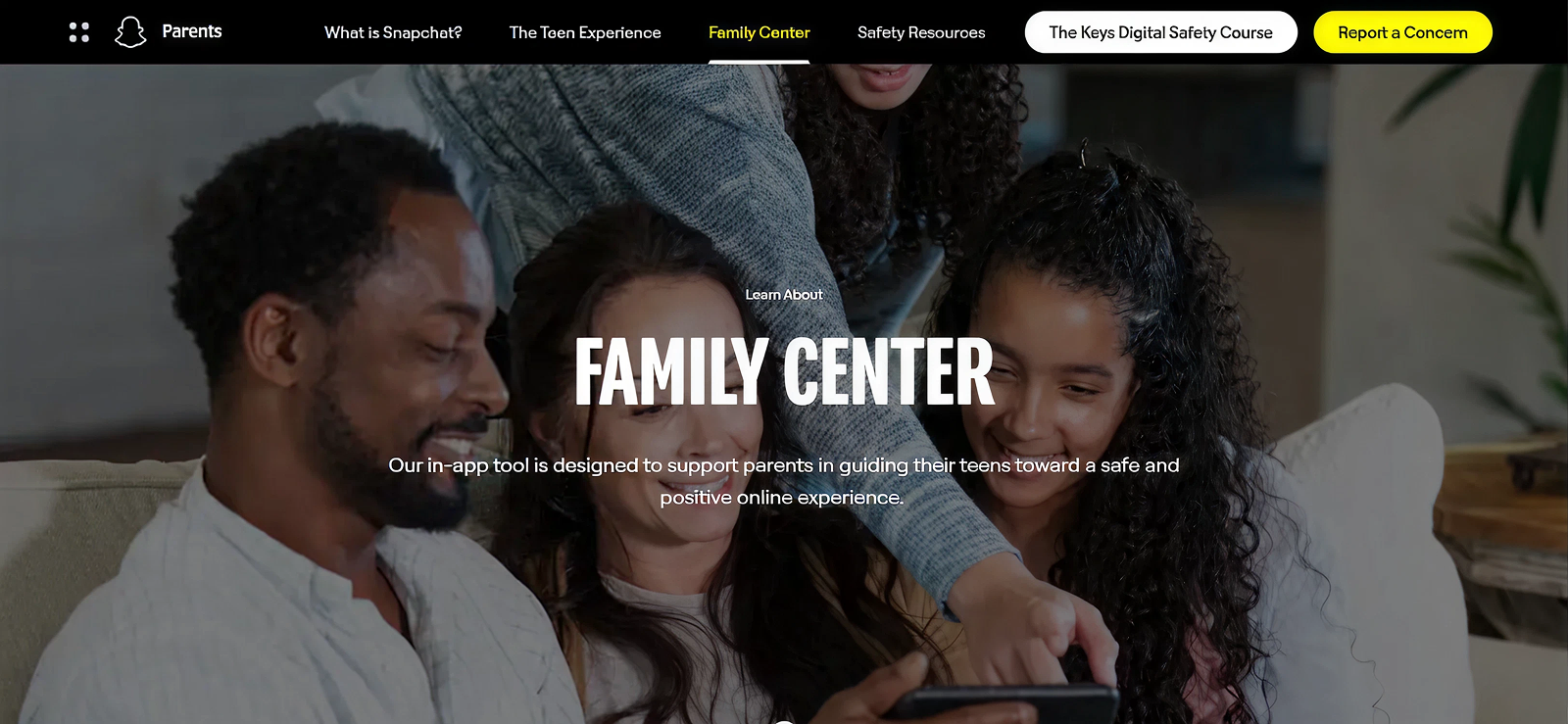
Snapchat Family Center is a built-in tool that offers Snapchat parental controls for you to gain limited insights into your teen’s activity.
Once you are linked with your child via the Family Center, you can see their friends list, review reporting history, and get alerts when they report someone. Moreover, you can check out friends they have recently chatted with.
The core concept of these supervision features is to help parents keep an eye on their kids’ Snapchat while maintaining privacy. However, all of this is only possible if the concerned person accepts your invite to the Snapchat Family Center.
To use Snapchat Family Center for monitoring their activity, you have to:
- Open Snapchat on your phone, go to the profile icon, and select settings.
- In the settings, click “Family Center” and look up your kid’s username.
- Send them the invite and wait for them to accept it.
- Use the dashboard to see Friends List, recent contacts, and more.
3. Try Out Manual Check-Ins
Manual check-ins are a communication-based monitoring technique. In these check-ins, instead of using any tools to get insights, you rely solely on regular conversations and app reviews.
You can start by setting clear expectations around acceptable use of Snapchat and then ask them open-ended questions to gauge how they are using the app. Moreover, you can occasionally sit with them to look at their friends list, privacy settings, visible content, and recent interactions.
However, for this to work, the phone must remain in the child’s control, and you must not reserve any judgment for them. The goal, again, should be guided transparency. Now, as is evident, this method relies primarily on the child’s honesty and can fail if they continue to delete chats or Snaps.
Nonetheless, try out the steps below for proper manual check-ins:
- Choose a routine moment to talk to them about Snapchat.
- Ask open-ended questions to inquire about any harmful encounters.
- Sit with them to review the app for transparency and honest conversations.
- Discuss both the rules set in place and the importance of online safety.
4. Check Frequently Used Devices
Kids tend to switch between devices like tablets, laptops, phones, etc., and leave behind traces of activity. By accessing any of these devices, you can look for logged-in sessions, notifications, saved images, and cached files related to Snapchat.
Therefore, instead of having to find workarounds, you can use already-provided access for proper parental oversight. But the success of this method is not always guaranteed because your child might log out of their Snapchat account after each session. Additionally, any efforts to conceal Snapchat activities can wipe all clues from the device.
Regardless, if still interested, here’s how to monitor child’s Snapchat with their frequently used devices:
- Look through any spare or shared phone, tablet, or computer.
- Find the Snapchat app there, check if their account is still logged in, and review it.
- If not, check galleries, files, etc., for Snapchat activity clues.
5. Review Snapchat Web History
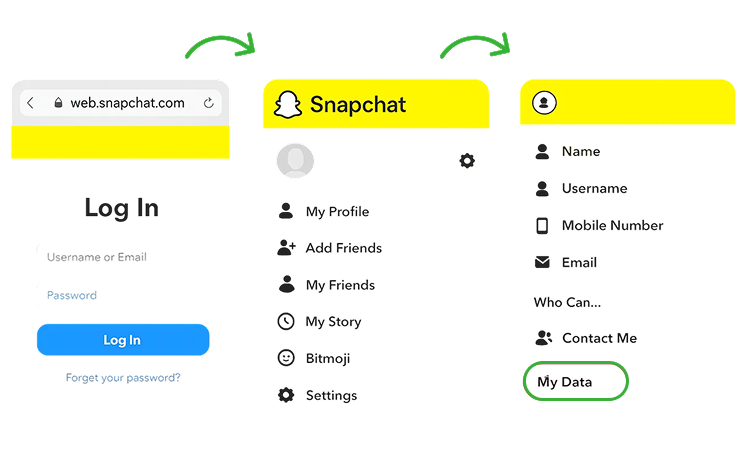
If there is a shared family laptop in your house, your child may use Snapchat web on it. That means you can review their activity related to Snapchat through its browser history.
Be it the visited sites, login pages, related searches, or other clues, the insights can offer you grounds to dig further if needed. Overall, while the logs will not show detailed messages or Snaps, they can still reveal usage patterns.
But note that a clear limitation of this method is that they might not even use the Snapchat web to begin with. Moreover, even if used, they can choose to delete history or access it in incognito mode.
Now, to use their Snapchat browser sessions for oversight, try out these steps:
- Use Chrome, Safari, Firefox, or any other browser that they frequent.
- Open history and look for “web.snapchat.com.”
- See when it was accessed and look at the page titles for any clues.

Did You Know?
Before you find ways to monitor their Snapchat, first see if they are active on the app.

6. See Cache Files ( For Android)
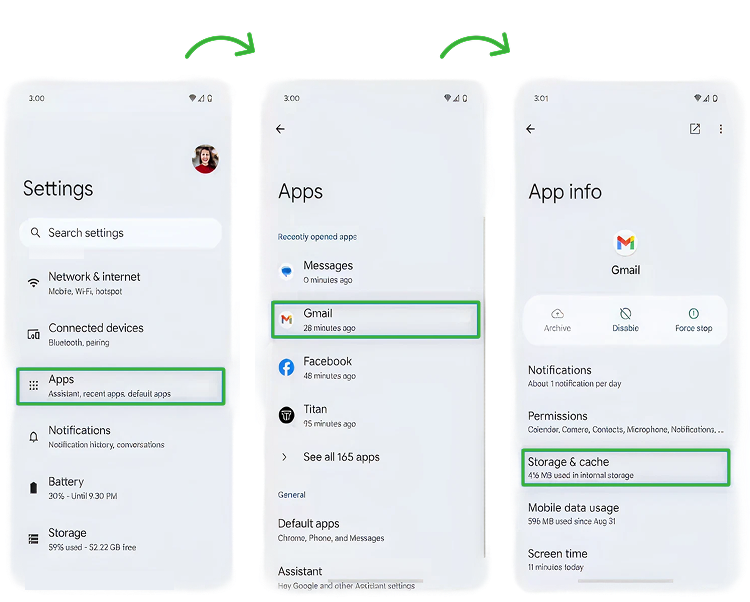
Various apps, including Snapchat, save temporary data in their host Android phone’s internal storage that is referred to as cache files. Data saved by Snapchat consists of thumbnails, previews, and residual media fragments, all present in its cache folder.
Therefore, when needed, parents can review these folders to find traces of Snapchat-related data and recent activities.
But any possible insights available in the cache files are time-sensitive and get deleted automatically after a while. Not only that, but the provided data is also very limited and cannot be used as a primary means of Snapchat tracking.
Now, let’s see how to monitor your child’s Snapchat using cache files in Android:
- Go to the file manager on their Android phone.
- Tap “Internal Storage” and then find the “Android” folder.
- In this folder, look for “Data” and “com.snapchat.android”.
- Access “cache” within the Snapchat folder for temporary media files.
7. Restore iCloud Backup (For iPhone)
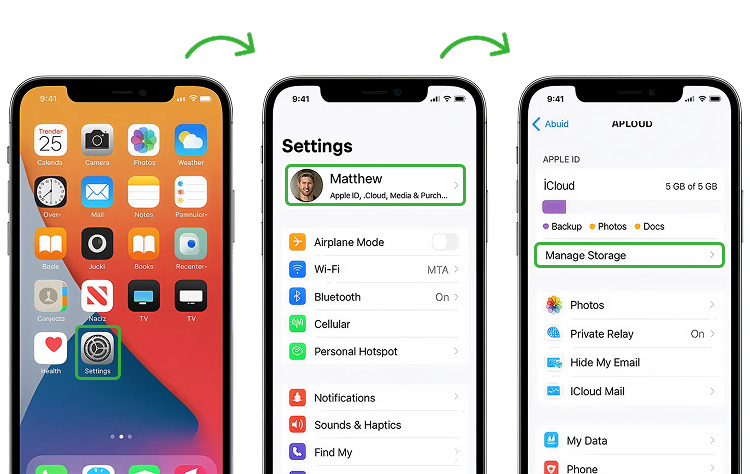
When an iPhone backs up to iCloud, it saves app data, settings, stored files, etc., from the phone.
Therefore, by restoring the iCloud backup of your child’s iPhone onto a secondary iPhone, you can access locally stored Snapchat-related data like app settings, login details, saved images, and any remnants of past Snapchat activity.
Though, needless to say, the method is quite aggressive in its approach without even properly showing what is happening on their Snapchat.
Simply work through the steps below, one after the other, to restore iCloud back-up for Snapchat activity logs:
- Turn on iCloud backup for Snapchat on their phone.
- Find a secondary device and proceed to reset it from settings.
- During setup, select “Restore from iCloud Backup” and sign in with your child’s Apple ID.
- Choose the latest backup and open Snapchat on the restored phone for specific insights.
FAQs
How to monitor my child’s Snapchat on iPhone?
You can track your child’s Snapchat on an iPhone by combining Apple’s built-in features with a Snapchat monitoring solution. One practical option is using an iCloud backup, which may allow you to view fragments of their past Snapchat activity after restoring the backup on another device. However, for deeper and more consistent visibility, Xnspy can be used since it runs discreetly in the background on the child’s iPhone and delivers detailed activity insights through a remote online dashboard.
How can parents monitor Snapchat without installing the app?
For anyone worried about how to monitor kids’ Snapchat without having to install any app, there are several methods. One way is to check their frequently used devices, like a family tablet or shared laptop, to review logged-in Snapchat accounts and spot traces of activity.
Another approach is manual check-ins, where parents talk with their child about their Snapchat use and review their app activity together to guide them. However, remember that these methods rely heavily on honesty and visibility.
How can I see my child’s Snapchat messages?
If your child has an active Snapchat session logged in on one of their frequently used devices, you may be able to open the app or Snapchat Web on that device and view conversations directly from there. However, this only works if they remain logged in and if the messages have not already disappeared. Alternatively, you can use Xnspy, which is installed on their phone and works in the background to capture Snapchat messages and related activity more consistently.
How to check your child’s Snapchat if they are logged in on a browser?
If your child has accessed Snapchat through a browser at web.snapchat.com, reviewing the browser history on that device can give you useful clues, such as login pages, related searches, and timestamps that indicate when they were active.
However, browser history only shows that Snapchat was used, not what actually happened inside the platform. To gain clearer insight into their Snapchat Web activity, parents often rely on Xnspy, as it provides more comprehensive visibility into what takes place on the child’s device.
How to monitor Snapchat on kid’s phone if they have multiple accounts?
Many commonly recommended ways to track Snapchat are useful, but they are mostly tied to a single, primary account, which is why they fail when a child creates secondary profiles.
For example, Snapchat parental controls like Family Center only apply to the one account your child agrees to link with you, leaving any hidden accounts completely out of sight. This is why many parents choose to rely on Xnspy instead, as it works at the device level rather than the account level, allowing you to see Snapchat activity across all accounts your child is using on their phone.
Leave a reply:
Your email address will not be published. Required fields are marked*

Tiffany Ross
Member since October 8, 2025
Tiffany Ross
Member since October 8, 2025
Tiffany Ross is a child digital safety educator and family technology researcher, with an M.Ed. in Learning Technologies, University of Texas at Austin. After graduating in 2016, she has continued to work in the industry for 9 years. During this time, she has focused on practical digital parenting strategies and responsible use of monitoring apps. Moreover, her work includes abuse prevention, healthy screen habits, social media safety, and other key concerns. Over the years, Tiffany has also contributed to more than 200 research-informed guides and family safety resources covering online risks, screen time management, and digital wellbeing practices for modern households.