The complete monitoring experience for your phone
Get XNSPY and start tracking calls, texts, multimedia, locations and more on any phone!
Get Started Now Live DemoSnapchat is a great way of staying connected, but it also keeps a lot hidden, especially when it comes to who someone talks to the most. With 69% of young Snapchat users reporting experiences of cyberbullying, it’s completely fair to want a bit more awareness of what’s happening behind the scenes.
Sometimes, that curiosity comes from noticing a shift in someone’s behavior. Other times, it’s just a gut feeling that something is off. Whatever the reason, it’s natural to want some clarity.
Snapchat doesn’t hand any of this to you directly, so I tested every way to get a useful answer, from official parental tools to data you’re entitled to request. In this guide, I’ll walk you through everything I experienced.
Quick Look Before Getting into the Details
- Snapchat made its Best Friends list private years ago. The feature still exists and still runs in the background, but there is no official way to see someone’s Best Friends list directly.
- Use Xnspy: A monitoring app’s screen recorder can capture the chat screen on a device you’re authorized to monitor by showing up the emoji indicators next to each contact’s name.
- Check Via Other Signed-In Devices: If a family tablet, browser, or old phone still has an active Snapchat session, you can open the chat list directly and see the real emoji rankings, but only for as long as that session stays logged in.
- Download Snapchat Data: Snapchat’s official “My Data” export includes a friends list and chat metadata you can use to estimate who someone talks to most, though it isn’t a ranked Best Friends list and needs account access to request.
- Try Family Center: Snapchat’s own parental tool shows a linked teen’s full friend list and who they’ve messaged in the last 7 days, but it never labels anyone a “Best Friend” and requires the teen to accept the invite.
Can You See Someone’s Best Friends List on Snapchat? Here’s the Truth
Yes, but only with workarounds. Snapchat used to display a public-facing Best Friends list next to user profiles, ranked by snap frequency. Snap made that list private years ago specifically to cut down on the social pressure and jealousy it created among teens, so today only the account owner can see their own ranked Best Friends based on who they interact with most.
That doesn’t mean the underlying signal disappeared, though. Snapchat still tracks interaction frequency internally and still displays small emoji indicators (a smiley face, a yellow heart, a fire icon for a Snapstreak, and a few others) next to contact names in the chat list. Those emojis are exactly what reveal someone’s closest contacts. The catch is that they’re only visible from inside that person’s own account or chat screen, not from outside it.
Top Picks You’ll Be Glad You Clicked

📍  How to Find Someone’s Location on Snapchat
💻 How to Log into Someone Else’s Snapchat: 5 Best Ways
💬  How To Recover Deleted Snapchat Messages Without the Target Device
🔥  Decoding Snapchat Slang: 150 Terms Parents Need to Know
How Knowing Someone’s Best Friends on Snapchat Could Help You?
Knowing who someone talks to most often on Snapchat can offer real insight into where their attention and energy are going day to day. If you’ve noticed a shift in someone’s behavior, or you’re a parent trying to understand your teen’s social circle, seeing who they’re snapping frequently can replace assumptions with something closer to fact.
This kind of visibility is especially useful when you’re concerned about inappropriate conversations, a sudden change in closeness with a particular contact, or you simply want a clearer picture of who’s actually part of someone’s day-to-day circle on the app.
How I Tested These Methods to See Someone’s Best Friends List on Snapchat
To figure out which of these methods actually deliver useful results, I built a small test environment instead of relying on guesswork. I used my Snapchat profile as the test profile with a mix of contacts: a few I snapped daily to build streaks, a few I messaged occasionally, and a few I never interacted with at all, so the account already had its own internal “Best Friends” pattern over about two weeks.
While testing, I considered the following factors:
- Access Level Required: Whether a method needed physical access to the device, the account’s login credentials, or just a Snapchat-side connection like a Family Center invite.
- Information Accuracy: I also checked if a method showed a confirmed, ranked signal (like the actual emoji next to a name) or only an indirect proxy, like message frequency or recency.
- Time to Useful Results: I then measured how long it took from starting the method to actually getting a usable answer.
- Ease of Use: Also, I paid special attention to the ease of use of every method. Because I was testing them for parents, I needed them to be as easy as they can be, so a non-tech-savvy parent could also use them.
How to See Someone’s Best Friends on Snapchat Without Alerting Them: 4 Proven Techniques
Here are the 4 most efficient methods you can use to look at someone’s Best Friends list on Snapchat while also maintaining discretion.
| Method | Reliability | Time Required | Limitations |
| Use Xnspy | High | 10-15 min setup | Requires one-time physical access to install on a device you’re authorized to monitor |
| Try Family Center | Medium | 10 min setup | Teen must accept the invite; never directly labels a “Best Friend,” only recent contacts |
| Download Snapchat Data | Medium | 1–48 hrs (processing) | Needs the account’s own login; gives a friends list and chat metadata, not a ranked list |
| Check Via Other Signed-In Devices | Medium-High | 2-5 mins, if available | Only works while a session happens to still be active on a shared device |
1. Using Xnspy
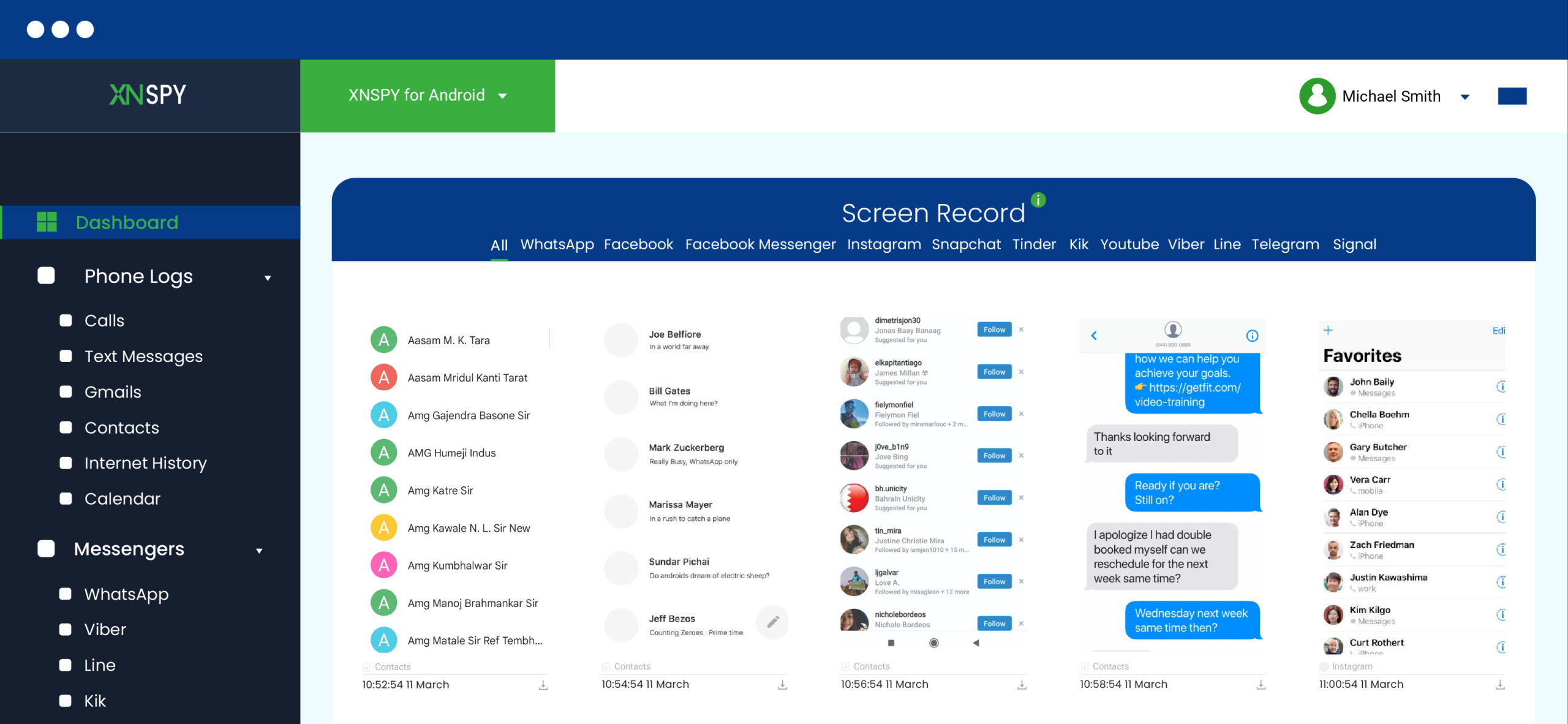
Xnspy is a phone monitoring app that can give parents visibility into a child’s Snapchat activity, including the emoji indicators that hint at their Best Friends, when it’s installed on a device they’re authorized to monitor.
Xnspy’s screen recorder periodically captures screenshots of on-screen activity, including the Snapchat chat list. Since Snapchat’s emoji system still runs in the background, smiley faces, yellow hearts, and fire icons appear in those captured screenshots exactly as they would on the live device. Reviewing screenshots over time lets you spot which names consistently show up with the strongest indicators.
Here’s how to use Xnspy to check this:
- Subscribe to Xnspy and choose a compatible plan.
- Install the app on the device you’re authorized to monitor.
- Log in to your Xnspy dashboard from any web browser.
- Open the Screen Recorder feature and review screenshots that include the Snapchat chat list.
How Did My Testing Go?
I installed Xnspy on a test device and let the screen recorder run for several days while I kept up my usual snap pattern with the “favorite” test contacts. The captured screenshots reliably picked up the chat list with the emoji indicators intact.
It worked exactly as expected, but two things stood out. First, the screenshots are periodic, not continuous, so if the chat screen isn’t open during a capture window, you simply don’t get that screenshot. However, the chances of that happening are very low as the interval is only 5 seconds long.
Moreover, this method only worked because I had legitimate, one-time physical access to install the app.

See Their Complete Snapchat Activity Instantly
With Xnspy, you can access their chats and top contacts in just a few taps.
2. Check Via Other Signed-In Devices

Snapchat sessions can stay active on a device or browser for a long time if nobody manually logs out, which means a shared family tablet, an old phone, or a saved browser session at web.snapchat.com can sometimes still have someone’s account open.
If you have legitimate access to a device like that, you can open the chat list directly and see the real, live emoji indicators next to each contact’s name, exactly as the account owner would see them. This is the only method on this list that shows the actual ranking rather than an inferred one, but it only works for as long as that session happens to remain logged in.
Here’s how to check:
- Open the Snapchat app, or go to web.snapchat.com, on a shared or secondary device the person has previously used.
- If a session is still active, you’ll land directly on the chat list without being prompted to log in.
- Swipe to or tap the Chat screen and review the emoji next to each contact’s name.
Did It Work for Me?
I left my test account signed in on Snapchat for Web after a routine session and came back two days later to find it still logged in. From there, I could see the live chat list with accurate emoji indicators, exactly matching what showed up through the other methods. This was the fastest method by far when it worked.
The catch is that it’s entirely opportunistic. Snapchat sessions can be ended at any time, whether the account owner logs out, changes their password, or the session simply times out, and once that happens, this option disappears with no warning. It’s worth checking if you already have access to a shared device, but it’s not something you can count on as a reliable method every time you want to see the list.
3. Download Snapchat Data
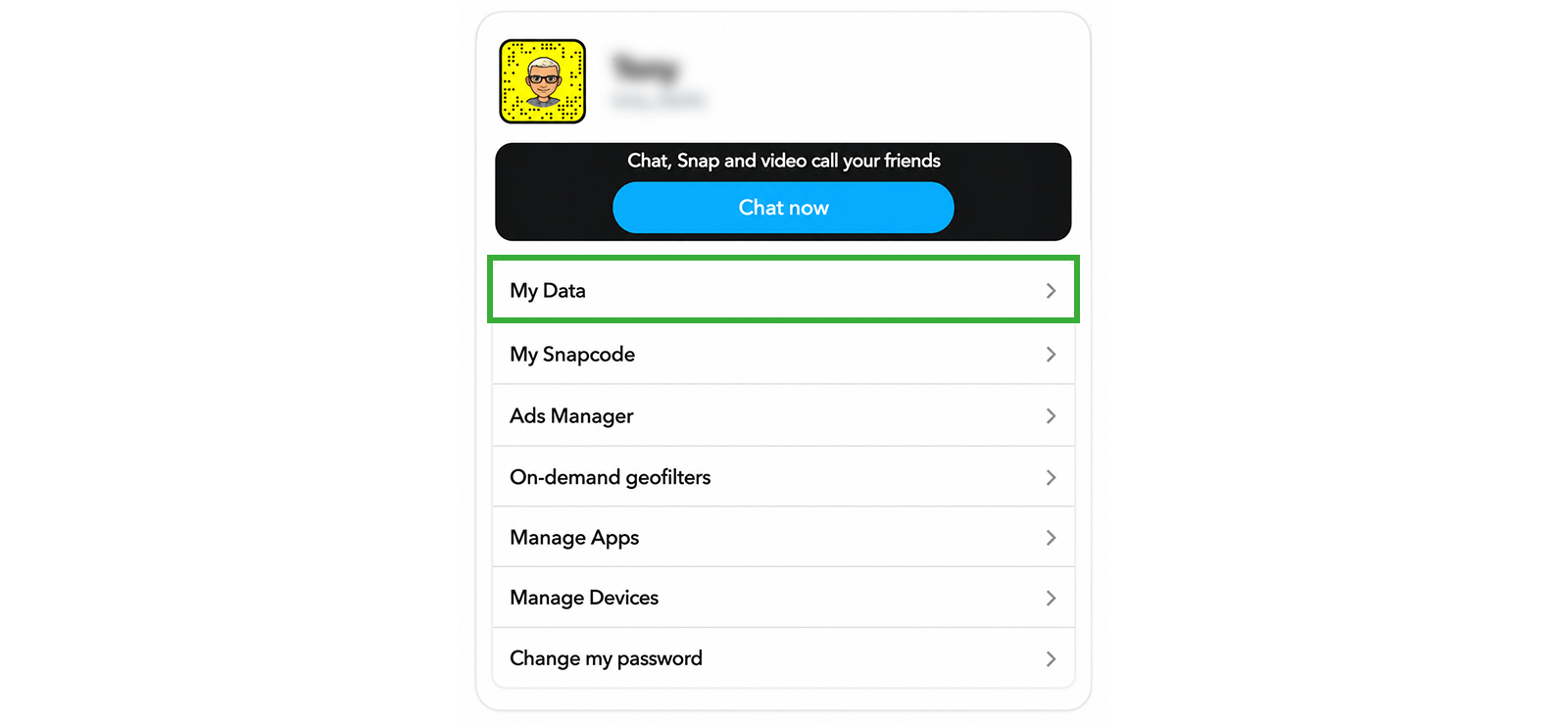
Snapchat lets any account holder request a full export of their own data through the official “My Data” tool, and that export includes a friends list along with metadata about chat activity.
This isn’t built as a Best Friends checker, so it won’t hand you a labeled ranking. What it gives you is a friends list (current friends, blocked users, friend requests) and saved chat history with metadata like sender, recipient, and timestamps.
By counting how often a particular contact shows up in that metadata, you can approximate who someone interacts with most, similar to what the internal Best Friends ranking is based on.
Here’s how to request it:
- Go to accounts.snapchat.com (or Settings > “My Data” in the app) and log in to the account.
- Under “Select data to include,” make sure Friends and Chat History are toggled on.
- Confirm the email address for the notification and click “Submit Request.”
- Once the email arrives (typically within a few hours, sometimes longer), download and open the ZIP file to review the friends list and chat metadata.
Did It Work for Me?
I requested a “My Data” export on my test account and the ZIP file arrived in just under two hours, well inside Snapchat’s stated window. The export included a clean friends list and a chat history file showing message counts by contact. Tallying those counts lined up almost exactly with the contacts I’d been snapping daily.
The limitation here is that this method only works on an account whose credentials you already have access to. It also takes processing time rather than giving an instant answer, and the lack of an explicit “Best Friends” field means you’re doing the interpretation yourself.

Did You Know?
You can also view and block the adult content someone views on Snapchat.

4. Try Family Center

If you’re a parent, Snapchat’s own Family Center tool gives you built-in oversight of a linked teen’s Snapchat activity, including their full friends list and who they’ve messaged most recently.
Family Center doesn’t show a ranked Best Friends list or any emoji-based status. What it does show is your teen’s complete list of friends, any new friends added in the last 7 days, and which accounts they’ve messaged with recently. Consistently seeing the same one or two names pop up in “recent contacts” over several weeks is a reasonable proxy for who’s closest to them, even without an official label.
Here’s how to set it up:
- Open Snapchat and go to Settings, then search for or scroll to “Family Center.”
- Tap “Invite Teens” and select your teen from your friends list, or enter their username.
- Wait for your teen to accept the invitation in their own app.
- Once connected, open Family Center to review their friends list and recent contacts.
Did It Work for Me?
For this method, I linked my test account to my wife’s account to simulate the parent account. Family Center showed the full friends list clearly, and the recent contacts view did surface the two accounts I’d been snapping the most, which lined up with what I already knew was happening on the test account.
That said, Family Center never directly told me who the “Best Friend” was; I had to infer it from repetition. It also completely depends on your child actually accepting the invite.
FAQs
How to see someone’s Snapchat BSF list without installing software?
Yes, but only indirectly. Snapchat’s Family Center shows a linked teen’s friends list and recent contacts without installing any software, and requesting your own “My Data” export works the same way. Neither one labels anyone a confirmed “Best Friend,” so you’re working from a strong hint rather than a direct answer unless you can view the live chat screen itself.
How to check someone’s best friends list on Snapchat if their profile is private?
If someone’s Snapchat profile is private, the only direct way to check their Best Friends list is by accessing their account via another device where it is signed in. However, a more discreet alternative is using Xnspy’s keylogger and screen recorder, which captures typed messages and Snapchat activity in real time, allowing you to track frequent contacts without needing full access.
How to find someone’s best friends list on Snapchat if they are using multiple accounts?
This is the trickiest scenario, since Family Center and a “My Data” export only ever cover one specific account. However, a third-party monitoring app like Xnspy can handle is, as its screen recorder captures whatever account happens to be active on the device at the time, so it keeps picking up chat lists and emoji indicators even if the person switches between profiles.
How to view someone’s best friends list on Snapchat without logging into their account?
Xnspy is built for exactly this. Once it’s installed on a device you’re authorized to monitor, its screen recorder periodically captures the chat screen, emojis included, without ever needing the account password. Catching the account still signed in on another device works on the same principle: you’re viewing the chat list directly without logging in yourself.
How to see where you are on someone’s best friends list without Snapchat Plus?
Snapchat’s Family Center is still the most accessible option for this. If you’re linked as a parent, you can see the full friends list and which contacts they’ve messaged in the last 7 days. It won’t show you an exact ranking, but if your name keeps showing up in that recent-activity view, that’s a reasonably strong sign you’re someone they talk to often.

4 Comments
Leave a reply:
Your email address will not be published. Required fields are marked*

Honore Couture
July 14, 2025 at 12:25 pmAny other ways I should know because I have tried all of these except for Xnspy and I cannot use any of them.
Louienex
July 14, 2025 at 2:49 pmNice information, I appreciation how many details I found in this article. Thanks alot.
Lewiszin
July 15, 2025 at 2:48 pmDo I need to pay for Xnspy? Is there no free plan or trial that I can use to excecute this method? I really need it.
George Luka
July 16, 2025 at 2:52 pmHow can I buy Snapchat family centre? Can you please guide me? Also, I have no idea how much to pay for it or what is the age limit for family centre. If you can also tell me that, I will be grateful.