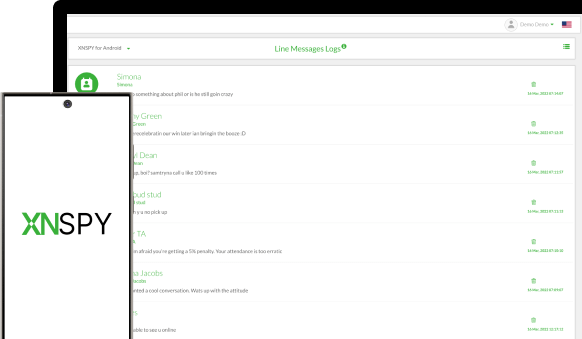
With XNSPY, you can remotely track LINE messages sent and received on target phone or tablet. Instantly check names and number of caller and other details like time and date stamps too.

With the XNSPY LINE Messenger monitoring tool, you can monitor LINE messages on all devices. If you have to monitor your kids’ personal devices comprehensively and without missing activity logs, then there’s no better way to do that than with XNSPY.
Your children need your help to tread in the online world . Since there are all kinds of risks lurking in their digital space, you have to be their protector and savior whenever and wherever they need you as a parent. So, when you monitor LINE app on their phones, you are actually doing them a favor. You can view who they are chatting with and what those chats are normally about.
According to a study, people who use their mobile devices more extensively are more prone to cyberbullying. When it comes to kids, particularly teens, they spend around 9 hours every day on their phones. Don’t let your kids fall prey to this. Get XNSPY LINE tracker today and start keeping tabs on their online activity.
Still not sure about something or want to have more information on features and compatibility? Click on the icons below to get the relevant info about your problems and get them resolved in an instant!
Want to check out if your target phone or tablet is compatible with XNSPY? This section will help you check if XNSPY supports your target device.
Want to know how to install XNSPY or having difficulty installing it? Check out our complete step-by-step guides here for hassle-free installation.
Have any questions about XNSPY and how it works? Check out frequently asked questions and their precise answers for easy troubleshooting.
Get answers to all your technical queries with our step-by-step, carefully designed, extensive troubleshooting guide.
Couldn’t find answers to your questions or have any other product-related queries? Click here to contact one of our Customer Support Agents right now.
XNSPY is extremely easy to use. This section will guide you about how XNSPY works and how you can use it to monitor all your target phones or tablets remotely.
XNSPY can be used to monitor LINE Messenger on all Android phones, running Gingerbread 2.3 or above. For more information, check out our compatibility page.
Once you have subscribed to XNSPY, you can access your child’s LINE messages by going to your XNSPY web account/online dashboard. On the dashboard, go to the “Messenger” tab, and select “LINE” from the drop-down menu to see all LINE messages.
While most apps allow parents to only see LINE message activity that occurred after its installation, XNSPY is different. The app lets you see all those LINE messages that existed on the target device before installation, too.
XNSPY works offline, which means that you can still continue to view LINE messages even if there is no internet connection. While the phone is not connected to the internet, XNSPY keeps recording the new activity logs and uploads them to the dashboard once the connection is restored.
Because XNSPY works in real time , it usually takes just a few minutes for the LINE text messages to be uploaded to your XNSPY web account.
For XNSPY to access LINE messages, you will need to have a working internet connection and a valid XNSPY subscription, which is available for as low as $8.33/month.
When every other app seems to be pushing for subscriptions alone, it is XNSPY that prioritizes user experience. No matter what, your satisfaction truly rests atop everything else for us.
Use The Discount Code During Checkout