Limited Time Offer :
dots grill
after-bg after-bg after-bg

Discover How XNSPY’s Hidden Screen
Recorder Works on Your Child’s Phone

icon

Social Media Tracking

Check out chats, posts, interactions, and content consumption patterns on 13+ popular social media apps.

icon

App and Web Activity

Gain insights into app usage, browsing patterns, and history, capturing everything users see on their screens.

icon

Untraceable Recording

Secretly view all the online activities on your kid’s phone to ensure their digital safety as a parent.

icon

On-Demand Screenshots

Take screenshots during key moments to understand phone usage and address concerns with clarity.

icon

Real-Time Recording

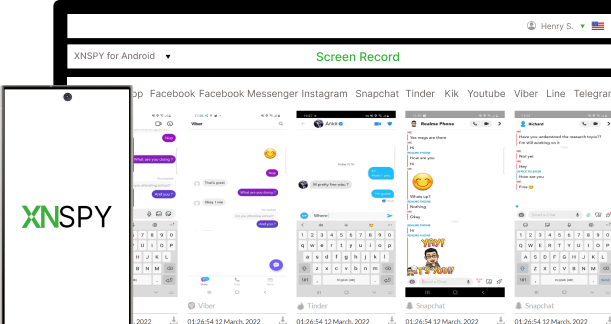
Access real-time screen recordings and updated screenshots every 5 seconds via your secure dashboard.

icon

Customizable Dashboard

Review timestamps, app details, and past screenshots, while browsing screen recording history for insights.

See XNSPY Phone Screen
Recording App for Parents in Action

Discover how XNSPY makes screen recording simple and incredibly effective.

Best Screen Recorder - arrow
after-bg

Beyond the Robust Screen Recorder: Unveiling XNSPY's Every Feature

XNSPY has the complete toolkit you need to protect and monitor your children.

What Our Customers Think of Xnspy
Screen Recorder App

Impressive Monitoring Solution!

XNSPY has been an incredible tool for monitoring my child's online activities. It provides me with comprehensive insights, allows me to ensure their safety effortlessly. Highly recommended!... show more

icon
Eleanor L. May 30th, 2023
star
It’s really awesome

My wife and I have hectic weekday routines, and monitoring our two teenagers is more than a hassle. We were glad to install the XNSPY monitoring app on their cell phones with online threats looming.... show more

icon
Edward Lorry May 21, 2024
star
Best Monitoring Software

What problems is XNSPY solving and how is that benefiting you? I had a problem keeping the correct data on my mobile as I was unable to track my Wi-Fi network logs and email.... show more

icon
Aniket A Jun 07, 2024
star

Monitor Everything on Their Phone

Social media, browsing habits, usage patterns – All in one place!

Best Screen Recorder - Dashboard
after-bg after-bg

Frequently Asked Questions

question General Questions

  • A screen recorder is designed to capture the activities displayed on a device's screen. When going through a kid’s phone, such apps let you view their activities in real-time. These tools typically work by periodically taking screenshots of the target device, often focusing on social media apps like WhatsApp, Facebook, Instagram, and Snapchat. For instance, XNSPY offers screen recordings for over 13 apps and lets you take remote screenshots, providing precise insights into ongoing activities.

  • A screen recorder app can be used for different tracking purposes. However, the most common one is parents wanting to see their children’s online activities to ensure their safety from adult videos, problematic content, explicit conversations, and cyberbullying. But remember that regardless of your reasons, ethical and legal considerations are crucial. You must ensure proper consent before recording others.

  • When buying a secret screen recording app, always look for stealth mode and efficient screenshot recording with minimal resource consumption. Real-time updates for screenshots are crucial, too, to ensure no activity is missed. Not only that, but additional features like remote access and downloading also enhance functionality. Lately, a reliable app must prioritize user privacy through encryption and by being low-resource-intensive.

  • Remote screen recording apps that monitor another person’s phone focus on capturing screenshots rather than audio. While this feature provides valuable insights into online activities, it typically doesn’t include voice recordings. However, premium apps like XNSPY offer voice note and call recording capabilities separately, allowing you to hear conversations directly from the dashboard. By combining screenshots and audio recordings, it delivers a comprehensive view of the target device’s online and communication activities.

  • An effective screen recorder operates in complete discretion without displaying an icon while running in the target phone’s background. Since these apps are designed to prioritize privacy, the recording process cannot be detected by the monitored kids. Overall, the moment they are installed on the target device, their name is changed, leaving no icon. However, using such apps responsibly and within legal boundaries is essential.

  • Spotting a secret screen recording app on your phone can be tricky, especially if it is a sophisticated one—but it is not impossible. Keep an eye out for signs like unusual battery drain, overheating, or slower performance. Checking app permissions can also help you spot any apps using screen capture or audio features. That said, some advanced apps run without leaving a trace, meaning they won’t drain your battery or show up in your running apps.

  • If your screen recording app crashes, restart the target device to reset its processes. Ensure the app is updated to the latest version and the phone's system software is up-to-date. Confirm the app has the necessary permissions, such as access to storage, microphone, or screen recording features. If the issue persists, contact their customer support. A reliable screen recorder app tends to have 24/7 customer support, which can provide quick assistance if issues arise. Some apps also offer email support or chatbots for troubleshooting. Choosing an app with round-the-clock customer service ensures prompt resolutions to any problems.

  • Yes, XNSPY’s screen recorder works on both iOS and Android devices. This screenshot app is designed to capture a child’ screen activity, so you can monitor what is happening on their device, no matter the platform. Just make sure the device is compatible and properly set up to get the most out of this feature!

  • To ensure the target device's recordings are stored securely, choose a trusted hidden screen recorder like XNSPY, which prioritizes data protection. XNSPY uses encryption to safeguard recorded data, ensuring only authorized customers can access it. Recordings are uploaded to a secure online dashboard and are accessible via login credentials, preventing unauthorized access. If you download the images, the best approach is to avoid storing screenshots on shared or insecure platforms.
  • No, XNSPY’s hidden screen recorder doesn’t have a strict time limit for recordings. You can capture someone’s activity as much as you need, whether it is a few minutes or a longer session. However, it is important to keep in mind that the longer the recording, the more storage space it may take up. So, it is a good idea to monitor storage and delete unnecessary recordings as needed.

New Year Sale

Use The Discount Code During Checkout

40%
OFF
  • Days
  • Hours
  • Minutes
  • Sec
BUY NOW