Limited Time Offer :
after-bg after-bg

How To Monitor Someone’s TikTok Account Remotely? [2025 Guide]

Due to TikTok's lax signup requirements and poor content moderation, youngsters have free access to the platform's numerous sexual and harmful trends. But given the inevitability, parents cannot simply abandon their children in the hopes that they will someday be mature enough to avoid falling for these viral pranks.

Therefore, parents need a creative way to keep track of their children's TikTok activity so they can judge for themselves whether the content is appropriate and safe. However, as we know, constant supervision is simply impossible because of busy schedules and limited account access. It is why stricter TikTok monitoring is needed.


How to remotely monitor calls received on a phone?
after-bg after-bg
after-bg after-bg after-bg

TikTok’s Built-in Parental Controls At a Glance

These TikTok parental controls are offered to improve user safety:

icon

Private Accounts

Now users can set their account to private, so only people they accept the request from can follow them and watch their activity.

icon

Time Limits

Users can set daily time limits on TikTok, schedule breaks that lock the user out of the app, and see a summary of how much time was spent on the app.

icon

Content Preferences

You can block videos based on hashtags and keywords. You can also use Restricted Mode to minimize exposure to content TikTok has labeled unsuitable for all ages. Restricted Mode needs a password so the account holder cannot bypass the setting.

icon

Family Pairing

The Family Pairing feature allows users to link their TikTok account to their child’s profile so they can monitor what kind of content they consume on the app. Parents can control who can send their children direct messages and who can comment on their videos.

But even with these built-in parental controls, there’s no guarantee that the user won’t create another profile to bypass these restrictions. It is why you shouldn’t rely too heavily on TikTok parental controls and use other mediums to keep tabs on a child’s account.

after-bg

Age Restrictions On TikTok

The youngest age at which a person can make a TikTok account is thirteen which is still extremely young.

But even if TikTok increases its signup age, kids can bypass the age requirements by simply adding a fake age, by searching how to turn off age restrictions on TikTok, or by finding out how to change your age on TikTok. It is why stricter controls are needed.

Why Should You Be Concerned About TikTok’s Security Features?

TikTok collects user data even when they are not using the app. It means that the app has access to a user’s likes, dislikes, and personal information, including email addresses, phone numbers, Wifi networks, and contacts saved on a person’s phone.

While other applications also collect data on its users, TikTok's parent business ByteDance is owned by China, and U.S. officials have repeatedly warned that China may require the company to reveal the information it has on its users.

Also, messages on the platform are not end-to-end encrypted. This indicates that it isn't as secure as some messaging apps, which include that additional security measure.

after-bg after-bg

XNSPY Remote TikTok Monitoring App - The Best Way to Track
Someone’s TikTok Activity

How XNSPY Works?

XNSPY is a TikTok tracking app that can effectively monitor TikTok to protect the phone owner from associated dangers. The app users have remote access to all chat sessions on TikTok through the screen records collected by XNSPY. The data logs are then uploaded to the app’s web dashboard in real-time for immediate update. Alongside monitoring through visual proofs, other logs like search history, screen time, downloaded media, etc., are also recorded.

XNSPY also allows you to block TikTok seamlessly on the phone. Select the Installed Apps tab from the list of tracking choices after logging onto their Dashboard. This page displays a complete list of installed apps on the device. As soon as you've identified TikTok by scrolling down the list, simply toggle the deactivate switch. Following that, the app will be disabled on the target device.

XNSPY is a more dependable program that monitors TikTok and other social media apps remotely and covertly since it can easily get past end-to-end encryption mechanisms employed by these platforms. In order to keep an eye on social media and instant messaging apps, XNSPY is a compatible solution for iOS and Android devices.

The program gets data by copying the memory address information and extracting the bit sequence stored at that address. That means that even if the phone owner deletes the data, XNSPY retains a copy of it.

Features

XNSPY has several features that help minimize TikTok’s impact. The end user can utilize these features in tandem to effectively reduce TikTok’s harmful effects. We’ll explain how these features help achieve this.

icon

Screen Record

This function shows a user’s Tiktok account, the people they follow, their feed, messages, and the media they exchange on the controversial social media platform.

icon

Web History

This shows the phone owner’s browsing history. So if they used a web browser to open TikTok, their web history would be recorded and sent to XNSPY’s servers.

icon

Installed Apps

This feature shows when TikTok was installed and can be used to block the app remotely.

after-bg after-bg

Using XNSPY To Track TikTok Accounts Without Having Access To The Phone

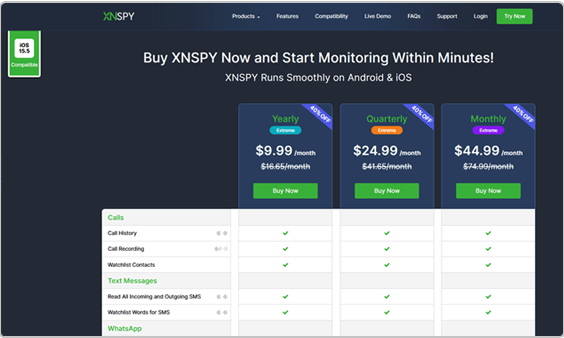
XNSPY is the easiest way to track someone’s TikTok account and monitor how they use the platform. All you have to do is buy a subscription to the remote TikTok monitoring app. We recommend buying the annual package as it’s the most cost-effective starting at $4.99 per month.

So let’s check out how you can install the app on Android and iOS.

How to Install XNSPY?

Step 1: Sign up for XNSPY

Choose an XNSPY subscription plan and sign up with your email address.

Xnspy dashboard
Xnspy dashboard

Step 2: Set up XNSPY

Install the XNSPY APK on the target device and let it sync with the XNSPY server.

Step 3: Start monitoring

You can start monitoring after the app is in sync with the device.

Xnspy dashboard
after-bg after-bg

Frequently Asked Questions

question General Questions

  • You can use TikTok’s built-in parental controls to minimize some of the dangerous content on the website, but a Remote TikTok monitoring app is the best way to make TikTok safe.

  • TikTok has sexual content on its platform and videos of people performing dangerous stunts that can negatively impact users. It also collects and shares data without the account holder’s consent.

  • TikTok has several videos that can be considered sexually explicit in nature and are meant for 18+ viewers. So is TikTok dangerous? Absolutely.

  • There are negatives and positives to the app. The negatives include sexual content, violent videos, the promotion of dangerous stunts, poor data security, and non-consensual data handling practices. Whereas the good includes keeping up with friends and their videos. But the latter can also be done through YouTube, which is a much safer platform.

  • The TikTok parental controls are insufficient, as children are still frequenting the website and falling victim to the dangerous and sexual content on TikTok. It is why I recommend XNSPY.

  • Giving children free rein on TikTok negatively impacts their natural development process by causing addiction and promoting risky behavior. It can further skew their view of sex and relationships. But you still might wonder, is TikTok safe with parental controls? Yes, but its safety can be enhanced by using XNSPY.

  • You head to settings in your TikTok app and go to parental controls. Or you can simply install XNSPY on your iPhone.

  • Home
  • Monitor TikTok Activity Securely and Remotely | XNSPY

Flash Sale

Use This Discount Code During Checkout

40%
OFF
  • Days
  • Hours
  • Minutes
  • Sec
BUY NOW