Limited Time Offer :
after-bg after-bg after-bg

How to Monitor Tinder Messages Remotely?

Who does not know Tinder at this point? The bachelors, the divorced, or the cheaters, everyone knows that if they can rely on the app to start dating. But you will probably think, “I have nothing to do with such dating apps, after all, I am married and have young kids.” Surprisingly, as your luck would have it, Tinder concerns you more now than ever before because your children can be using it behind your back. With parents not privy to their teens’ activities, they can get in touch with anyone, even a predator.


How to Monitor Tinder Messages Remotely?
after-bg after-bg
after-bg after-bg

Need of Monitoring Apps for Tinder

You cannot stop your teen from using Tinder but you can monitor their Tinder account to ensure they are safe. In this modern digital age, you need to keep up with what your teen is up to. One wrong move can ruin their life. Tinder also doesn’t just help you find dates but lets you chat too, which means your teen will talk to a number of strangers. We all know there is no limit to chatting. It starts with simple ‘Hi’ and then this innocent conversation can change into sexting and who knows what your teen might start sharing. Fortunately, you can put this to an end before it even begins by using Xnspy.

How Xnspy Works?

It begins with installing Xnspy on your teen’s phone (which we would call the target phone). When you subscribe to the app, you are given instructions to download it on the target phone and set up a web account. The app requires you to wait for 24 to 48 hours before you start monitoring. At the backend, during this waiting period, Xnspy transfers data from the target phone to its servers and then your web account so that you can view your teen’s Tinder messages from a remote location.

after-bg

Steps to Monitor Tinder Messages

Follow the steps below to monitor your teen’s Tinder messages:

Step 1: Login to Your Account

Visit https://cp.xnspy.com/ and enter your login details.

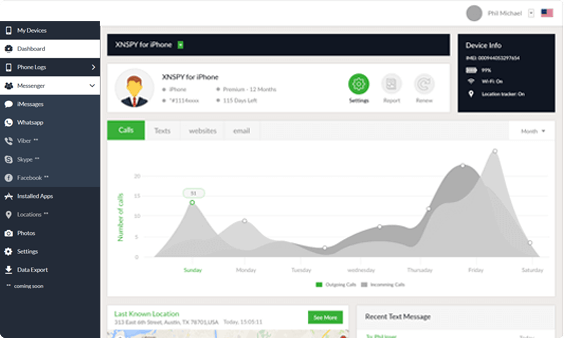
Xnspy dashboard
Xnspy dashboard

Step 2: Choose “Messenger” from Dashboard

From the dashboard, choose ‘Messenger’ and a drop-down list will open up.

Step 3: Select “Tinder”

Choose ‘Tinder’ from that list and you will be taken to the Tinder Messages logs.

Xnspy dashboard
Xnspy dashboard

Step 4: View Tinder Conversations

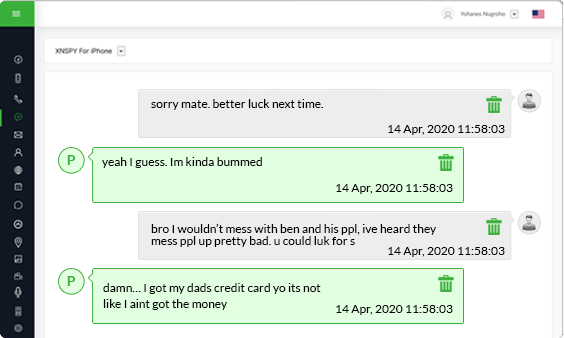
The screen will show you the name of Tinder account holders and their conversations with the target phone. Click on any name to view all the messages sent and received between them and the device owner. Xnspy also displays the time and date stamps of these conversations.

So, monitoring children’s Tinder messages remotely can keep parents aware of what’s happening in their dating lives, along with keeping them safe from predators.

after-bg after-bg after-bg

You Can Totally Rely on XNSPY - We’ve Got Your Back

XNSPY does not need only a subscription but also your satisfaction, so much so that giving you the best experience truly matters above all else.

icon

Stealth Mode 100%

Invisible

icon

100% Secure

Satisfaction Guaranteed

icon

24/7

Live Chat

  • Home
  • XNSPY: Remotely Monitor Tinder Messages with Ease

Flash Sale

Use This Discount Code During Checkout

40%
OFF
  • Days
  • Hours
  • Minutes
  • Sec
BUY NOW