The complete monitoring experience for your phone
Get XNSPY and start tracking calls, texts, multimedia, locations and more on any phone!
Get Started Now Live DemoWhatsApp location tracking offers a unique way to keep your loved ones in check, but it’s not always as straightforward as it sounds. You might think you’re in control, but unless you know exactly how to track someone on WhatsApp without them knowing, things can get confusing. Don’t worry, though—we’ll walk you through 3 proven ways to do it step by step.
All You Need to Know at a Glance
- WhatsApp Live Location allows users to share real-time whereabouts for 15 minutes, 1 hour, or up to 8 hours if still active in the chat.
- Chat history can reveal previously shared location pins or live location messages as map previews.
- WhatsApp Web mirrors chats on a computer, letting you review if location messages were shared.
- Monitoring apps like XNSPY capture screenshots of WhatsApp activity, showing location messages exchanged.
- XNSPY’s GPS tracking shows real-time location and location history even when WhatsApp is closed.
How to Find Someone’s Location on WhatsApp Without Them Knowing? 3 Proven Ways
WhatsApp location tracking is an easy and convenient way to monitor a loved one from within the app. Triggered with just a few taps, this feature is great for ensuring the safety of a loved one. But the challenge arises when your loved one is putting themselves in danger and does not want to be tracked. What do you do then?
We’ve discovered the three best ways on how to find someone’s location on WhatsApp without them knowing, and we’ll break them down for you below.
1. View Location on WhatsApp With XNSPY
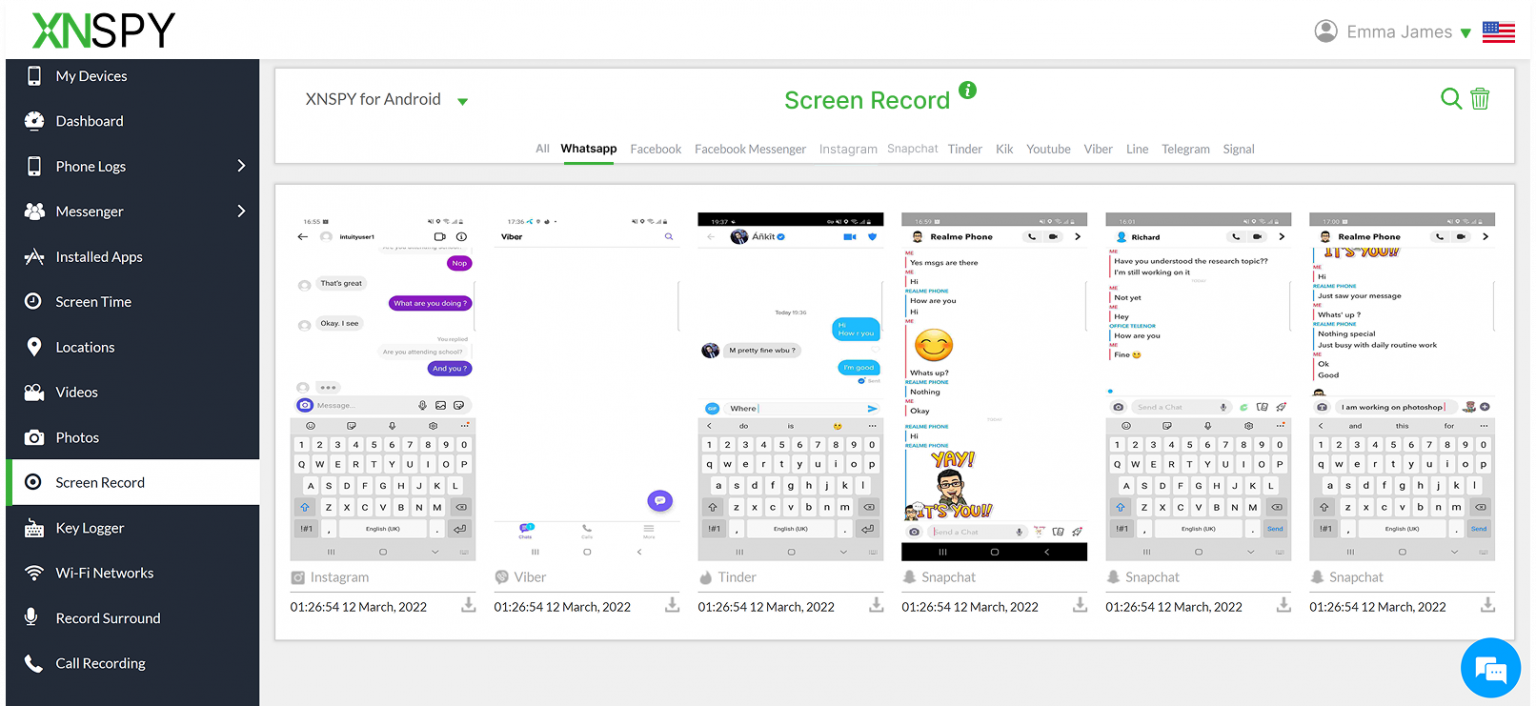
If you want to check someone’s WhatsApp location activity, XNSPY can be a useful monitoring solution. The app is mainly designed for parents who want to supervise their child’s phone usage remotely, including their activity on messaging apps like WhatsApp.
To check WhatsApp location activity, you can review the screenshots captured by XNSPY at regular intervals. These screenshots may show location messages shared in chats or the live location feature being used within WhatsApp conversations. This allows parents to see who their child is sharing their location with and what information is being sent.
However, it is important to note that WhatsApp screenshots only capture activity when the app is actively open. If your child is not currently using WhatsApp or hasn’t shared their location in a chat, the screenshots may not provide continuous location updates.
For more reliable insights, parents can use the built-in GPS location tracking feature available in XNSPY. This feature gathers location data directly from the device’s GPS, allowing you to monitor the child’s real-time location as well as their detailed location history.
With this feature, parents can track their child’s whereabouts even if WhatsApp is not open or if location sharing has not been enabled in the app.
To check someone’s WhatsApp location with XNSPY, follow these steps:
- Visit the official XNSPY website and purchase a subscription plan.
- Wait for the confirmation email containing your login credentials.
- Download and install the app on the target device using the provided link.
- After installation, log in to the web dashboard to monitor WhatsApp activity and location data.

Not Just A WhatsApp Location Tracker
Monitor WhatsApp messages, multimedia, voice notes, calls, and much more with XNSPY
2. Check WhatsApp Live Location
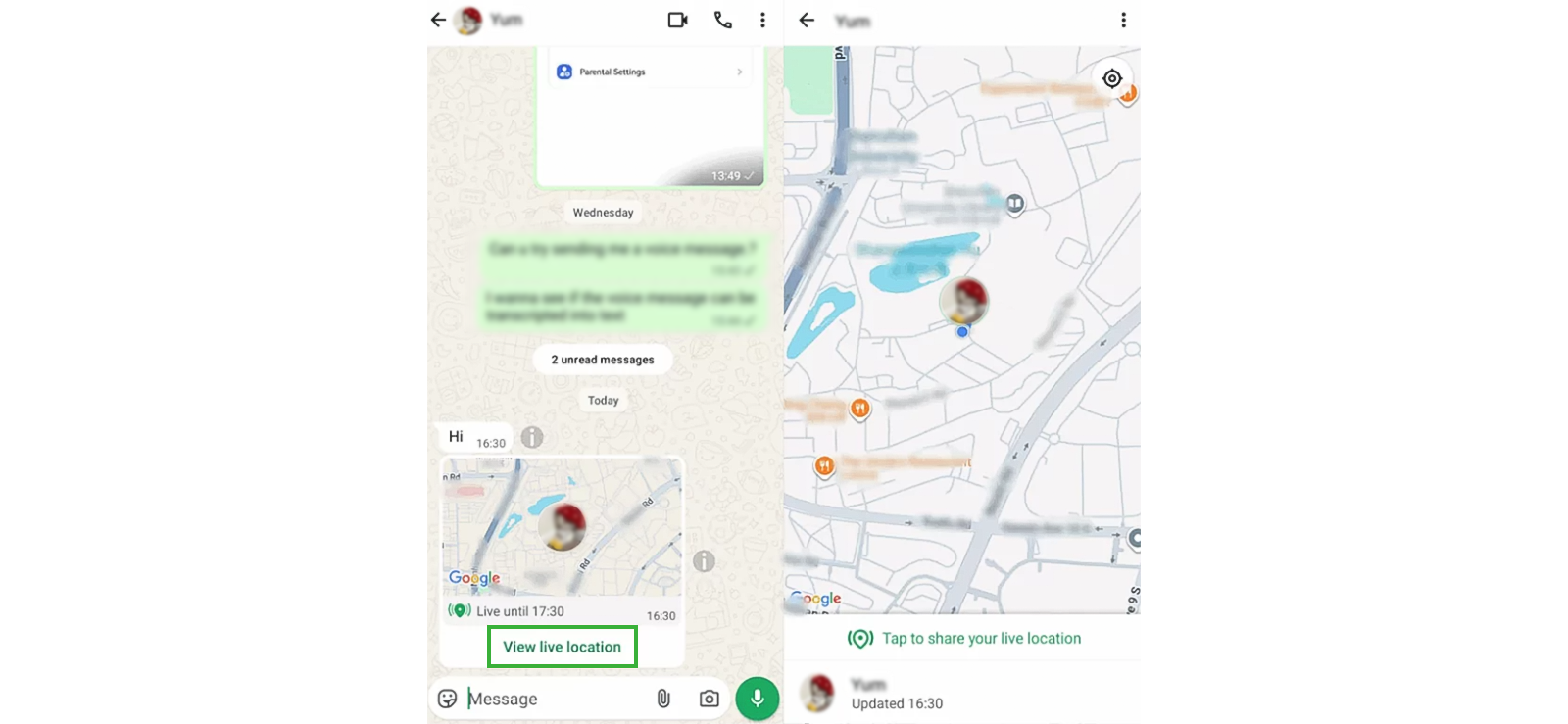
One way to see someone’s location on WhatsApp is by checking whether they previously shared their Live Location in a conversation and if the sharing session is still active. WhatsApp allows users to share their real‑time location for a selected duration, typically 15 minutes, 1 hour, or up to 8 hours. During this period, the location updates automatically on the map as the person moves. If the sharing session has not expired yet, anyone in the chat can open the location message and view the sender’s current position in real time.
To check an active live location, follow these steps:
- Open WhatsApp and go to the chat with the person.
- Scroll through the conversation to find the Live Location message.
- Tap the map preview attached to the message.
- If the session is still active, the map will show their current moving location.
This method only works if the person previously enabled live location sharing and the selected time duration has not ended yet. Once the time limit expires or the sender manually stops sharing their location, the map will no longer update and will only display the last recorded position.
3. Access Their WhatsApp Web
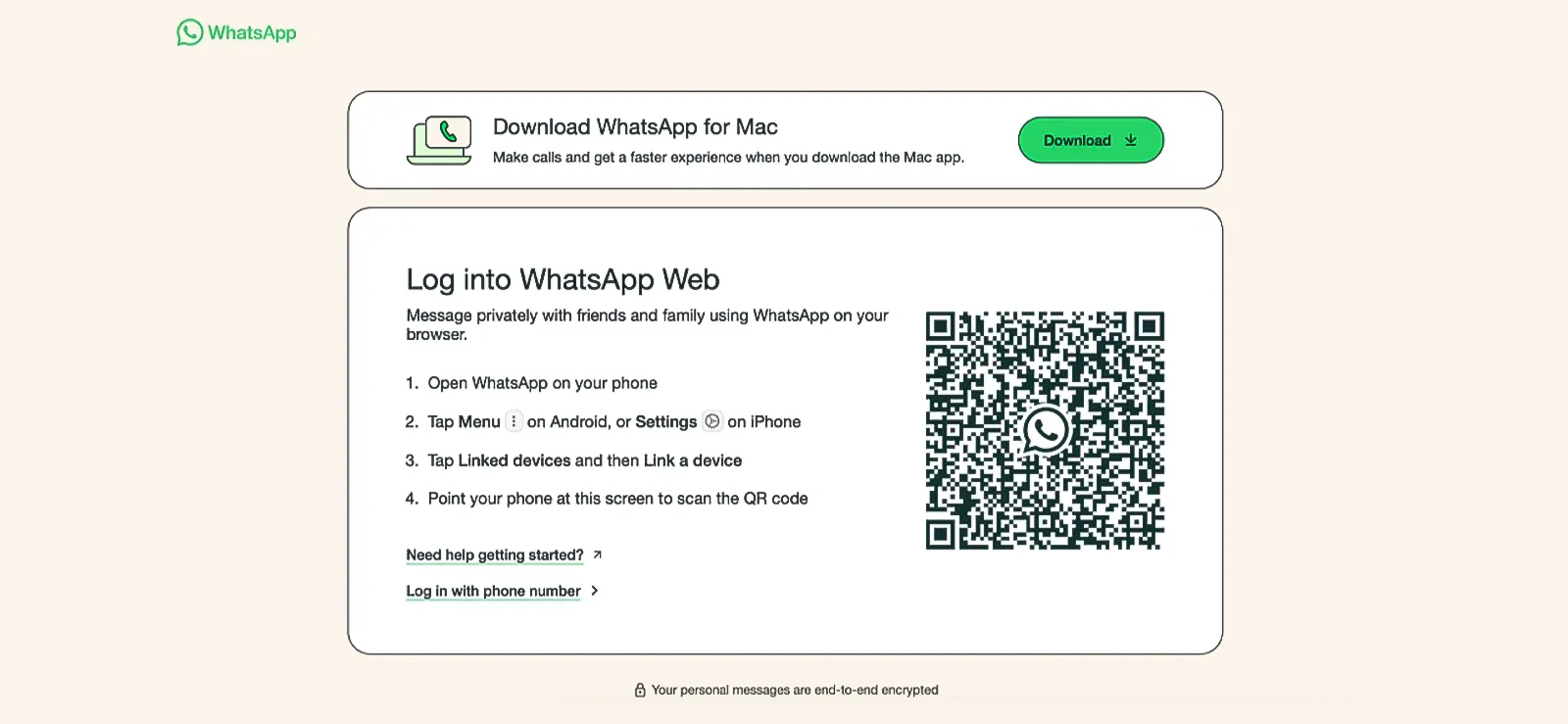
Another way to check whether someone has shared their location on WhatsApp is by accessing their account through WhatsApp Web. This web interface mirrors the conversations from the phone onto a computer browser once the account is linked. When access is established, all chats, media, and shared content become visible on the connected device.
By reviewing these conversations, it is possible to identify if the user has sent or received a location pin or enabled live location sharing with another contact. Any location message appears as a map preview within the chat, which can be opened to view the exact place that was shared.
To use this method:
- Open a browser on a computer and visit the WhatsApp Web website.
- Open WhatsApp on the target phone.
- Tap the three‑dot menu and select Linked Devices.
- Tap Link a Device and scan the QR code shown on the computer screen.
- Once the account is linked, browse through the chats on WhatsApp Web and look for location messages or map previews.
This approach only works if the WhatsApp account is successfully linked to the browser and remains connected to the internet on the phone. If the user logs out of linked devices or regularly checks active sessions, the connection may be removed. Additionally, this method does not directly track someone’s real‑time location; it only allows you to review chats to see whether a location was shared within conversations.

Pro Tip
If you’re looking to get into more detail and read their encrypted WhatsApp messages for a complete picture, we’ve figured that out as well.

FAQs
Is it Legal to Track Someone’s WhatsApp Location Without Their Knowledge?
No, tracking someone’s WhatsApp location without their knowledge or consent is illegal and a violation of privacy. However, there are exceptions, like tracking your child’s WhatsApp location for their safety. If you’re a parent wanting to ensure your kid’s safety, using tracking features with their consent can be acceptable. Always be sure to understand the laws in your area and have open conversations about privacy to maintain trust.
Can Someone See My Location on WhatsApp?
Yes, someone can see your location on WhatsApp, but only if you choose to share it with them. If you share your live location, they can track your movements in real-time for a set duration or until you stop sharing. Once the time expires, they can no longer see your location unless you share it again.
How to Track Someone on WhatsApp Without Installing Software?
Tracking someone on WhatsApp without installing software is not possible, as most effective tracking methods require an app on the target device. However, you can ask the person to share their live location directly through WhatsApp. But if you want a more reliable solution, consider using XNSPY. Once installed on the device, it runs in the background, gathering WhatsApp location data and sending it to a secure dashboard you can access anytime. This means you can keep an eye on their whereabouts without having to rely on them to share their WhatsApp location.
Can you stop someone from seeing your live location on WhatsApp?
Yes, you can stop someone from seeing your live location on WhatsApp at any time. Open the chat where your live location is being shared, tap the ‘Stop Sharing’ option, and the location updates will immediately end. Once stopped, the recipient will only see the last shared location rather than your real-time movement. Alternatively, you can also disable location permissions for WhatsApp in your phone’s settings to prevent further location sharing.
Can WhatsApp location be tracked if the person turns off GPS?
No, accurate location tracking on WhatsApp generally requires GPS or location services to be enabled on the device. If GPS is turned off, WhatsApp cannot update or transmit precise live location data. In such cases, any previously shared live location may stop updating, or the app may rely on less accurate sources like network signals. Without location services enabled, real-time location sharing through WhatsApp typically will not function properly.
Empower Yourself with Remote and Ethical Oversight
Use XNSPY to monitor your loved ones and ensure their safety

3 Comments
Leave a reply:
Your email address will not be published. Required fields are marked*

Cynthia K. Johnson
February 13, 2025 at 10:25 amHm quite informative
Rodger
February 27, 2025 at 11:58 amAre there other ways to see their location for free?
Hanna E. Lowery
April 9, 2025 at 2:19 pmWill the google map method only share one location or will it keep tracking indefinitely?