The complete monitoring experience for your phone
Get XNSPY and start tracking calls, texts, multimedia, locations and more on any phone!
Get Started Now Live DemoEver scroll through TikTok and think, “Wait, where did that video go?” Or maybe you are curious about the kinds of videos someone keeps watching. With TikTok, it is way too easy for things to vanish into the endless feed.
However, there are easy ways to catch up. In this guide, we will show you 5 of the most effective methods on how to see watch history on TikTok.
A Quick Overview
- Built-in Watch History or Liked Videos helps quickly revisit recent content.
- Downloading TikTok account data provides a full record of watch activity.
- Browser history can reveal TikToks watched on desktop or web versions.
- Xnspy allows parents to monitor children’s TikTok activity in real time.
- Watch history persists across devices but is limited by TikTok’s retention rules.
Why Your TikTok Watch History Matters?
Whether you are trying to find that one video you loved or understand your own scrolling habits, TikTok’s watch history can be surprisingly useful. It is more than just a list of videos – it is a window into one’s top interests and platform trends. Here’s why it matters:
- Rediscover favorite videos: Quickly locate that hilarious skit, useful life hack, or viral dance you forgot to save.
- Understand viewing habits: See what types of videos you, or someone you’re curious about, spend the most time watching.
- Improve feed recommendations: TikTok’s algorithm uses your watch history to suggest content you’ll actually enjoy.
- Spot trends and interests: Notice patterns in the videos that capture attention, from memes to niche communities.
- Stay organized and efficient: Instead of endless scrolling, having a record of watched videos makes it easier to revisit content.
Trending Blog Picks

🤸  How to See If Someone Is Active on TikTok: 5 Smart Ways
🎵  How to Watch TikTok Without App: 5 Simple Ways
⛔  How to Know If Someone Blocked You on TikTok: Signs & Methods
🔏  How to View Private TikTok Accounts: 4 Safe and Legal Methods
How to See Watch History on TikTok: 5 Quick Ways
When it comes to knowing how to see TikTok watch history, fortunately, TikTok and other tools make it possible to access your watch history, or at least pieces of it, through certain methods. Here are 5 reliable ways to do this.
1. Try TikTok’s Built-in TikTok Feature
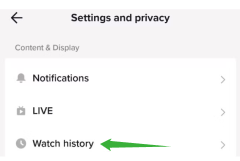
TikTok itself has features designed to help you keep track of videos you’ve already watched. This method relies on the app’s internal tracking system, which records interactions such as viewed videos, likes, and shares.
The “Favorites” or “Liked” sections can indirectly serve as a history of videos you’ve engaged with, while the “Watch History” in some accounts or regions may allow a more direct view. This works because TikTok stores your engagement data locally and in your account profile, making it accessible for review.
To know how to find TikTok watch history using the built-in feature:
- Open the TikTok app and tap on Profile.
- Tap the three lines (menu) in the top right corner and select Settings and Privacy.
- Look for Watch History or check the Liked Videos section to see content you’ve interacted with.
- Scroll through to revisit any video of interest.
While convenient, this method has some limitations. TikTok only tracks watch history if the feature is enabled on your account, so videos watched while it’s off won’t appear. Additionally, the app typically only keeps a record for a limited period (up to 180 days), meaning older videos may no longer be visible.
2. Request Data
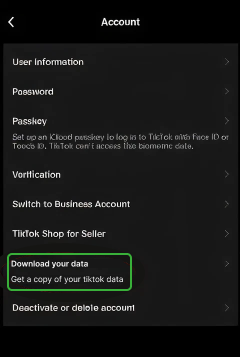
TikTok allows users to download their account data, which includes watch activity, likes, comments, and more. This method works because TikTok compiles your engagement history into a downloadable file, which can be analyzed to see the videos you have interacted with. It is the most official way to get a complete record of your account activity.
To request your TikTok data:
- Open the TikTok app and go to Profile > Settings and Privacy.
- Tap Privacy, then scroll down to Download your data.
- Select the data format (usually JSON or CSV) and submit your request.
- Wait for TikTok to prepare the file (this may take a few days).
- Download the file and open it to view the watch history details.
The limitation here is timing, as TikTok can take several days to process the request. Other than this, analyzing raw data files can be technical for casual users. Plus, it provides you with the full account activity, not a simple chronological video feed, which may feel overwhelming to go through.

No TikTok Activity Goes Unnoticed With Xnspy
When TikTok’s built-in tools fall short, Xnspy does the job.
– Monitor TikTok activity through automatic screen recordings.
– See search behavior and typed keywords.
– Get instant alerts when concerning words appear.
3. Apply the ‘Watched’ Filter in Search
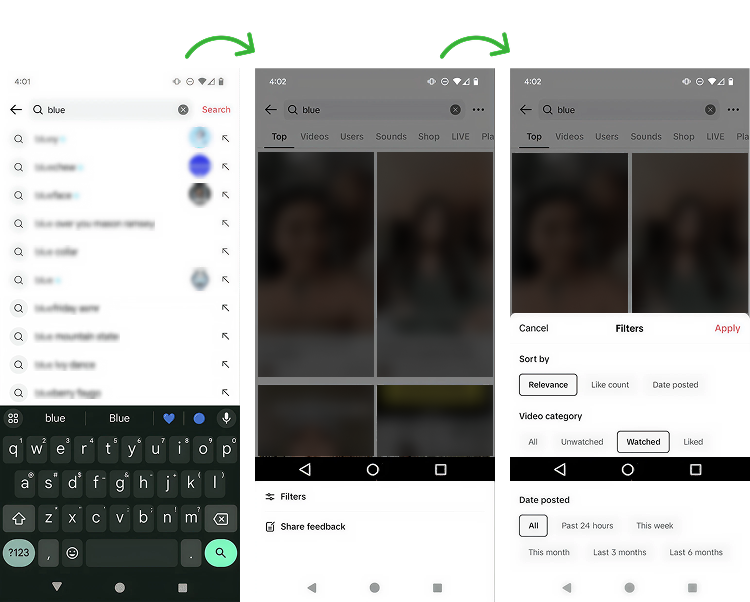
TikTok’s search function can indirectly help you track what you’ve watched by using the ‘Watched’ filter. When you search for content or hashtags, TikTok marks videos you’ve already viewed. The mechanism relies on your account’s stored watch data to indicate whether a video has been seen before, giving a visual cue in search results.
If you want to know how to see watched videos on TikTok, follow these steps:
- Open TikTok and tap the Search icon.
- Enter a keyword, hashtag, or phrase related to the video you’re trying to find.
- Tap Filters and select Watched.
- Scroll through the results, which now show only the videos you’ve previously seen.
While effective for rediscovering content, this method only works if you remember keywords or hashtags associated with the video. It doesn’t provide a full chronological watch history.
4. Access Browser History
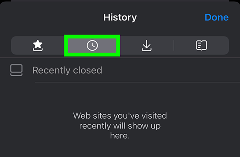
If someone often uses TikTok on a web browser, their watch history can sometimes be reconstructed through the browser’s history. This works because each video you view generates a URL entry in the browser, effectively logging your activity externally to TikTok’s app.
To access browser history:
- Open the browser used to watch TikTok (Chrome, Safari, etc.).
- Go to the History section (usually Ctrl+H or Command+Y).
- Search for “tiktok.com” or keywords related to videos you watched.
- Click on the URLs to revisit the videos.
The limitation here is that this method only tracks videos viewed via the browser, not the TikTok app. If you switch devices or clear your history, the record may be incomplete. Other than this, if you click on a video, only then is a new URL generated. However, if you keep browsing without clicking on new videos, some watched content may not appear in the history.

Did You Know?
Spotify also has explicit content that can reach your children

How to Track Your Child’s TikTok Watch History and Know What They are Really Watching?
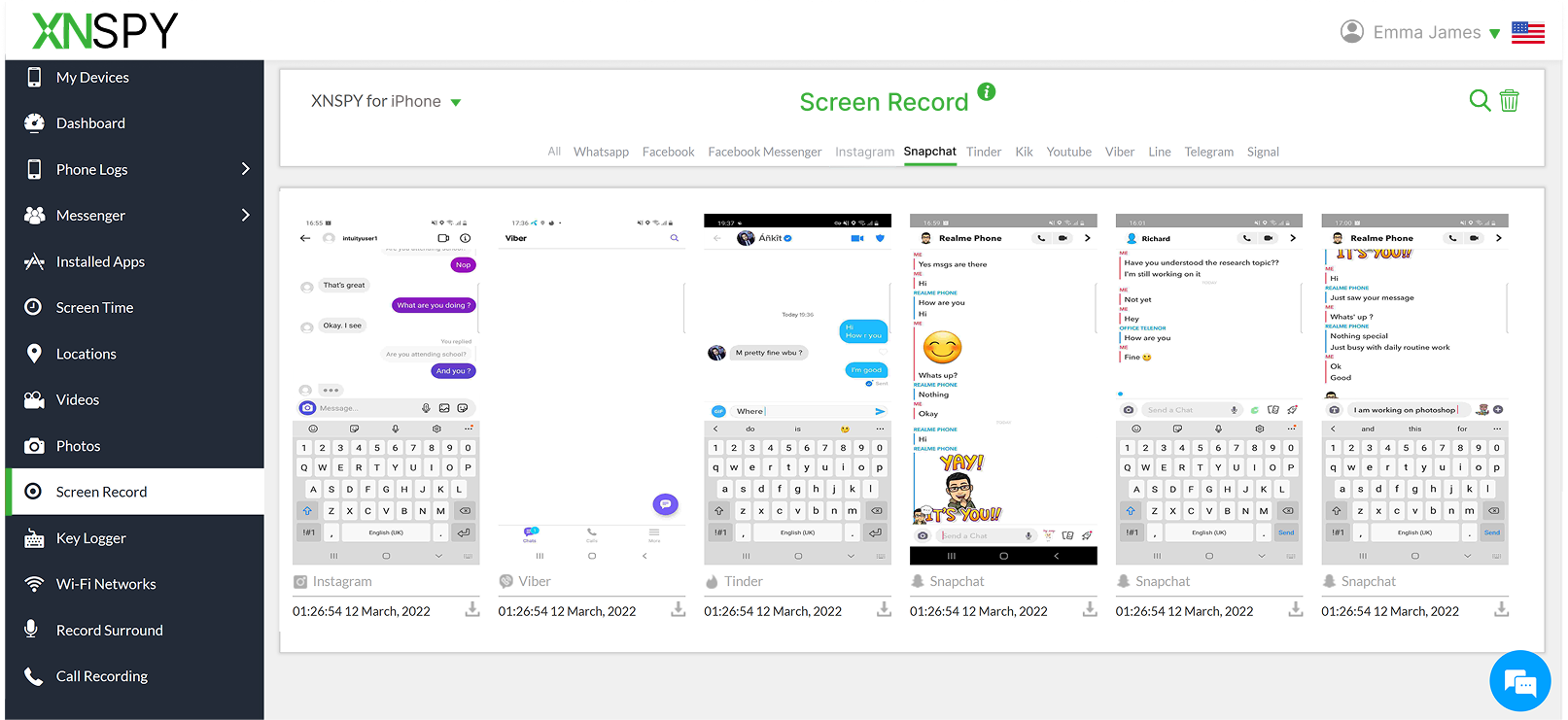
TikTok has been at the center of an ongoing debate when it comes to children’s safety. While the platform can be entertaining and creative, it has also raised concerns over exposure to inappropriate content, addictive scrolling patterns, risky challenges, and algorithm-driven recommendations that can quickly lead kids toward material they were never meant to see.
For parents, this creates a real challenge: how to see recently watched TikToks on their child’s account? Simply asking isn’t always enough, and built-in parental controls often fall short of offering a complete picture.
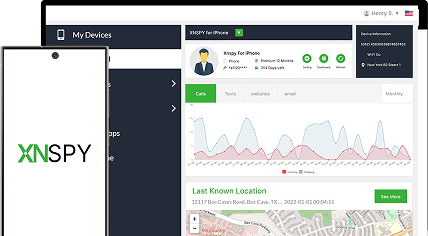
Here, Xnspy can help in a big way. Designed with parental oversight in mind, it offers a way to stay informed without constantly hovering or invading day-to-day conversations. Xnspy provides real-time updates, so parents can see activity as it happens rather than discovering issues afterwards.
Xnspy’s setup process is straightforward. It is compatible with major Android and iOS devices, and the dashboard is user-friendly as well. Once installed, all activity is organized clearly, so you’re not digging through confusing logs or technical data.
How Xnspy Helps You See TikTok Watch History?
When it comes to understanding TikTok watch behavior specifically, Xnspy’s features fill in the gaps left by the app itself. The screen recording feature plays a key role here, as it captures on-screen activity at regular intervals to give you the visual context of what your child is scrolling through on TikTok. It helps identify patterns, such as repeated exposure to certain types of content, without needing constant manual checks.
But this is not where Xnspy stops. For moments when something feels off, the on-demand screenshot feature allows parents to instantly capture what’s on the screen in real time, offering immediate clarity.
Beyond visuals, Xnspy’s keylogger adds another layer of insight by recording what a child types into search bars and messages. This makes it easier to understand what they’re actively looking for on TikTok, including trends, hashtags, or creators that may not show up clearly in watch history alone.
Complementing this, keyword alerts allow parents to set specific terms related to unsafe content, triggering notifications whenever those words appear. Together, these Xnspy features help parents move from guesswork to informed awareness.
FAQs
How to look at watch history on TikTok after clearing the cache?
Clearing the TikTok cache only removes temporary files stored on your device, not data saved to your account. If your watch history feature was enabled, you can still view recent videos by going to Profile > Settings and Privacy > Activity Center > Watch History. However, any videos watched while logged out or before the feature was enabled won’t appear, and the history is still limited to TikTok’s retention period.
How to find watch history on TikTok when using a PC?
TikTok’s desktop version does not currently offer a dedicated watch history feature like the mobile app. However, you can retrace watched videos by checking your browser history for TikTok URLs or revisiting liked and favorited videos from your account. This method works best if you consistently use the same browser and haven’t cleared its history, but it won’t show a complete or chronological viewing record.
How to see watched videos on TikTok if you deleted the app and reinstalled it?
If you delete and reinstall TikTok, your watch history can still be accessed as long as you log back into the same account and the feature was enabled previously. Since watch history is tied to your account rather than the app itself, recent videos should reappear under the Watch History section. That said, anything outside TikTok’s retention window or watched while logged out won’t be recoverable.
How to view watch history on TikTok if you recently switched phones?
Switching phones doesn’t erase your TikTok watch history because it’s stored on TikTok’s servers, not your device. After installing the app on your new phone, simply log in with the same account and navigate to Activity Center > Watch History. As long as the feature is turned on, you’ll be able to see recently watched videos, subject to TikTok’s time limits and account-based tracking rules.
How to see recently watched TikToks if you use multiple accounts?
When using multiple TikTok accounts, watch history is tracked separately for each one. To see recently watched videos, you must switch to the specific account where the video was viewed and then access its Watch History section. TikTok does not merge or sync histories across accounts, so keeping track of which account you used is essential for finding previously watched content accurately.

3 Comments
Leave a reply:
Your email address will not be published. Required fields are marked*

George
January 29, 2026 at 2:16 pmI am glad I also found a way to check on my kid's watch history while looking up ways to find mine. Thank you.
Elliotte Mike
February 2, 2026 at 2:05 pmAre you for real? The built-in tiktok feature is giving me so much problem, how is it working for others?
Kylie Seimal
February 3, 2026 at 2:12 pmIf I use tiktok app, will it also appear in the web browser? A bit confused.