Do you want to monitor the Viber conversations from a remote location without accessing their phone? Here are 5 ways you can keep tabs on the Viber messages of another person.
To use Xnspy for checking the Viber messages, you must first install it on the target device. Installation does not take much time. You will need physical access to the device and simply open the download link to download and installed the app.
Xnspy has a dashboard that lets you see everything stored on the target device. It is just like the control panel of a website having different tabs, letting you navigate through the phone.
The step-by-step guide below explains how you can see someone’s Viber Messages:
Log into Xnspy’s web account by entering your login credentials. That’s how you will get to the dashboard.
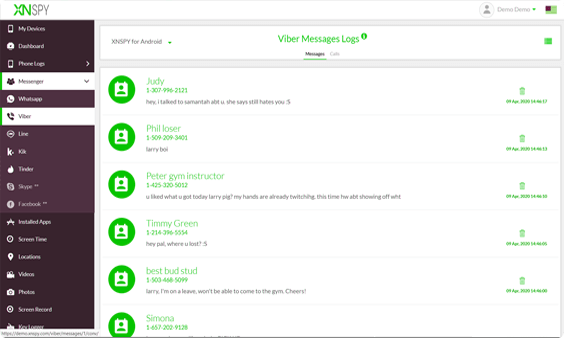
Choose ‘Messenger’ from the menu and a drop-down list will appear. Choose ‘Viber’ and now you will land on the Viber Messages Log.
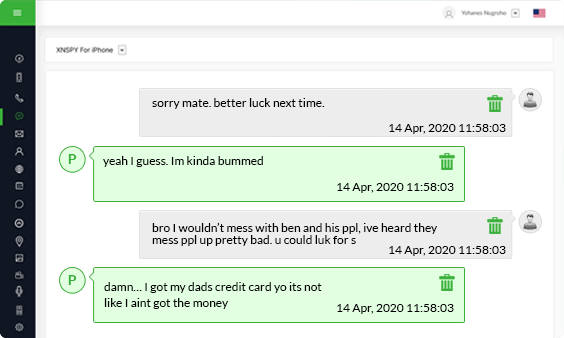
Select the contact that you want to read Viber conversation for to open up the chat between them and the target device. You can also see the time and date stamps with each message.
In case you want to access the photos sent or received via Viber or audio and videos messages then they will be saved in the phone’s gallery. By choosing the ‘Photos’ and “Videos” menu from the dashboard, you can find them and see what kind of multimedia is being exchanged between the Viber Contacts and the device owner.
Xnspy will give you all the information you need to keep tabs on your kids and find out how they are using the Viber application.
Xnspy has two editions - Basic and Premium. The Basic Edition starts from $4.99 a month, whereas the Premium Edition starts at $7.49 a month. To see Viber messages, you will have to choose the Premium Edition.
Xnspy is compatible with all latest Android and iOS devices. Check out its compatibility table to see if you can use Xnspy to monitor the device you like:
Android
iOS
Supports Android OS Versions 4.x, 5.x, 6.x, 7.x, 8.x, 9.x, 10, 11, 12, 13, 14, 15
Supports iOS Versions 6.x, 7.x, 8.x up to 17.0.3
If you are only interested in reading the Viber chat history not the latest or future messages, then you can send yourself the conversation backup via email. This will only contain text though.
The overall process will just take 2 minutes of your time. But to follow through, you will have to access the monitored device for a little bit.
Keep in mind the backup does not send contact lists, images received, outgoing photos and videos, file content sent via Viber or any unsent messages.
Here is what you need to do. The process is the same in both Android and iPhone. Now follow the steps below:
Depending on the number of messages on the Viber account, this could take a while. Once the processing is complete, a file will be created and it will be ready to be sent via email. You simply have to enter your address to receive the backup.
There will be multiple spreadsheets in the file linked to each contact. The text conversations will be inside the spreadsheet. If there was any photo or video sent, the spreadsheet will say “Photo Message” or “Video Message.”
Like any other messenger, Viber keeps a log of the message history on the device in a separate file. You can create a backup copy of this file and restore the user’s chat history in your own device.
However, this method of tracking is not as straightforward as it looks. You will need moderate technical skills for that. So here is what you have to do. You must reach the database of the Viber messages on the person’s phone. Note that, the monitored device must be rooted or jailbroken for this purpose. Other than this, you will need a root explorer app to find the right paths on the monitored device and get to the folder that contains a log of Viber chats.
If you want to remotely access the Viber chats, call logs, and photos, then go for Xnspy. The app runs in the background of the target phone discreetly without disrupting the overall functioning while offering real-time activity updates. Not only that, but compared to the other options available in the market, the app is also not as expensive, starting only at $7.49 for its Premium edition. Along with being an affordable option for monitoring Viber messages from a remote location, it is highly compatible with hundreds of makes and models for both Android and iOS.
If you don’t want to install any third-party app on the device you would like to monitor, then simply email yourself the backup of the Viber conversations. Make sure you remove the traces of the email, otherwise, the owner of the device will know.
XNSPY does not need only a subscription but also your satisfaction, so much so that giving you the best experience truly matters above all else.
Use This Discount Code During Checkout