The complete monitoring experience for your phone
Get XNSPY and start tracking calls, texts, multimedia, locations and more on any phone!
Get Started Now Live DemoTeens and kids are spending a great chunk of their day on Discord, with 44% of teen gamers stating they regularly use it for gaming communities. Your child can be among these numbers as well. However, private DMs and group conversations can vanish before you ever get a chance to see them.
And when your child deliberately deletes them, they raise more questions than answers. In private chats or group servers, kids may delete texts that point to bullying, harassment, or risky behavior, leaving you completely in the dark.
That is exactly why parents need to know how to see deleted Discord messages without alerting the user. If that describes your situation, the good news is that there are 5 methods worth knowing, and I have personally tested every single one of them.
Take a Quick Look Before You Scroll
- Discord does not offer any built-in feature to recover or view deleted messages. Once a message is deleted from within the app, it is gone from Discord’s servers permanently.
- Xnspy is a reliable option for parents. Its keylogger captures every keystroke typed on a child’s device, and its screen recorder logs periodic screenshots of Discord activity.
- BetterDiscord + MessageLoggerV2 can intercept deleted messages in real time, but it only works on desktop (PC/Mac), not on mobile, and violates Discord’s Terms of Service.
- Moderation Bots (Dyno, Carl-bot, Logger) log deleted messages inside servers, but only in servers you own or manage, and never in private DMs.
- Phone Notification History (Android) is a built-in Android feature that preserves notification previews, including Discord message text, for up to 24 hours after delivery.
- Discord’s Email Notifications can capture a message preview in your inbox before deletion, but only if email notifications were pre-enabled and the message triggered a notification before it was removed.
Can You See Deleted Messages on Discord?
Yes, it is possible to catch deleted Discord messages, but not through the app itself. Discord does not offer a built-in feature to view them on its desktop or mobile versions.
Once a message is deleted, it is removed from Discord’s servers and cannot be retrieved from within the platform. Discord operates this way deliberately to protect the privacy of its users. According to Discord’s own data policy, manually deleted messages are not included in a user’s data package. So, even a formal data download will not give you access to content someone has chosen to delete.
That said, there are external approaches that can help you log or intercept messages before or immediately after deletion, depending on where and how your child uses Discord.
Why Parents Need to Know How to Check Deleted Messages on Discord
Knowing how to view deleted messages on Discord without alerting the target can be genuinely important if you are a parent trying to protect your child online. Here is why:
- Apps like Discord are a common environment for risky interactions involving explicit content and cyberbullying.
- Many harmful trends spread through private messages and group chats, and senders often delete their tracks afterward.
- Some chats may include links to inappropriate websites, hate speech, or grooming conversations that disappear within seconds.
Being actively aware of what is being said, even content that gets deleted, gives you the ability to step in when a situation starts to escalate.
How I Tested Methods to Recover Deleted Discord Messages
Before recommending any method to parents, I spent two weeks running hands-on tests across different devices, including an Android device (Google Pixel), an iOS device (iPhone), as well as macOS and Windows.
For testing, I set up controlled scenarios in which Discord messages were sent and then deleted at varying intervals, some within seconds, some after a few minutes, across private DMs and server channels.
I evaluated each method based on whether it could capture message content before, during, or shortly after deletion, and whether it required physical device access, remote access, or account credentials.
I considered the following criteria for each method:
- Pre-deletion capture rate: My approach was to see if the method logs the message text before it was permanently removed.
- Device and platform coverage: I also assessed the working of the methods on various devices, including desktop/laptop, as well as on mobile phones (Android/iOS).
- Ease of setup: I focused on the ease of setup as well, and asked myself if a non-technical parent could realistically configure it.
- Reliability over time: One test wasn’t enough for me. I looked for every method to give me consistent results by repeating it under different conditions.
Some More Helpful Blogs For You

⛔  If Someone Blocks You, Can You Still See Their Location?
👀  How to See Someone’s Activity on Instagram Without Having Their Phone
📳  What Happened to Omegle: Exploring the Rise and Fall of the Platform
🌐  How to See Incognito History on Android Without the User Knowing
5 Methods to See Deleted Messages on Discord for Parents
Here, I’ve stated all the effective methods to see someone’s deleted Discord messages. But before going into the details, let’s go through a brief comparative overview.
| Method | Works On | Requires Device Access | Reliability | Limitation |
| Xnspy | Phones and Tablets (Android/iOS) | One-time install | Very High | Physical access is needed and cannot be installed on a desktop. |
| BetterDiscord + MessageLoggerV2 | Desktop | Yes | Medium | Desktop only; violates Discord ToS; may break after updates |
| Moderation Bots | Any device (server-based) | No | High (servers) | Requires server admin permissions |
| Phone Notification History | Android Only | Yes | Medium | Android only; 24-hour window; must be enabled in advance |
| Discord Email Notifications | Any device | Physical access to the email inbox is needed | Low–Medium | Only works if email alerts were pre-enabled; narrow timing window |
1. Use Xnspy
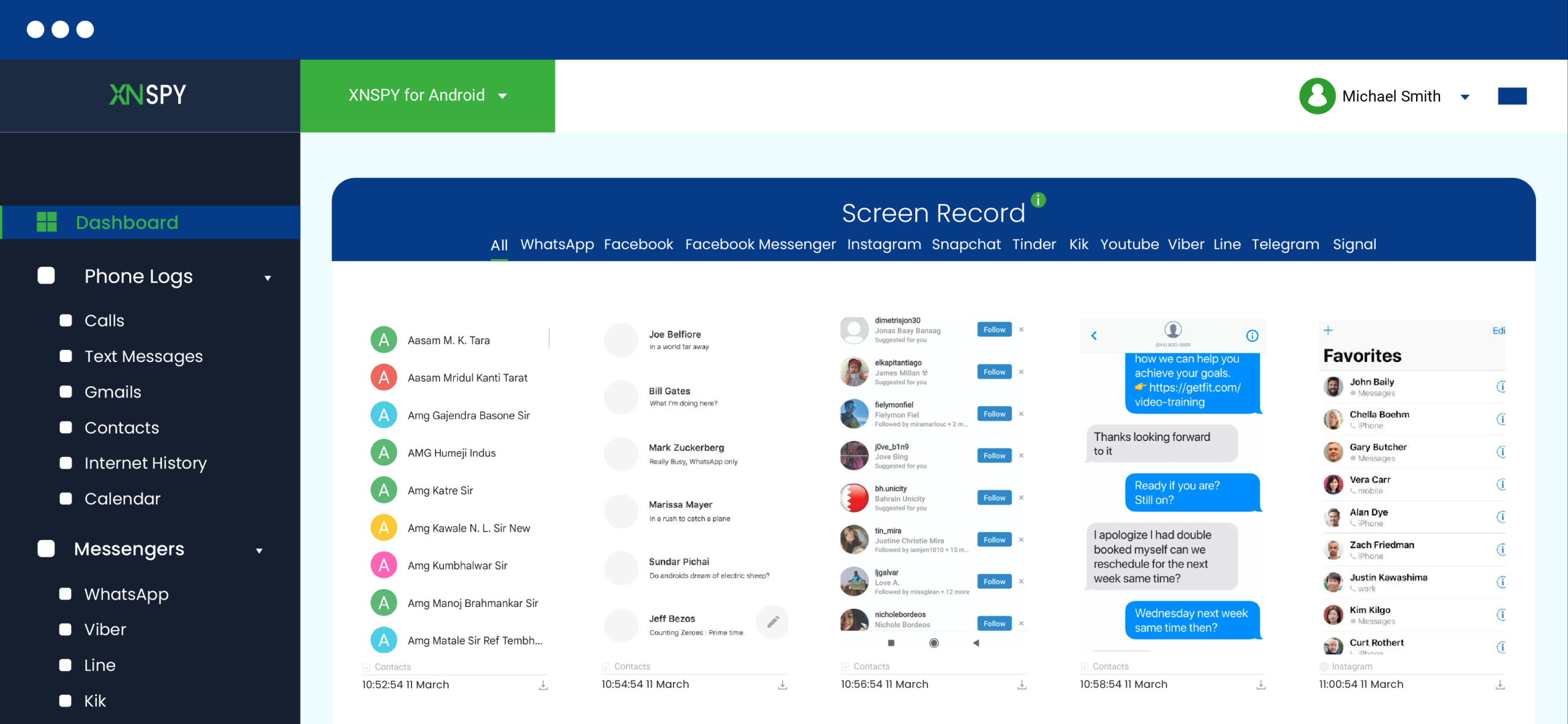
If you need a way to stay informed about your child’s deleted Discord messages without physically accessing their phone every day, Xnspy is a reliable option that I have tested.
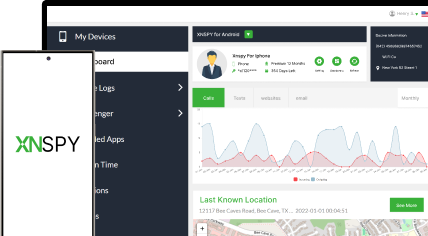
Xnspy is a parental monitoring application that gives you access to two features that matter most for Discord: a keylogger that records every keystroke typed on the device, and a screen recorder that captures periodic screenshots of whatever is happening on screen.
The keylogger is particularly powerful for Discord. Because it records input at the keyboard level, it captures what your child types before the message is ever sent, and certainly before it can be deleted. Even if a message disappears seconds after being sent, the keylog already contains the text.
The screen recorder adds visual context. It captures what appears on the Discord screen at short intervals (5 seconds). It gives you a broader view of conversations, usernames, and interactions, including content in both private DMs and server channels.
Both logs are uploaded automatically to a cloud-based dashboard that you can access remotely from your own phone or browser, without touching the target device again after the initial setup.
Here is how to monitor deleted Discord messages using Xnspy:
- Purchase an Xnspy plan that includes Discord monitoring and keylogging.
- Install and configure the app on your child’s Android or iOS device.
- Log in to your Xnspy dashboard using the credentials sent to your email.
- Navigate to the Keylogger section to review typed messages, including those deleted after sending.
- Check Screen Recorder under Screenshots to view captured Discord screen activity, including active conversations.
How Did It Go For Me?
Xnspy was the standout performer across all my tests. The keylogger captured message text even in cases where the sender deleted the message within two to three seconds of sending it, faster than any other method I tested could respond.
The screen recorder added useful visual context. In my tests, I could see not just the text of a conversation but also the usernames of those involved, timestamps, and the broader channel or DM context.
The one limitation worth noting is the setup requirement: Xnspy needs to be installed on the target device once before monitoring begins. For parents who have legal authority over their child’s phone, this is a straightforward one-time step. But it does require brief physical access to get started. After that, everything runs remotely.
For parents who want to monitor interactions on a desktop, Xnspy is only compatible with iPads, Android tablets/phones, and iPhones.

Monitor Discord Without a Trace
With Xnspy, every Discord move is just a click away.
2. Installing the BetterDiscord App
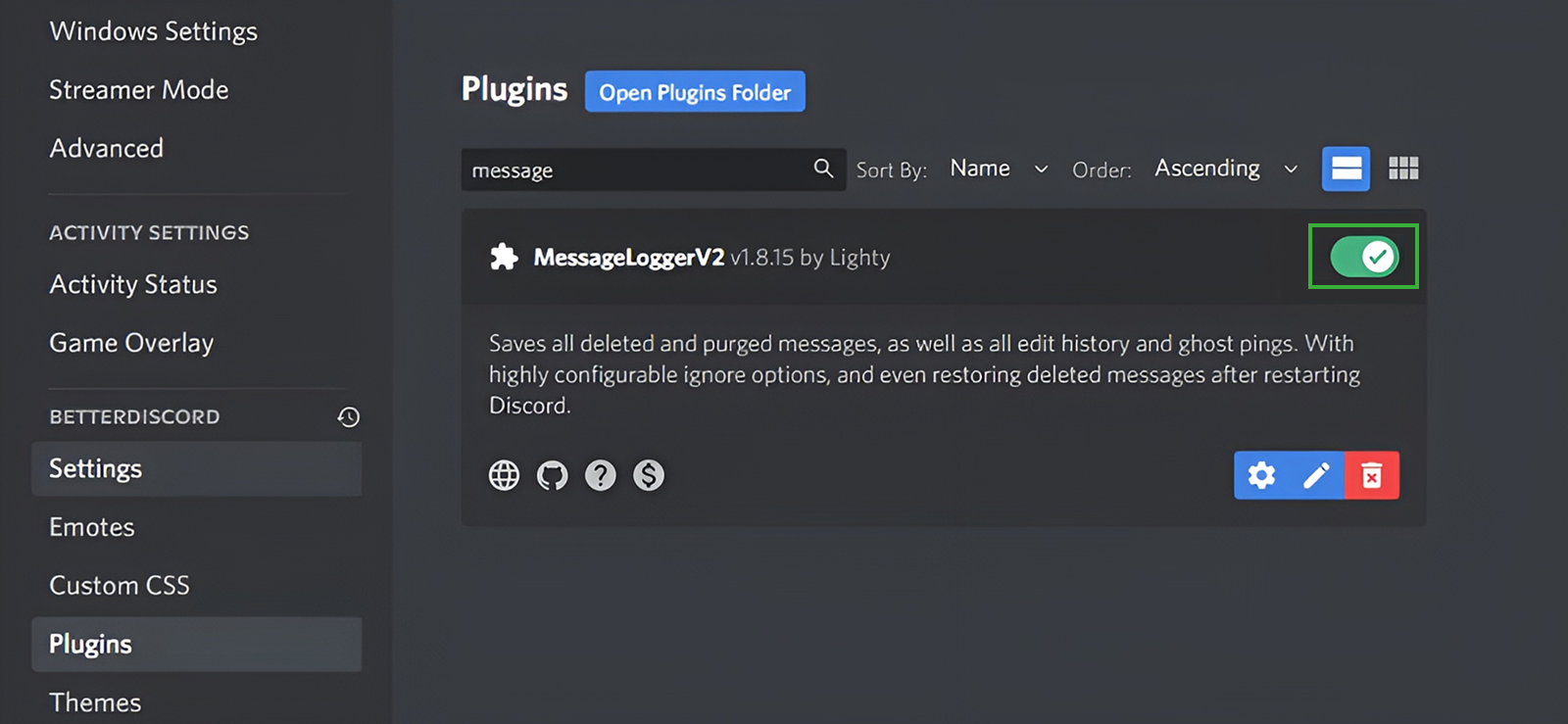
If you’re wondering how to view deleted Discord messages without them knowing, BetterDiscord is an option that can be considered.
Being a client modification tool that enhances Discord with extra features, BetterDiscord lets you install plugins, including MessageloggerV2, which can capture and store deleted messages. Once set up on the target device, you can quietly access chats that have been removed without the other person knowing.
To access hidden and deleted messages through BetterDiscord, follow these steps:
- Download BetterDiscord from the official website and install it on the target laptop by following the on-screen instructions.
- Download the MessageLoggerV2 plugin from a trusted source, like GitHub. Then, place the plugin file into the BetterDiscord Plugins folder (found via Discord > User Settings > BetterDiscord > Plugins).
- Open the target person’s Discord and go to User Settings > BetterDiscord > Plugins. Toggle the MessageLoggerV2 plugin on to start tracking deleted and edited messages.
- Once activated, the plugin will log all deleted messages in the other person’s Discord. Navigate to the relevant chat or server, and you’ll be able to view any previously deleted messages.
How Did It Go For Me?
BetterDiscord with MessageLoggerV2 worked as advertised during my desktop tests. The plugin captured deleted messages in both server channels and private DMs before they disappeared from the interface. The log also retained edit history, which added useful context in conversations where messages were altered rather than outright deleted.
That said, the limitations are real and significant. The method is locked to desktop use, which ruled it out entirely for monitoring a child who primarily uses Discord on their phone.
I also found that Discord updates occasionally broke plugin compatibility, requiring a manual plugin refresh before logging resumed. And because it modifies the Discord client, the ToS risk is not theoretical; it is an active trade-off parents need to consider before using this approach.
3. Use Moderation Bots
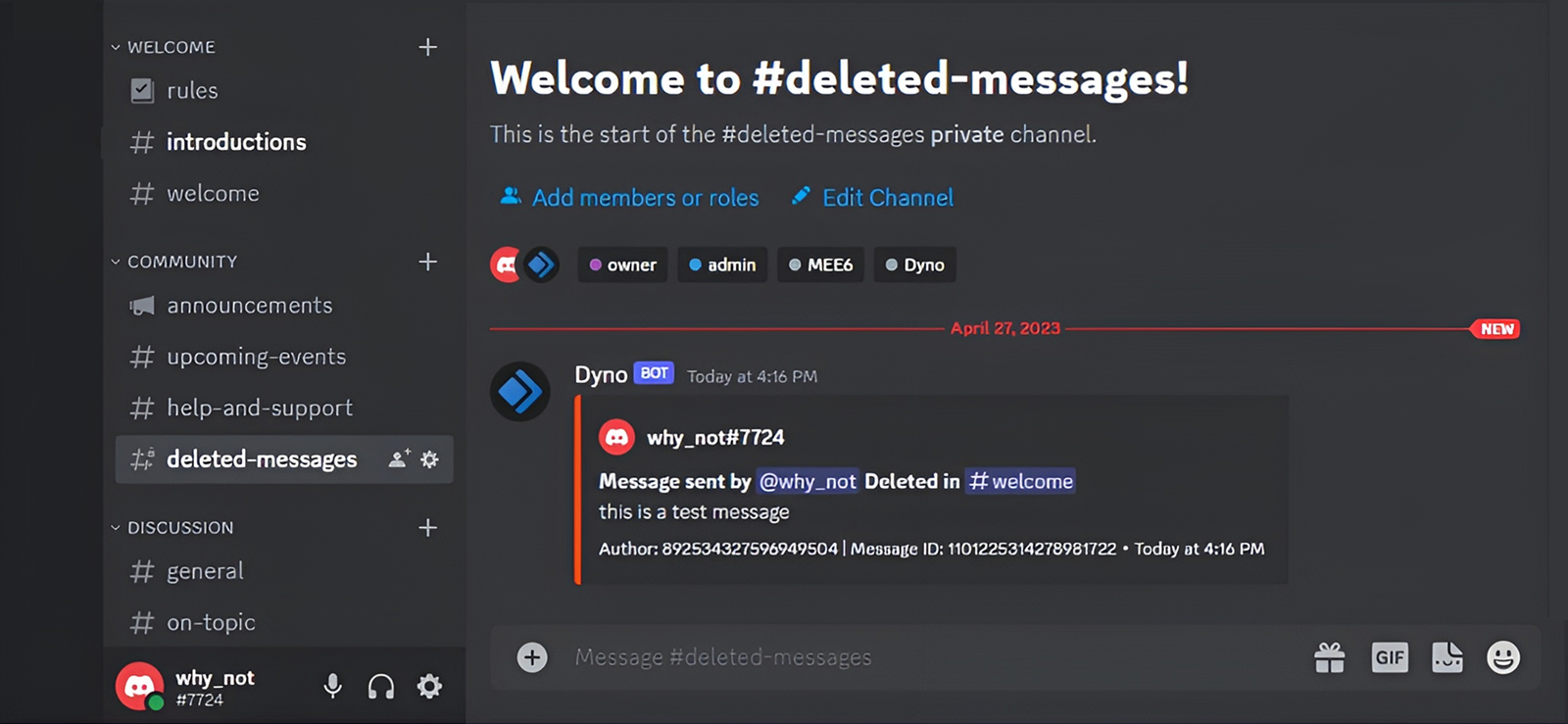
Using moderation bots can be another potential approach to figuring out how to see deleted messages on Discord mobile without the user knowing. The app contains tools like Dyno, Logger, and Carl-bot to help server administrators save activities, including deleted messages.
Once set up properly, these bots quietly log all deletions, making it possible to review conversations remotely, even from your own phone. You can achieve this by creating a fake account and adding the bot to a server where your child is an active participant, allowing you to track deleted messages without raising suspicion.
Once set up properly, these bots quietly log all deletions, making it possible to review conversations remotely, even from your own phone.
Let’s take a look at how you can do this:
- Pick a trusted moderation bot.
- Invite the bot to your child’s Discord server and grant necessary permissions.
- Set up logging features so that all edited or deleted messages are automatically saved.
- Access the log channels through your phone and keep an eye on your kids deleted messages and interactions.
How Did It Go For Me?
In server contexts where I had admin rights, the moderation bot approach worked reliably. Dyno logged deleted messages within seconds of deletion, preserving the sender’s username, the original content, and the timestamp of both sending and deletion. Carl-bot performed similarly with slightly more configuration options.
The hard wall, however, is private DMs. During testing, none of the bots were able to capture anything from private conversations between users, which is exactly where most concerning conversations between kids happen. If your child is primarily using Discord’s DM feature, this method will leave the most important conversations unmonitored.

Did You Know?
Just like Discord, you can see deleted messages on WhatsApp without the user knowing.

4. Check Phone Notification History
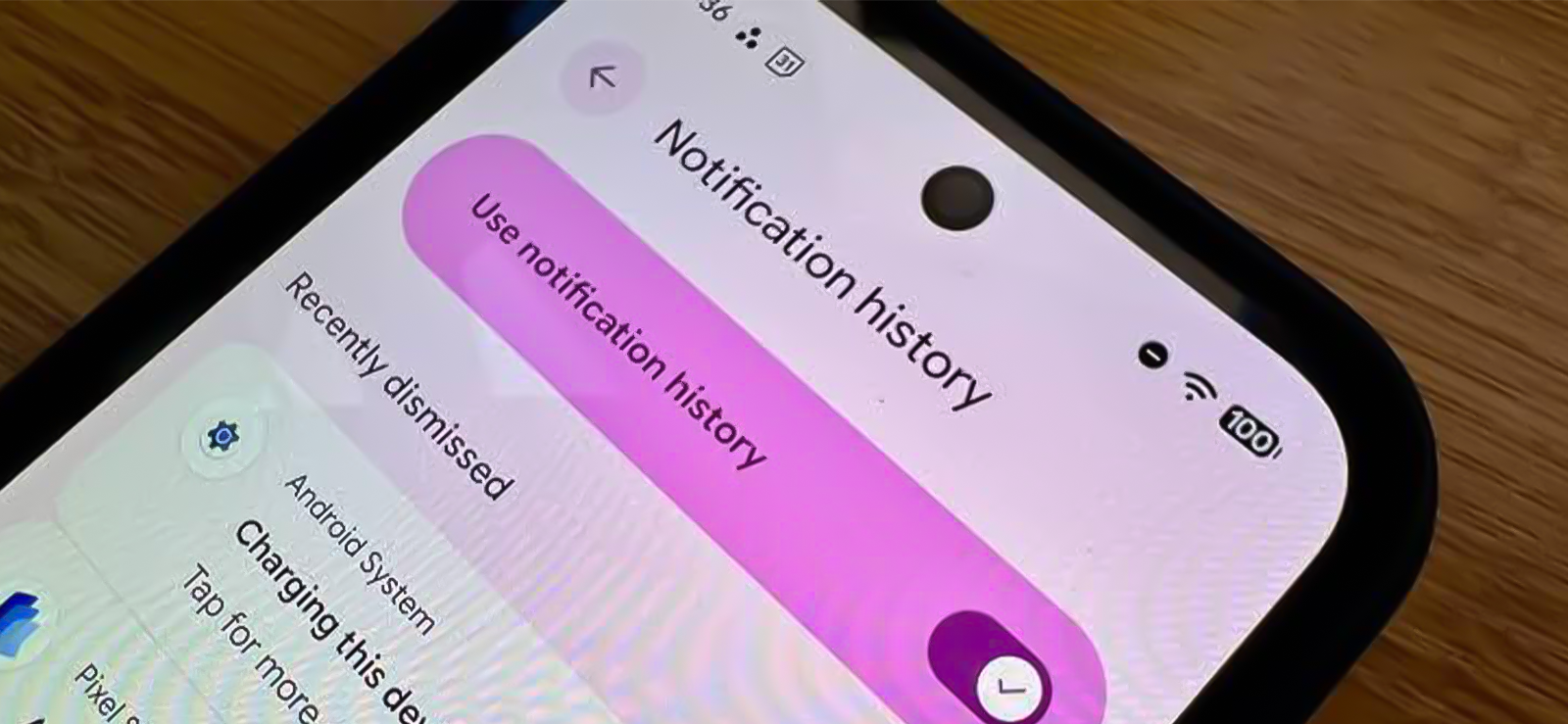
When a Discord message arrives on an Android phone, the operating system delivers a push notification that typically includes the sender’s name and a preview of the message text. Here is the critical detail: once that notification is delivered to the device, Discord cannot retroactively remove it, even if the sender immediately deletes the message inside the app.
Android 11 and later versions include a built-in Notification History feature that preserves a log of all delivered notifications for up to 24 hours. If Discord notifications were enabled and a deleted message triggered one of these notifications, the preview text may still be visible in Notification History even after the message has vanished from Discord.
Here is how to see deleted messages on Discord using Notification History on Android:
- On the target Android phone, open the Settings app.
- Tap Notifications.
- Tap Notification History (on some Android skins like Samsung One UI, this may be under Advanced Settings > Notification History).
- If the toggle is off, turn it on. Note: enabling it now will not restore past notifications — it only saves future ones from this point forward.
- Scroll through the history to find Discord notifications. Each notification entry shows the app, timestamp, and message preview.
- Look for Discord entries from the relevant timeframe to see whether a deleted message’s text was captured in the notification preview.
How Did It Go For Me?
This method surprised me with how useful it was for quick, passive checks. In testing on a Pixel, Discord notifications that had already been dismissed from the lock screen and notification shade were still visible in Notification History for the full 24-hour window.
In cases where a message was deleted within seconds of being received, the notification preview still contained the full message text, completely intact. The deletion inside Discord had no effect on the notification that was already delivered to the OS.
The limitations are, however, serious. For starters, the previews show limited text, so in case of longer text, you won’t be able to read the whole of it. Moreover, the Notification History only stores entries for 24 hours, and the feature must be enabled before the notifications arrive; there is no retroactive recovery. It also only shows one side of the conversation.
5. Checking through Discord’s Email Notifications

One way to see deleted messages on Discord without the other person knowing is by checking email notifications. Discord sends email alerts for messages, even before they are deleted. This way, you can review messages discreetly and access important information without needing any external tools.
Here’s how to find deleted messages on Discord discreetly using email notifications.
- Enable email notifications in your Discord settings under “Notifications.”
- Stay active in the server or DMs where messages are being sent, so you are more likely to receive email alerts.
- Check your email inbox for the message notifications Discord sends.
- If a message is deleted shortly after being sent, you may still have a copy in your email inbox for review.
How Did It Go For Me?
This method had the most inconsistent results of anything I tested. Whether a message triggered an email notification before deletion depended on several factors simultaneously: whether email notifications were enabled at all, whether Discord had already sent the email before the deletion occurred, and whether the email arrived before the user cleared it.
In practical terms, the window is narrow. For messages deleted within a few seconds of being sent, Discord often had not yet dispatched the email alert by the time the deletion happened. For messages that stayed live for a minute or more before being deleted, email capture was more consistent.
I would treat this as a supplementary check rather than a primary monitoring strategy. If email notifications happen to catch something, that is a useful bonus, but it is not reliable enough to depend on as your main approach. On top of all of this, you first have to get access to the email inbox for this method to work.
FAQs
How to see deleted messages on Discord mobile without installing software?
You can see deleted Discord messages on your mobile without installing software by using Discord’s email notifications. You can also do this by reviewing the notification history, but only on Android. If you’re looking for a more thorough alternative on how to see deleted messages on Discord DMs without the target person knowing, Xnspy is a reliable choice. Though it requires installation, it gives consistent access to deleted Discord conversations.
How to view deleted messages on Discord if they use the mobile browser?
If your child accesses Discord through a mobile browser, moderation bots may log some deleted messages, but they are not always reliable. To ensure a better form of viewing, an application like Xnspy can offer more consistent results. Its keylogger records every typed message, while the screen recorder captures real snapshots of their activity. Together, these features allow you to see their Discord conversations even when they are using the mobile browser instead of the app.
How to view deleted Discord messages without having access to their account?
You cannot directly view deleted Discord messages without account access, as Discord doesn’t store deleted content. However, if you are looking into how to recover deleted Discord messages discreetly, consider using third-party monitoring tools like Xnspy on the target device. It can log chats before deletion if installed beforehand. Keep in mind, this requires physical access to the target device.
How to look at deleted messages on Discord if the target device has been factory reset?
If the target device has been factory reset, recovering deleted Discord messages becomes very difficult. You could use software such as BetterDiscord to help keep tabs on future deletions; however, it won’t retrieve anything wiped during a reset. In such cases, using Xnspy is a more reliable solution, as it can log Discord messages in real time and upload the data to a secure cloud before deletion. However, Xnspy must be installed on the device before the reset. If it wasn’t, there’s no way to recover deleted Discord messages from a factory-reset device.
How to find deleted messages on Discord if the target has locked their device?
If the target has locked their device, recovering deleted messages becomes tricky without physically accessing their phone. However, one option can be to access the emails via another device. Another method is to set up moderation bots that log server conversations before they are deleted. Therefore, if you’re wondering how to recover deleted messages on Discord DMs secretly, these approaches offer ways to stay informed despite their limitations.
How to recover deleted Discord messages on someone’s phone if they have deleted the account?
The biggest question on any parent’s mind is how to recover deleted messages on Discord without alerting the user, especially if they have deleted their account. In this regard, using moderation applications can be an effective solution if they are set up beforehand. Additionally, checking the device’s notification history may reveal old deleted messages.

4 Comments
Leave a reply:
Your email address will not be published. Required fields are marked*

Angela L. Collier
August 7, 2025 at 3:01 pmWhere do I check the email notifications for discord? I tried the email that was mentioned but there is nothing there.
Jonney Jones
August 22, 2025 at 2:44 pmI think discord is the worst of all social media apps out there
Rebecca Jones
August 27, 2025 at 2:46 pmMy son is partically addicted to discord at this point since he started using it during Covid-19. I am seriously thinking of using a monitoring app on him now.
Jennifer
September 1, 2025 at 2:56 pmThank you so much... I requested data from my daughter's discord using this blog only to find out that she has been getting bullied quite aggressively.