The complete monitoring experience for your phone
Get XNSPY and start tracking calls, texts, multimedia, locations and more on any phone!
Get Started Now Live DemoAs a parent in the era of social media, staying informed about your child’s behavior on platforms like Instagram is more important than ever. Studies show that teens addicted to social media are 2.1 times more likely to develop anxiety disorders, so you need to stay aware of how they spend their time online.
While open communication should always be the foundation, there may be times when you feel the need for extra insight into their Instagram activity without needing direct access to their mobile phone.
Whether you’re concerned about their Instagram engagements or just want to ensure they’re using Instagram safely, you can observe their account activity remotely.
Want to know how? Well, I have tested and compiled a list of five solutions on how to see someone’s Instagram activity discreetly.
Before You Scroll: Here’s Everything Under 60 Seconds
- Yes, you can see someone’s activity on Instagram, but only in limited ways since the platform removed the “Following” tab back in 2019.
- Xnspy gives the most complete picture because it captures screenshots and keystrokes directly from the target device.
- Instagram’s Family Center lets you see time spent, followers, and privacy changes, but only after the other account accepts a supervision invite.
- Checking activity from your own account can surface likes, comments, and online status, but only if the person follows you back and hasn’t restricted visibility.
- Turning on notifications for someone’s content tells you when they post, go live, or share a Reel, not what’s actually in it.
- The Friends Tab in Reels shows public Reel activity between mutual followers, but the other person can hide their own activity from it entirely.
Can You See Someone’s Activity on Instagram? Separating Rumors from Reality
Yes, you can see another person’s activity on Instagram – but with significant limitations. Today, Instagram only shows a user’s activity if their account is public or if you follow their private account, and even then, the details you see are quite limited.
Previously, Instagram had a “Following” tab that let users view the interactions of people they followed, such as who they liked or commented on. However, this feature was removed in 2019 due to privacy concerns.
Without the “Following” tab, seeing someone’s Instagram activity is much more restricted. Now, you will only come across glimpses of their interactions if Instagram’s algorithm happens to show it in your Feed, and even then, it is indirect and inconsistent.
Because of these changes, parents who need to stay informed must consider alternative, ethical ways to gain meaningful insights into their child’s activity on Instagram.
Your Next Reads

🚫  How to Find Someone’s Location on Instagram Without Them Knowing
👀  How to View Someone’s Instagram Story Anonymously: 6 Easy Ways
📣  How to View Private Instagram Profiles Without the Target Phone
🏅  How to Block Adult Content on Facebook Without the Target Phone
How I Put Each Method Through the Test?
I ran each method against real accounts over the course of a week, measuring how much it actually revealed, how easily that visibility could be shut off, and whether the method held up once the other account took basic privacy precautions.
I used two test accounts for the free, built-in Instagram methods, one set up as a “child” account linked through Family Center, and a separate account I followed to check notifications, online status, and the Friends Tab. For Xnspy, I installed it on a spare Android phone and ran the screen recorder and keylogger against real Instagram sessions to see what showed up on the dashboard.
Here is what I tracked for each method:
- Visibility delivered: I tested what you actually get to see, whether it is full activity logs, basic usage stats, or just a notification that something happened.
- Set up friction: Also, I saw whether the method requires physical access, an accepted invite, or no setup beyond following the account.
- Break point: I then assessed the specific action (private settings, a second account, Close Friends list) that shuts the method down.
- Consistency: To test the consistency of the results, I saw whether the method delivered the same result every time or only worked intermittently.
- Dependency on the other person: I also tested whether the method requires the target’s cooperation (accepting an invite) or can work without their involvement.
How to See Others’ Activity on Instagram Without Accessing the Target Phone: 5 Proven Methods
Since 45% of teens feel they can’t live without Instagram, parents have no choice but to keep an eye on their child’s app activity. So today, we will explore five effective ways on how to see someone’s activity on Instagram without them knowing.
| Method | What It Shows You | Works Without Their Phone? | Biggest Limitation |
| Xnspy | Screenshots, keystrokes, full activity logs | Yes | Requires one-time setup on the target device |
| Instagram’s Family Center | Time spent, followers, privacy changes | Yes, after they accept supervision | Useless if they have a second account |
| Check Activity from Your Account | Likes, comments, online status (if visible) | Yes, if they follow you back | Easily blocked via Close Friends or privacy settings |
| Turn On Notifications for Their Content | Alerts when they post, go live, or share a Reel | Yes, if you follow them | Only tells you they posted, not what they’re doing otherwise |
| See Friends Tab in Reels | Public Reels they’ve liked, commented on, or posted | Yes, if you’re mutual followers | Only shows public Reel activity, and they can hide it |
1. Using Xnspy

Xnspy is a monitoring app installed directly on the target device, and it’s the most thorough option here because it doesn’t depend on Instagram’s own settings cooperating. Its screen recorder captures screenshots at 5-10 second intervals, so you get a visual trail of whatever is happening on the screen, including Instagram activity across multiple accounts. Its keylogger separately records keystrokes, which covers things like Instagram messages and search queries.
Here’s how to see others’ activity on Instagram by using Xnspy:
- Subscribe to an Xnspy plan that fits your needs.
- Install and set up the app on the target device.
- Log in to your Xnspy dashboard using the credentials sent to your email.
- Open the Screen Recorder or Keylogger section to review Instagram activity.
How Did It Go For Me?
I ran this on a spare Android phone with Instagram set up and active, and the screen recorder did exactly what it claims: it kept capturing screenshots every few seconds while I scrolled, posted, and messaged, building a usable timeline of what happened on screen. The keylogger picked up everything I typed, including a DM and a search query, without me having to do anything extra on the dashboard side.
The setup did require physical access to the device for installation, which is worth knowing upfront since it’s the one method here that isn’t purely remote after that point. But once it’s installed, everything else genuinely runs in the background, and the dashboard updates without needing the target device unlocked or open.

Instagram Secrets? Not with Xnspy Watching
Discreetly monitor every move they make on Instagram.
2. Using Instagram’s Family Center
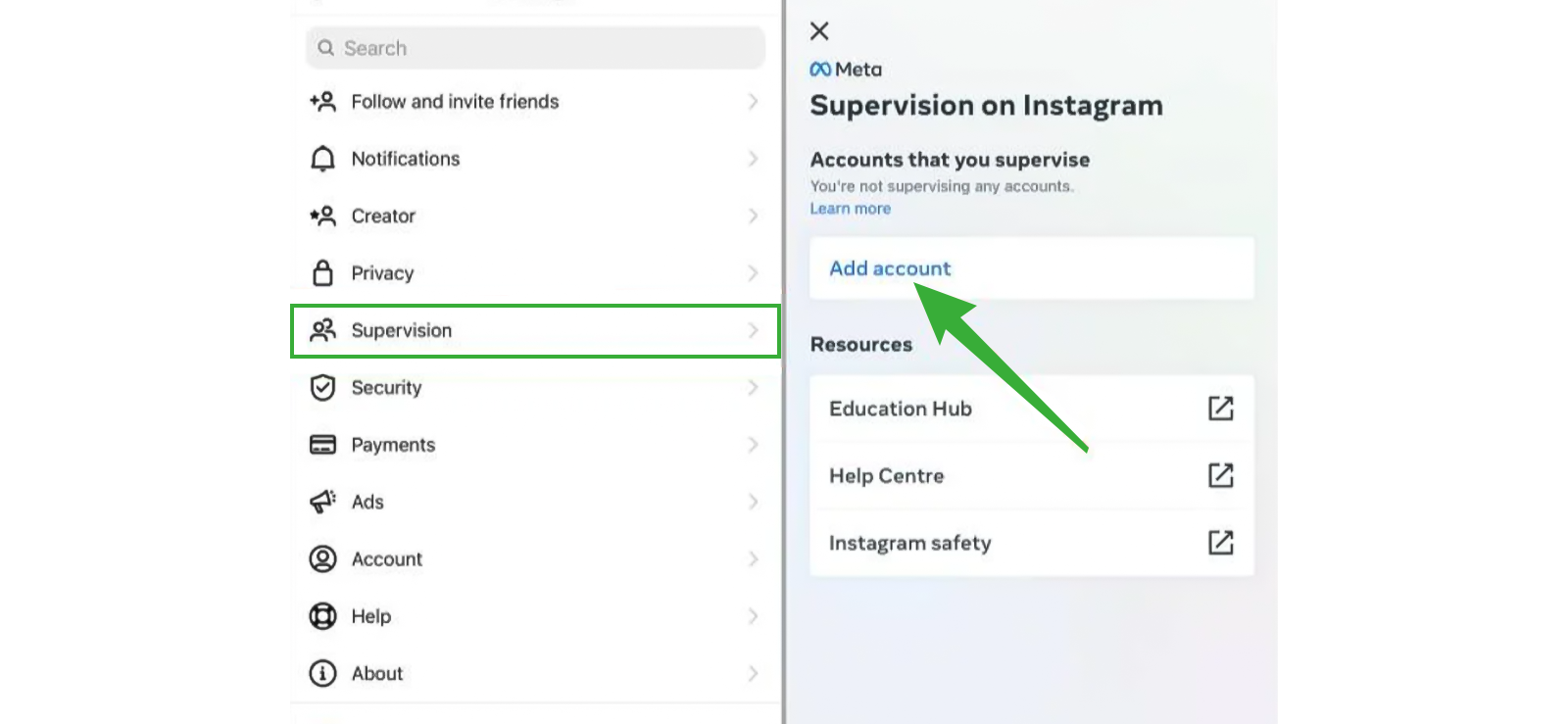
Family Center is Instagram’s built-in supervision tool, designed for parents who want visibility into time spent on the app, followers, and following lists, and any changes made to privacy settings. It requires the other account to accept a supervision invite, so it isn’t a hidden or one-sided setup.
To know how to see activity on Instagram of another person remotely with the Family Center:
- Open the target Instagram account on your device.
- Go to Settings, then scroll to Privacy.
- Tap Supervision under Privacy and Security.
- Send a Supervision invite to the account you want to monitor.
- Once accepted, check app usage, followers, and privacy changes from your Family Center dashboard.
How Did It Go For Me?
Setting this up between my two test accounts took just a couple of minutes, and the dashboard updated with time-spent data and follower changes reliably once the invite was accepted. It was the easiest method here if both accounts are cooperating.
The real limitation showed up when I created a second, unlinked test account: Family Center had no visibility into it whatsoever, since supervision only applies to the specific account that accepted the invite. So if your child switches to or creates a separate account, as many teens do, this method goes dark with no warning that anything’s missing.
3. Check Activity from Your Account

When it comes to knowing how to check someone’s activity on Instagram, this is the simplest method since it just uses your own Instagram account to passively observe someone you follow. Refreshing your feed can surface their recent interactions depending on Instagram’s algorithm, and their online status (if they haven’t disabled it) shows you roughly how active they are.
To do so:
- Open Instagram on your phone.
- Look up their account.
- Check their following and follower lists for changes. Also, see their posts/stories and comments manually.
- Revisit their account periodically for new activity.
How Did It Go For Me?
This worked, but inconsistently. On a few refreshes, my feed did surface a post or comment from my test account, but it wasn’t reliable enough to count on, and Instagram’s algorithm clearly wasn’t prioritizing showing me that activity. Online status was the more dependable signal of the two; when my test account opened the app, the “Active now” status reflected it almost immediately.
Where this method fell apart was the moment I added the test account to a Close Friends list and limited activity status visibility. Both signals disappeared instantly. So this is fine as a casual, supplementary check, but it’s the easiest method for someone to shut you out of without you even realizing it happened.

Did You Know?
Just like Instagram, you can also keep an eye on someone’s Facebook activity.

4. Turn on Notifications for Their Content
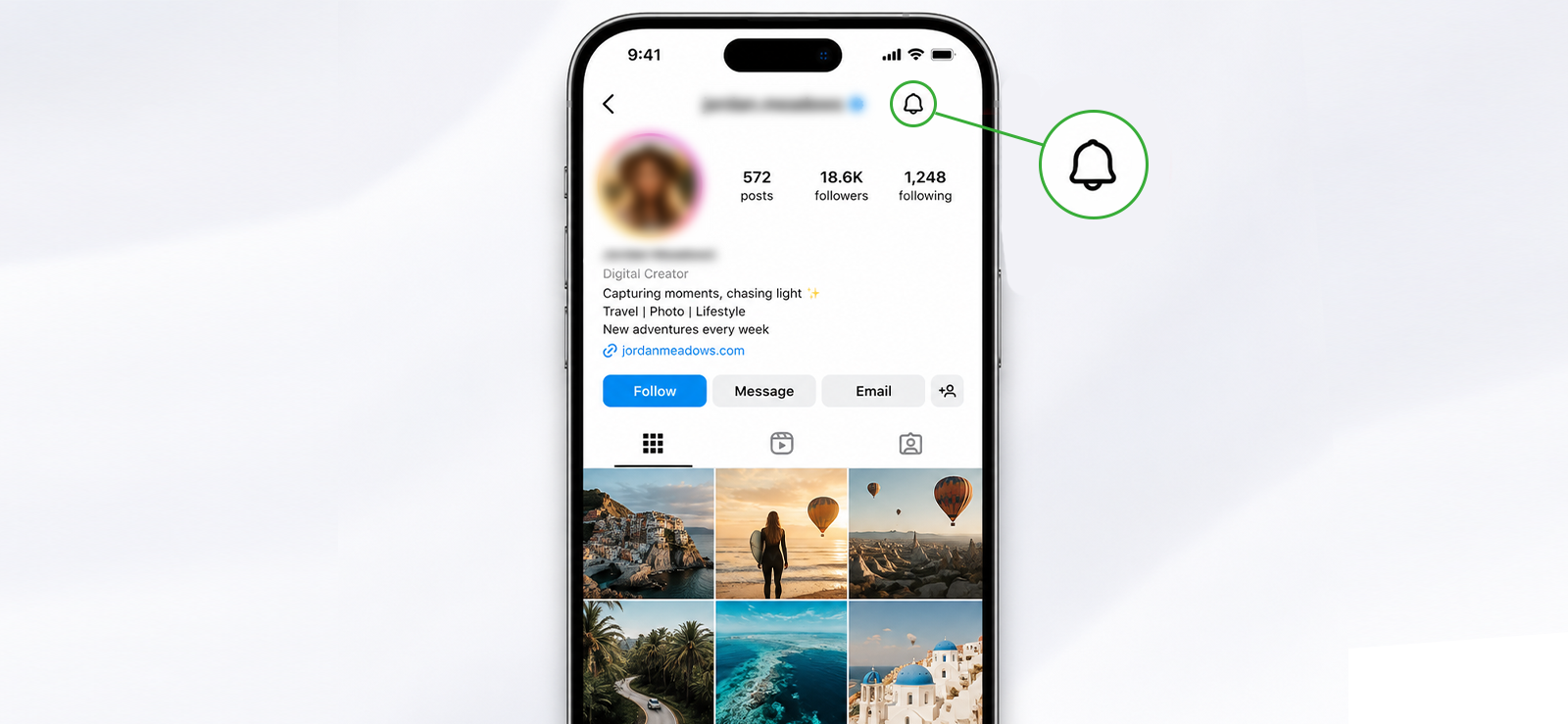
Instagram lets you turn on notifications for any account you follow, so you get alerted every time they post, go live, share a Reel, or put up a Story. It’s built for staying updated with favorite creators, but it doubles as a lightweight way to know exactly when someone is active on the app without checking their profile manually.
Let me walk you through the steps of how to check someone’s Instagram activity by turning the notifications on:
- Open the person’s profile on Instagram (you need to follow them first).
- Tap the bell icon near the top of their profile, next to the three-dot menu.
- In the notification settings that appear, toggle on Posts, Stories, Reels, and Live Videos individually based on what you want alerts for.
- Keep your phone’s push notifications enabled for Instagram so the alerts actually reach you.
How Did It Go For Me?
This one was straightforward to set up, and it worked exactly as advertised on my end. Within a few minutes of my test account posting a Reel and putting up a Story, I got both notifications. I left Live Videos off during testing since I didn’t want a flood of alerts for unrelated accounts, but toggling it back on took five seconds.
The catch became obvious fast, though: this method only tells you that something happened, not what’s in it or who they’re talking to, what they have watched, or what they have commented oned on.
I got a notification the moment my test account posted, but I still had to open the app and check the post myself to see what it actually was. So if your goal is to know whether someone is active on Instagram at a given moment, this works well. If you’re trying to understand what they’re saying in DMs or who they’re engaging with privately, notifications won’t get you there at all.
5. See Friends Tab in Reels

The Friends Tab sits right next to the regular Reels tab and shows public Reel activity from people you mutually follow. This includes the Reels they’ve liked, commented on, reposted, or posted themselves. It’s Instagram’s way of surfacing what your circle is engaging with.
Here’s how to check someone’s Instagram activity without them knowing via the Friends Tab in Reels:
- Open Instagram and tap the Reels icon at the bottom of the screen.
- Look at the top of the Reels feed for the “Friends” tab, sitting next to the default Reels feed.
- Tap it to see Reels your mutual followers have liked, commented on, reposted, or shared.
- Tap on a friend’s profile picture next to a Reel to see what they specifically did with it.
How Did It Go For Me?
The Friends Tab worked when there was something to show, but the operative word there is “when.” During testing, my mutual-follow test account liked a handful of public Reels, and those showed up in the Friends Tab within the same scroll session, profile picture and all. Tapping a friend’s icon next to a Reel did pull up what they’d done with it, just as advertised.
But this is where I have to be upfront about the limitation, because it’s a real one: the Friends Tab only surfaces public Reel activity, and it only works between accounts that follow each other back. It won’t show anything from private accounts you’re not mutuals with, and it has nothing to do with Stories, DMs, or general browsing.
On top of that, Instagram gives people a setting to hide their own likes and comments from the Friends Tab entirely, so if the person you’re trying to keep an eye on has that toggled off, you’ll see nothing here, no matter how often they’re actually using Reels. I tested this directly by switching that setting off on my test account, and the activity disappeared from the Friends Tab immediately. So treat this as a nice-to-have glimpse, not a reliable way to track someone’s Reels habit.
FAQs
How to see activity on Instagram of another person without installing the software?
If you don’t want to install the software, Instagram’s built-in parental controls allow you to link your child’s account to yours for limited activity insights. However, these controls can be bypassed through alternate accounts. Instead, you can use the Xnspy Instagram monitoring app for more comprehensive and real-time updates, as it offers a clearer view of their overall Instagram activity across multiple accounts.
How to check someone’s activity on Instagram without logging into their account?
If you are wondering how to see people’s activity on Instagram secretly and without logging into their account, you can start by checking their activity from your own account if you follow them. Alternatively, you can also explore Instagram’s Friends Tab within the Reels section to view any mutual engagements. Though limited, these features help you stay aware without needing direct access to their Instagram login credentials.
How to see someone’s Instagram activity even after they block you?
If blocked, you can check someone’s Instagram activity by using a device they frequently use. With their Instagram account already logged in on that device, you may find clues about their activity. Plus, even if logged out, their browser history might reveal engagements and other activity details. However, since physical access is not always practical, Xnspy’s screen recording and keylogging features provide a more effective way to discreetly observe ongoing Instagram activity without account access.
How to check someone’s Instagram activity if their account is private?
In case the target person’s account is private and you don’t follow them, viewing their Instagram activity becomes nearly impossible through standard means. While tools like Instagram viewers or checking other social media platforms may offer minor insights, they are unreliable. Instead, for detailed and consistent Instagram activity updates, advanced applications like Xnspy are a far more effective solution.
How to see people’s activity on Instagram if they use a second or fake account?
When the target person uses alternate or fake IG accounts, traditional methods like Instagram’s Family Center offer little control. Even checking their activity through your own account becomes ineffective if you’re unaware of the second account. In such situations, the only partial workaround is checking a frequently used device for any logged-in Instagram accounts or browser history. But these insights are still limited. For unrestricted access, use Xnspy, which captures their Instagram activity in real time across all accounts.
Monitoring and Control Like No Other
With Xnspy, nothing slips through.

4 Comments
Leave a reply:
Your email address will not be published. Required fields are marked*
Jenney Adams
August 25, 2025 at 3:01 pmInstagram is so full of issues. Why is the American government not doing anything about this?
Lorena Rae
August 27, 2025 at 3:01 pmI wish instagram would bring back the following tab, I miss it
Lauren Bissell
August 28, 2025 at 2:39 pmReally need xnspy because my son is spending over 5 hours on instagram per day and I am really worried for him
George Watson
September 4, 2025 at 2:54 pmNice ✨