The complete monitoring experience for your phone
Get XNSPY and start tracking calls, texts, multimedia, locations and more on any phone!
Get Started Now Live DemoMost kids were first introduced to social media through Facebook because of how mainstream the app is. Therefore, familiarity with the app keeps them coming back, and often scrolling mindlessly.
In fact, 69% of Facebook users do it without even realizing. Such constant usage of Facebook can, sometimes, expose children to content way beyond their age.
To make matters worse, Facebook does not provide one universal setting that guarantees every adult post will be blocked.
However, I found several ways on how to block inappropriate content on Facebook of the other person.
What the Guide is All About: Quick 60 Second Summary
- Adult content on Facebook: Explicit pornography is prohibited on Facebook, but suggestive content may still appear on kids’ feeds.
- Xnspy: Monitors Facebook activity through screenshots, messages, etc., and allows parents to restrict access to the app remotely.
- Facebook controls: Reduce inappropriate recommendations through Sensitive Content, Teen Account, and Feed preference settings.
- Reporting: Flags inappropriate posts, videos, Reels, advertisements, and accounts for Meta’s review.
- Browser extensions: Block or limit access to Facebook through a specific desktop browser.
- Router or DNS controls: Restrict Facebook or adult websites across devices connected to the home network.
What Does “Blocking Adult Content on Facebook” Actually Mean?
Before choosing a method, I recommend distinguishing between four different outcomes:
- Blocking prevents access to Facebook entirely.
- Reducing tells Facebook that the user wants to see fewer posts of a particular type.
- Reporting asks Meta to review a specific post, account, advertisement, Reel, or video against its policies.
- Monitoring provides visibility into what appears on a supervised device’s Facebook, but does not automatically remove that content.
This distinction matters because several tools tend to reduce adult content exposure instead of blocking it entirely.
Is There Porn on Facebook? Separating Facts From Fiction
Many parents wonder, “Why am I seeing inappropriate videos on Facebook?” and that leads to more questions, like whether pornography exists on Facebook for kids, too. The answer requires an important distinction.
Meta’s Community Standards prohibit adult nudity and sexual activity, and content that violates those rules may be removed when detected or reported.
However, that does not mean users can never encounter inappropriate material since content featuring revealing clothing, suggestive poses, flirtatious themes, adult discussions, etc., may still appear if it does not violate Meta’s removal standards.
Therefore, while explicit pornography is against Facebook’s rules, suggestive content can still surface through recommendations, Reels, Pages, groups, advertisements, or shared posts.
Due to such concerns, parents need to understand ways to restrict Facebook reels showing inappropriate content remotely.
How I Evaluated the Methods Chosen for This Guide
To evaluate each method fairly, I followed a three-step approach. First, I reviewed the method’s documented capabilities to understand what it was actually designed to do.
Next, I tested how effectively it addressed different types of adult-content exposure on Facebook. Finally, I compared the results against a consistent set of evaluation factors to determine its overall usefulness.
- Effectiveness against unwanted adult content: I evaluated each method based on how well it addressed unwanted adult content on Facebook in practical situations.
- Access and setup requirements: Some solutions require direct access to a device or account, while others can be configured remotely. Understanding the setup requirements helped me determine how realistic each option is for parents.
- Coverage across Facebook surfaces: Adult content can appear in several areas of Facebook, not just the main Feed. I checked whether each method remained effective across different sections.
Your Next Reads

💡 How to Tell if Someone is Talking to Someone Else on Messenger
⚡ How to See Someone’s Activity on Facebook Without Them Knowing
🏅 How to See Friend’s Location on Facebook Without Them Knowing
💬 How to Retrieve Deleted Text Messages on Android Without the Phone
How to Block Inappropriate Content on Facebook: 5 Techniques That Work
If you are a worried parent wanting to learn how to block adult content on Facebook without them knowing, I have compiled a list of the 5 tested and reliable techniques that you can choose from.
| Method | Primary Purpose | Access Required | Coverage Score | Main Limitation |
| Xnspy | Monitor activity and restrict the Facebook app | Initial access to the supervised device | 80% monitoring; 20% direct blocking | Does not selectively filter Facebook posts |
| Facebook controls | Reduce sensitive recommendations | Access to the Facebook account | 60% | No guaranteed complete block |
| Reporting | Flag violations and influence recommendations | Access to the account to view the content | 100% reporting availability; 0% guaranteed removal | Reactive and item-specific |
| Browser-level extensions | Restrict Facebook website access | Access to the computer or managed browser | 40% | Does not normally cover the mobile app |
| Router or DNS controls | Restrict domains on a home network | Router administrator access | 40% | Cannot inspect individual Facebook posts |
1. Use Xnspy
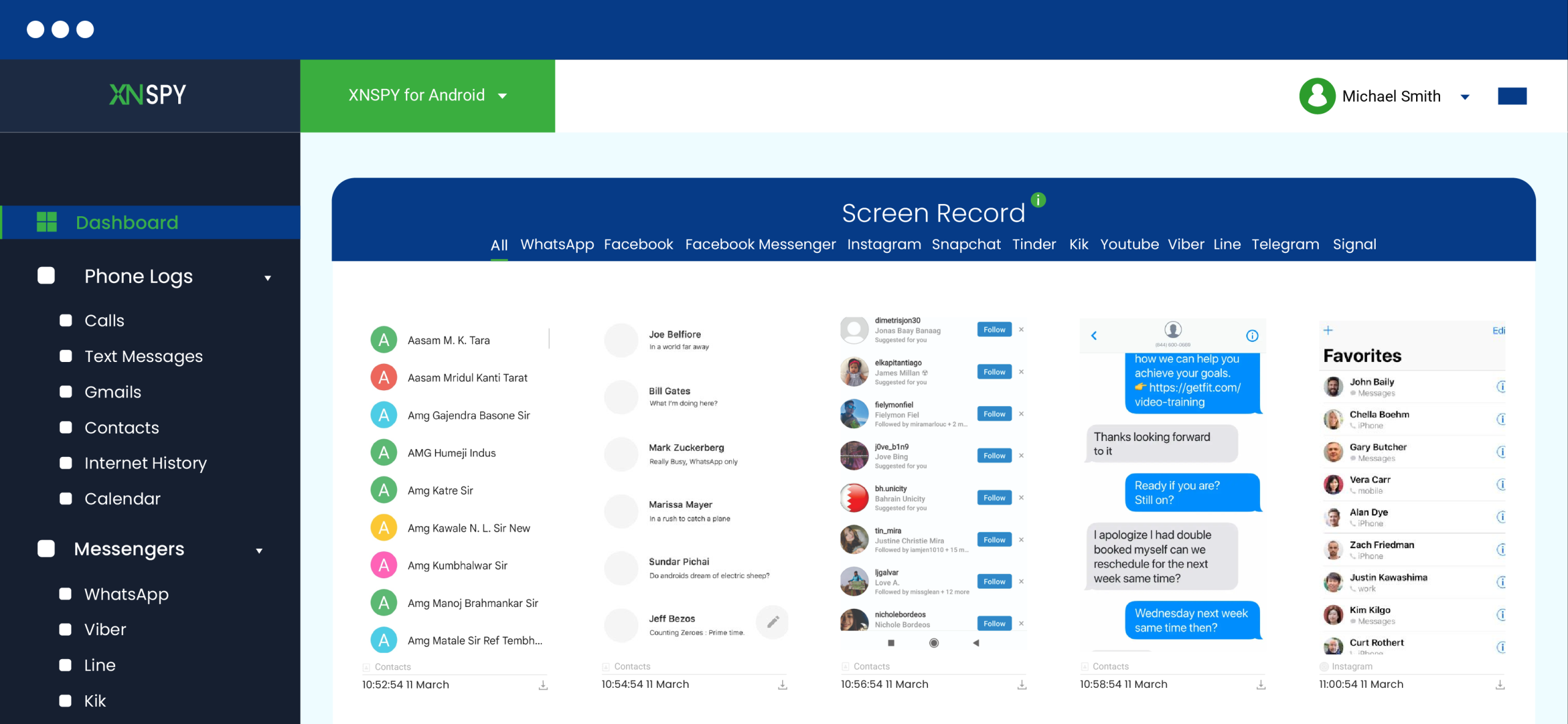
Xnspy is a parental monitoring and device-management application designed to help parents supervise a child’s activity on compatible devices. Through its web-based dashboard, it provides access to features such as screen activity monitoring, app-usage tracking, browsing-history records, keyword alerts, and other supported device data.
One of its key features is screen recording, which periodically captures activity on the phone, which can help parents review the content being viewed on Facebook, such as posts, Reels, Pages, advertisements, search activity, and shared links.
The platform also includes keyword-alert functionality since parents can create watchlists with selected words or phrases to receive alerts for. Not only that, but its app-usage monitoring also provides additional insight into how frequently Facebook is used.
If parents observe any concerning patterns and increasing exposure to adult content, they can also manage the device through its app blocker. The app blocker can limit access to Facebook remotely.
Here is how to block sexual content on Facebook with Xnspy:
- Review the activity logs and block the Facebook app if necessary.
- Check that the child’s device is compatible with Xnspy.
- Select the plan containing all required features.
- Follow the official setup instructions and grant the permissions needed.
My Findings
I assessed Xnspy against five Facebook exposure scenarios, i.e., Feed, Reels, search results, and activity across multiple Facebook accounts on the same monitored device.
Overall, it offered a plausible monitoring route in four of the five scenarios, producing an 80% monitoring-coverage score. I found that periodic screen capture showed activity occurring within different parts of the Facebook interface. I could also see watch activity on other Facebook accounts, as long as they were accessed from the same phone.
Its direct content-blocking result gave me 20% content-blocking score since it restricted the Facebook application as a whole, but did not block selective Reels.
I would say that its strongest point was visibility. With the provided data, I could easily connect repeated exposure with the account, Page, search term, or activity that may have contributed to it.
The main drawbacks, however, were that monitoring is not the same as filtering, and installation and permissions are required for using Xnspy.

Get Xnspy for Complete Facebook Access
Know what goes on behind the scenes with just a few clicks.
2. Adjust Facebook Controls

Facebook’s native settings are the most direct free way to influence what appears inside the platform. While they do not guarantee a fully filtered feed, they can reduce certain sensitive recommendations and send clearer preference signals to Facebook.
Firstly, the Sensitive Content setting determines how much potentially upsetting or offensive recommendation content the account may see. Therefore, where available, choosing the more restrictive option can reduce exposure, although it does not override every recommendation or remove content shared directly by friends.
Secondly, Content Preferences provide additional controls. Parents can help kids mark posts as “Not interested,” unfollow people or Pages, reconnect with selected accounts, and manage other Feed preferences.
For users aged 13 to 17, Facebook Teen Accounts add protective default settings. That is why, depending on age and supervision status, a parent may be able to review settings and approve requests to make certain protections less restrictive.
Let’s see how to block inappropriate content on Facebook app with its built-in controls:
- In your child’s Facebook account, open the Menu, select Settings & privacy, and then select Settings.
- Locate Content preferences and review the available Feed, sensitive-content, snooze, unfollow, and recommendation options.
- Open Sensitive content and select the option that offers less offensive recommendation content.
- Alternatively, on unsuitable posts, Reels, or videos, open the three-dot menu and select Not interested, Show less, Hide, Unfollow, or Block.
- Open the Family Center and complete the parent-and-teen setup.
My Findings
When I evaluated the native controls across Feed, Reels, search results, and alternate access routes, they produced a meaningful account-level result in three of the four scenarios, giving the method a 60% coverage score.
As is evident from the discussion, the controls were most relevant to Feed recommendations, recommended videos, and content associated with followed accounts.
I found two distinct control layers particularly useful. The first was the broader Sensitive Content setting, and the second was item-level feedback, such as “Not interested.” Using both layers creates clearer preference signals than relying on either one alone.
The method earned a 0% guaranteed-blocking score because none of the native preference settings promise that every suggestive post will be stopped.
3. Report Violating Content

Reporting is appropriate when a post, video, Reel, advertisement, profile, group, or comment appears to violate Facebook’s Community Standards.
Though a report does not automatically remove content, it instead sends the item to Meta for assessment. Meta may remove, restrict, or otherwise act on it if reviewers or automated systems determine that it violates the applicable rules.
Here’s how to remove dirty videos from Facebook by reporting them:
- On the post, Reel, video, advertisement, profile, or comment, select the three-dot menu or the available options control.
- Select Find support or report or Report, depending on the content and available menu.
- When reporting, choose the category that most closely reflects the issue.
- Complete the reporting prompts and keep checking Facebook’s Support Inbox for an update.
My Findings
For this method, I again reviewed the reporting workflow across four common scenarios, and a reporting route was available for each, resulting in a 100% score.
However, that does not mean all four reports resulted in removal. Reporting achieved a 0% guaranteed-removal score because the final decision belonged to Meta.
Overall, during testing, I identified three possible outcomes of reporting, i.e., the content may be removed for violating policy, it may remain because Meta finds no violation, or it may become less visible to the reporting user.
While I could report content immediately, I found it time-consuming to address posts individually.

Did You Know?
Facebook is not the only platform with inappropriate content; Snapchat is full of explicit content, too.

4. Setup Browser-Level Website Controls

A browser extension can restrict access to Facebook on a computer, introduce schedules, limit time on the website, or block selected web addresses, which is useful when a child primarily accesses Facebook through Chrome or another desktop browser.
However, a standard browser extension does not understand Facebook’s feed well enough to reliably distinguish an acceptable family photo from a sexually suggestive Reel hosted on the same Facebook domain.
Therefore, most consumer extensions are better at blocking the entire site, applying a time limit, or hiding selected page elements than accurately classifying every post.
When it comes to Facebook reels porn, you can block it using browser-level restrictions:
- Use a well-reviewed browser extension and add it to the child’s browser profile.
- Block facebook.com, set the allowed hours, or configure the account’s website permissions.
- Check if the controls are working as advertised and review restrictions as needed.
My Findings
During testing, I found out that a normal extension reliably addressed only the configured desktop browser. Overall, the method gave me 40% coverage.
The most significant finding was that a standard extension affected only one browser environment, not the entire device. Therefore, other browsers, the Facebook mobile application, and unmanaged devices remained outside its control.
Nonetheless, I appreciated that the setup was quick and scheduling offered me flexibility. However, again, upon further testing, it was evident that the controls can be easily removed and the method cannot be used as a standalone.
5. Use Router or DNS Controls
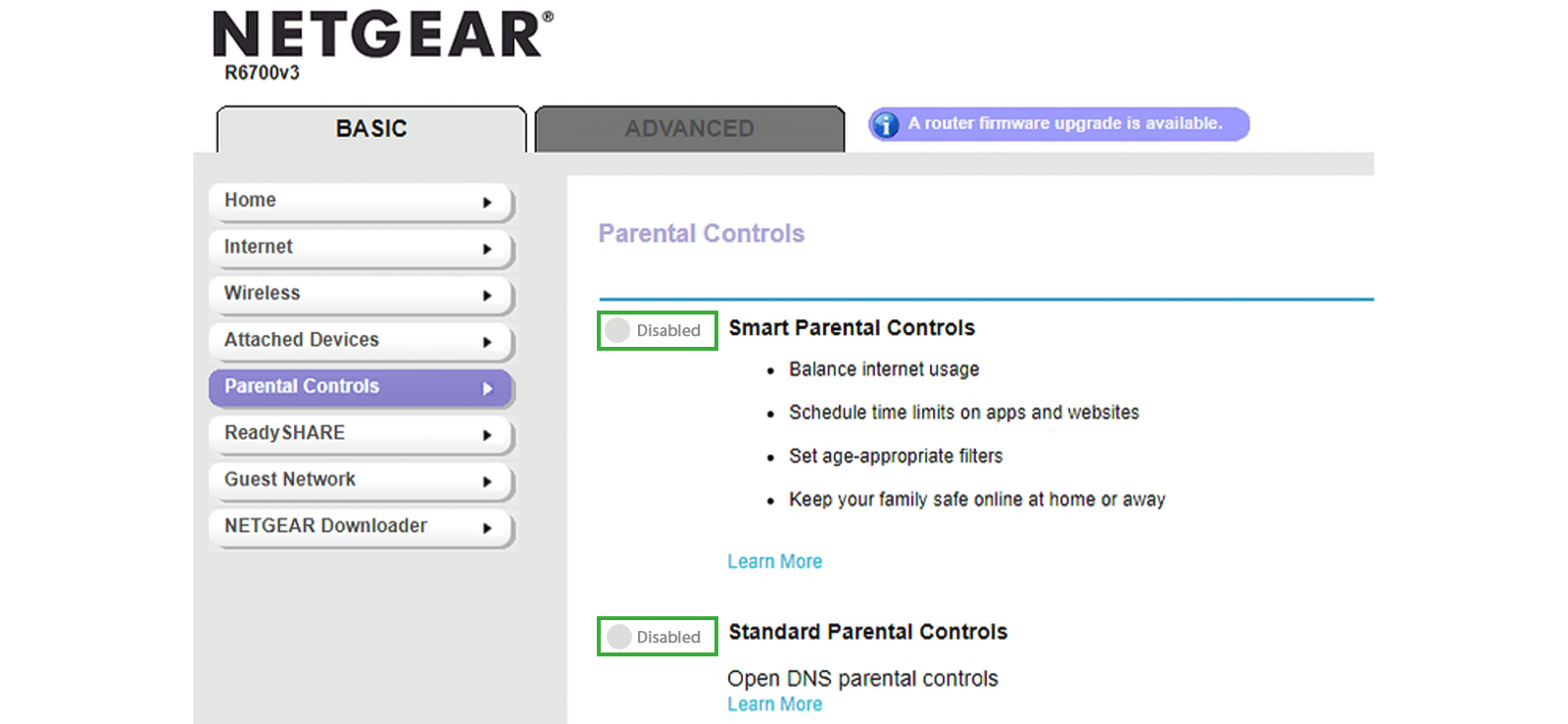
Router parental controls and DNS filtering can apply restrictions to multiple devices connected to a home network. Depending on the router or DNS service, you can block adult-domain categories, schedule internet access, restrict social-media domains, or assign policies to a child’s device.
With this approach, you can prevent external adult website links from opening even when shared on Facebook and also block Facebook entirely on the home Wi-Fi network.
What it cannot normally do is selectively block Facebook Watch, Reels, Marketplace, or individual News Feed posts while allowing the rest of Facebook.
If you are concerned about Facebook reels showing inappropriate content to your child, use router controls:
- Enter the router’s local administration address in a browser or use the management application.
- Use the router administrator credentials to get access to parental controls.
- Group the child’s phone, tablet, and computer by device name or hardware address.
- Enable adult-domain category filtering, add access schedules, or block Facebook as a complete domain.
My Findings
For router and DNS controls, I checked its performance in five scenarios: blocking Facebook on home Wi-Fi, blocking an external adult domain, filtering an individual Facebook post, filtering a specific Facebook section, and continuing the restriction over mobile data.
The method succeeded in two of the five scenarios, producing a 40% coverage score. It could block the complete Facebook domain on the configured network and could restrict many separately hosted adult domains through category filtering.
However, for specific Facebook filtering, it produced a 0% score because standard DNS or router rules could not reliably distinguish an adult Reel from a normal Reel, or block one Marketplace listing while allowing another.
The method also covered only the configured Wi-Fi network while mobile data remained outside the router’s authority.
FAQs
How to block sexual content on Facebook Marketplace listings?
Facebook does not provide a setting that completely blocks sexual content in Marketplace listings. However, unsuitable listings can be hidden, reported, or marked “Not interested” to improve recommendations. In addition, Xnspy’s screen-recording feature can help parents remotely review Marketplace activity, searches, and viewed listings. Moreover, if exposure continues, its app blocker can restrict access to Facebook entirely.
How to block inappropriate content on Facebook app without installing the software?
You can reduce inappropriate content on the Facebook app without installing software by adjusting Sensitive Content and Feed preferences. Additionally, hiding unsuitable posts, selecting “Not interested” or “Show less,” unfollowing problematic accounts, and reporting content that violates Facebook’s standards helps too. However, when considering how to block porn on Facebook, note that these controls reduce exposure but cannot guarantee complete blocking.
How to remove dirty videos from Facebook if my child uses a desktop?
For Facebook reels porn blocking on a desktop, report each video through the three-dot menu and select the most relevant violation category. Moreover, choose “Not interested,” hide the video, or unfollow the source to reduce similar recommendations. Browser extensions and router controls can also restrict access to Facebook entirely or block external adult websites; however, they cannot reliably identify and remove individual Facebook videos.
How to block porn on Facebook if they come through shared links?
To block porn on Facebook when it appears through shared links, use router or DNS filtering to restrict external adult websites across devices connected to the home network. In addition to that , reporting the post and adjusting preferences also helps. However, note that these controls cannot inspect or selectively block every link shared within the platform.
How to stop inappropriate videos on Facebook Watch if my child has multiple Facebook accounts?
If you want to better understand how to block adult content on Facebook reels, use Facebook’s Sensitive Content settings, select “Not interested,” hide videos, and unfollow or block problematic sources on each account. Browser extensions can further restrict Facebook accounts used in a managed desktop browser, but they do not apply to mobile apps or other browsers. Lastly, for parents, Xnspy can monitor activity across accounts used on the same supervised device and block Facebook entirely if needed.


1 Comments
Leave a reply:
Your email address will not be published. Required fields are marked*



Hannan Wenzal
September 11, 2025 at 2:51 pmThis is very frustrating for me as a mother of four sons.