The complete monitoring experience for your phone
Get XNSPY and start tracking calls, texts, multimedia, locations and more on any phone!
Get Started Now Live DemoSnapchat, the one app that forces us to snap various parts of our day to keep that streak going. Addicting? No doubt. But irritating too – when that one person never responds. You are left questioning if they are even active or not. When you try to figure it out, back-to-back roadblocks are all you get; after all, Snapchat is known for the foolproof privacy it offers.
But is it really that challenging, or are there certain workarounds that can help you out? That is what we are here to assist you with. Come along as we take you through 9 easy methods to know someone’s Snapchat online status.
How Snapchat Tracks Activity: Understanding the Basics
The Snapchat activity indicator is quite subtle. The app doesn’t announce when someone’s online the way other platforms do, but that doesn’t mean it isn’t keeping track. The app constantly runs background processes that record user interactions, from when a Snap is sent or opened to when a Story is viewed, or a Bitmoji gets updated.
Each of these small actions contributes to an overall pattern of user activity, even if the details aren’t made public.
When you open Snapchat, the app syncs with its servers to refresh data: who has posted a story, who is online recently, and whose profile has gone through an update. These system checks are what make certain features possible, like seeing if someone’s viewed your snap, or noticing that their Bitmoji has changed positions on Snap Map. It is Snapchat’s way of keeping the experience.
We Handpicked These For You
👻 How to View Someone’s Snapchat Story Anonymously: 6 Easy Methods
🧑🤝🧑 How to See Someone’s Best Friends List on Snapchat: 5 Best Ways
🔞 How to Block Inappropriate Content on Snapchat: 5 Best Ways
⚡ How to Log into Someone Else’s Snapchat: 5 Easy Methods
How to Know If Someone Is Active on Snapchat: 9 Proven Methods
Now that you know how Snapchat quietly keeps track of activity, it’s time to put that knowledge to use. The app might not shout “online” in big bold letters, but it definitely drops subtle hints for those who know where to look.
1. Look for the Green Dot
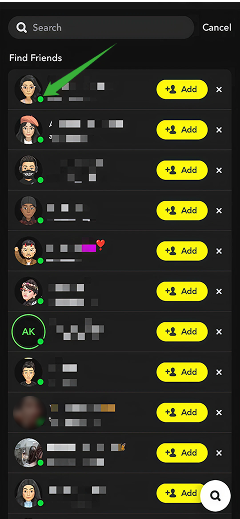
One of the simplest ways to tell if someone’s active on Snapchat is by spotting the green dot next to their Bitmoji or name. This little status light shows up only when Snapchat detects that the user has been recently active.
Here’s how to tell if someone is active on Snapchat:
- Open Snapchat and head to your Chat screen.
- Look through your list of friends. Active users may have a small green dot next to their Bitmoji or avatar.
- You might also notice it in the Quick Add section or when viewing mutual friends.
- If the green dot appears, it means the person has used Snapchat within the last 24 hours.
Still, this method isn’t perfect. The green dot doesn’t mean the person is online right now, just that they have been active recently. Snapchat also limits how often it shows this indicator, so you won’t see it for everyone, even if they are using the app. It is a handy clue, but not a guarantee of real-time activity.
2. Use Xnspy Snapchat Monitoring App
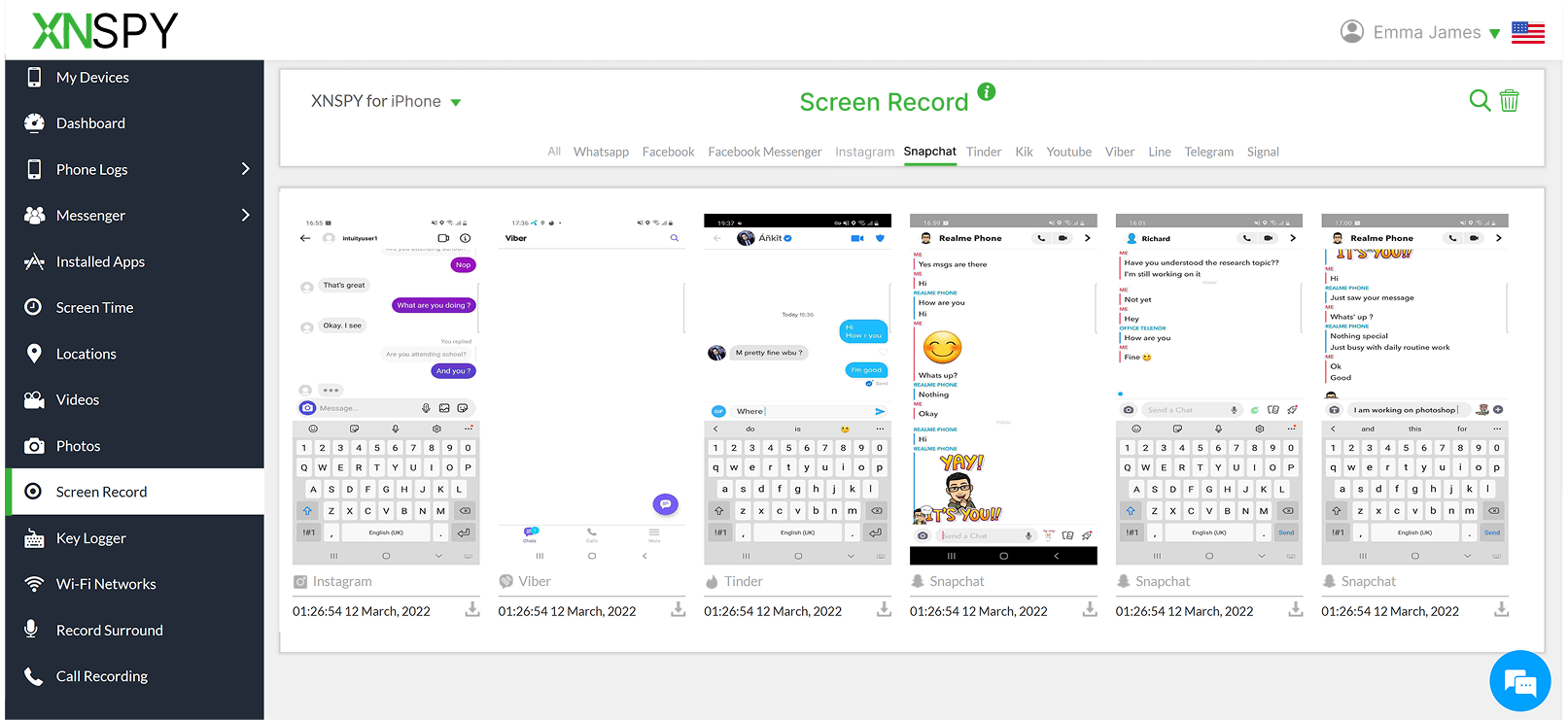
If you want to know how to see if someone is active on Snapchat, a good way to do so is to use a Snapchat tracking app. Xnspy is one such app that you can install on a targeted device and collect live, real-time activity updates.
This app runs 24/7 in the background without causing disruption in the normal functioning of the targeted device. Moreover, as the installation procedure is pretty straightforward, you won’t have a problem getting it going. Once installed, it tracks every activity and uploads that information to an online web dashboard from where you can view it.
The screen recording feature of Xnspy captures automatic screenshots of the targeted device’s Snapchat activities. These snapshots are taken after regular intervals of 5-10 seconds. Other than this, the keylogging feature records all the typed content on Snapchat and uploads it to the dashboard with the app logo. If Snapchat is currently being used, you can easily see both these logs to find out.
To use Xnspy:
- Choose a subscription that suits you best and proceed with the payment.
- You will receive a link to download Xnspy. Access the targeted device and download Xnspy on it.
- Log in to the dashboard using a web browser.
- Once logged in, you will be able to see all the required logs directly from the dashboard.
Xnspy also offers other monitoring features. When used in combination, these features help you get an in-depth picture of all device-related activities. These features include multimedia access, internet history, installed apps, and screen time analysis.

Xnspy: Track Snapchat Activity the Smart Way
Know someone’s Snapchat habits beyond what the app reveals.
– View Snapchat chats even if they are deleted
– See live Snapchat activities via screen recording
– Get Snapchat’s usage time and frequency via screen time
3. Find Them on the Snap Map
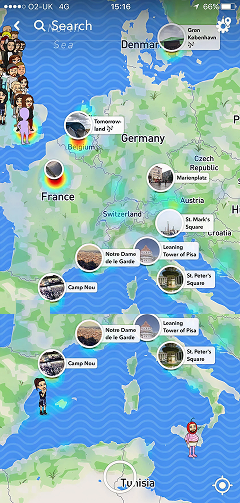
Snap Map is one of Snapchat’s most revealing features when it comes to tracking activity. It allows users to see where their friends were when they last used the app, represented by their Bitmoji on a map. If someone’s location updates frequently, it is a strong sign of their Snapchat active status.
Here’s how to check it:
- Open Snapchat and tap the location pin icon from the bottom left corner of the camera screen to access the Snap Map.
- Look for your friend’s Bitmoji on the map.
- Tap their Bitmoji to see the last updated time and location details.
- If their Bitmoji moves locations or shows a recent update, it means they’ve been active.
Still, Snap Map isn’t always reliable for pinpointing activity. If someone has turned on Ghost Mode, you won’t see their location at all. The app also updates location data only when the person actively opens Snapchat, not when it runs in the background.
Plus, privacy settings or connectivity issues can delay updates. So while Snap Map can be one of the most visual indicators of activity, it’s only as accurate as the user’s sharing preferences allow.
4. Check for Views on Your Story

Your Snapchat Story can be one of the easiest ways to see if the other person is active on Snapchat. When someone watches your Story, it means they have opened the app and viewed content recently. If you notice their name showing up in your Story views consistently, that is a clear sign they are using Snapchat and keeping up with your updates.
Here’s how to know if someone is active on Snapchat using this method:
- Open Snapchat and tap on your Bitmoji or profile icon in the top left corner.
- Under the “My Story” section, tap your Story thumbnail to open it.
- Swipe up on the screen to see the list of viewers.
- Look for the targeted person’s name to see if they’ve viewed it and have been active.
That said, Story views only tell part of the story. Some users prefer to skip Stories or limit what they watch, so not seeing their name doesn’t automatically mean they are inactive. Others might use the app to chat or Snap privately without scrolling through Stories. It is a useful indicator, but one that depends heavily on the other person’s viewing habits.
5. See Their Stories
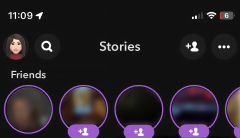
Another simple way to know if someone’s active on Snapchat is by checking whether they have posted a Story. Stories disappear after 24 hours, so if you see a new update, it means the person has been active within that timeframe. Since Snapchat pushes people to share daily moments, frequent story posts are a reliable indicator that they are regularly opening the app.
Let’s see how to use this method:
- Open Snapchat and swipe right to access the Friends or Chat screen.
- At the top, you will see the Stories section featuring recent uploads from friends.
- Look for the person’s Bitmoji or profile icon. If there is a colored ring around it, they have posted a new story.
- Tap their profile icon to view the story, and note how long ago it was uploaded.
But this method isn’t foolproof either, as some users rarely post but stay active through chats and snaps. On the other hand, others might have certain privacy restrictions. They might only post the stories for selected people, which means that you might not be able to see those posts.
6. Send Them a Message

One of the most straightforward ways to check if someone’s active on Snapchat is to send them a message. When you do, Snapchat gives subtle indicators that reveal whether they’re online or have recently opened the app. From “Opened” timestamps to Bitmoji reactions, even a simple chat can tell you more than you might expect.
Let’s see how to know if someone is online on Snapchat:
- Open Snapchat and swipe right to go to the Chat screen.
- Tap the person’s name to open your chat with them.
- Type and send a quick message.
- Wait and watch for signs: if their Bitmoji pops up, they’re online right now. If the chat says “Opened” with a timestamp shortly after, it also indicates that they are active and have viewed your message.
That said, messaging isn’t always guaranteed to give you the insight you need. Some users have notifications enabled, which lets them preview messages without opening the app. Others might open Snapchat but avoid certain chats, leaving your message unread. It is a good real-time check when you are trying to confirm activity, but it only works if they actually open your chat or interact with you.
7. Review the Sent Snaps
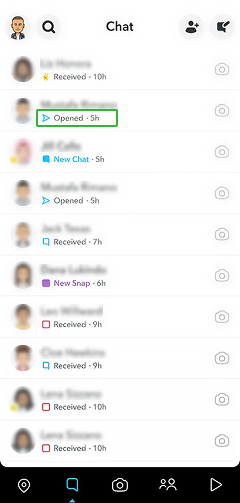
Another way to know about someone’s Snapchat active status is by reviewing the status of the Snap you have sent them. Snapchat quickly lets you know if they open the Snap. Snapchat’s built-in indicators, like “Delivered,” “Opened,” and “Screenshot,” are essentially time-stamped clues about when someone interacted with the app.
To know someone’s online status via this method:
- Open Snapchat and swipe right to go to your Chat screen.
- Look for the snap you sent to the person.
- If the icon next to their name says “Delivered”, it means the snap reached them but hasn’t been opened yet.
- If it changes to “Opened”, they’re active on the app.
However, this method depends heavily on how the other person interacts with Snapchat. If they are not opening snaps regularly, it might look like they are inactive even if they have been using the app for other things, like watching Stories or browsing Spotlight.

Did You Know?
Now, you can also find out if someone has blocked you on Snapchat.

8. Turn Story Notifications On
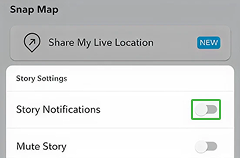
If you are trying to keep quiet tabs on someone’s Snapchat online status, Story notifications can do the work for you. By turning on notifications for a specific user, Snapchat will alert you whenever they post a new Story. This can serve as a clear sign that they are active.
Here’s how to use this method:
- Open Snapchat and swipe right to access your Chat screen.
- Tap and hold on the person’s name.
- Select “Story Settings” or “Story Notifications.”
- Toggle on the “Story Notifications” option.
- You’ll now get alerts whenever they upload a new story.
Still, this method has a few limits. You will only get notifications when they post a Story, not when they open Snaps, Chat, or browse the app. Some users post rarely, meaning you might go days without any alert, even if they are active in other ways. Plus, if you have notifications turned off for Snapchat in your phone’s settings, these alerts won’t come through.
9. View Their Snap Score
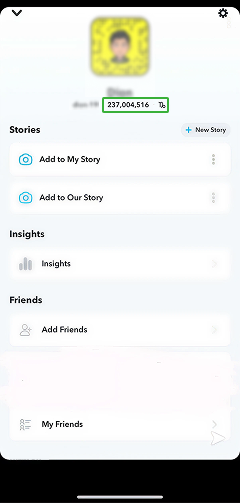
Snap Score is a built-in Snapchat activity indicator of how active a user is overall. It is the number next to a person’s name that counts the total snaps they have sent and received, along with other in-app actions.
If you notice that someone’s Snap Score keeps increasing, that is a reliable indicator that they have been active; snapping, chatting, or engaging with the app in some way, even if they are not interacting directly with you.
Here’s how to see if someone is active on Snapchat:
- Open Snapchat and swipe right to go to your Chat screen.
- Tap on the person’s Bitmoji or name to open their profile.
- You’ll see a number below their username; that’s their Snap Score.
- Note the number, wait a while, and then check again later.
- If the number has gone up, it means they’ve been active on Snapchat.
Still, the Snap Score method isn’t perfect. The app doesn’t update scores instantly, so it might take a bit of time before changes appear. And if someone has their privacy settings tightened or has removed you as a friend, you might not see their score at all.
FAQs
How to see when someone was last active on Snapchat?
You can find out when someone was last active on Snapchat by piecing together a few built-in clues. Check to see if their Snap Map location has been changed to see when it was last updated. The “Opened” label in chats and changes in Snap Score also reveal recent activity. Additionally, a new story upload often means they have been online. And as this upload comes with a timestamp, you can be certain about the last time they were active. You can also use a monitoring app like Xnspy to get such insights remotely.
How to know if someone is online on Snapchat if they are using multiple accounts?
If someone uses multiple Snapchat accounts, it can be tricky to tell when they are online. Look for real-time clues like their Bitmoji appearing in chat, a quick “Opened” response to your messages, or new story uploads. Checking Snap Map updates and Snap Score changes can also hint at recent activity. However, since each account tracks activity separately, you’ll need to monitor both profiles to see which one they are actually using.
How to tell if someone is online on Snapchat when you are using the web version?
When using the web version of Snapchat, the options to check if someone is online are more limited than on the mobile app. You can still look for hints like the Bitmoji appearing in chat, which indicates they’re active in real time, or notice when your messages switch from “Delivered” to “Opened.” However, features like Snap Map, green dots, or story updates aren’t available on the web, so activity clues are fewer.
How can you tell if someone is active on Snapchat while you are logged out of your account?
You can’t directly tell if someone is active on Snapchat while you’re logged out, since all activity indicators like Snap Map updates, story views, or chat statuses are only visible when you’re signed in. However, you can still check public stories from certain users through the Snapchat web portal or search results if their privacy settings allow it. Beyond that, you can use the Xnspy monitoring app to know about someone’s Snapchat activity without having to log into your own account.
How do you know if someone is active on Snapchat when they have blocked you?
If someone has blocked you on Snapchat, there’s no direct way to tell if they’re active. You won’t see their profile, Bitmoji, stories, Snap Score, or chat status, as all signs of activity are completely hidden. Even searching their username will show no results. To confirm, you can try checking from another account. Moreover, you can also choose to track their Snapchat activity by installing Xnspy on their phone.


5 Comments
Leave a reply:
Your email address will not be published. Required fields are marked*

Zander Stanton
February 27, 2026 at 11:16 amI did not even know that there was a green dot indicating that someone is active lol
Shay Charles
March 2, 2026 at 9:58 amWhat if I am not friends with them on Snapchat? Any other options?
Kylie Seimal
March 3, 2026 at 10:51 amCan I still see my friend's on Snap map even if I have disabled my own location?
Juliette Marquez
March 10, 2026 at 10:28 amPersonally, I am starting to believe that Snapchat has more problems than solutions, why even use the app.
Jasper Robertson
March 19, 2026 at 10:27 amMy daughter has become addicted to Printrest, I know unheard of but I am so so concerned.