
The complete monitoring experience for your phone
Get XNSPY and start tracking calls, texts, multimedia, locations and more on any phone!
Get Started Now Live DemoYour child uses Instagram every day, remaining oblivious to what simmers just beneath the surface. But you, as a parent, must know better. From the rising culture of trends to a nagging feeling of missing out, their activity can have real consequences.
That is why Instagram safety for parents is a major concern. The solution? Two simple words: Instagram monitoring. Doing so is essential to ensure your teen stays safe while using the platform.
From built-in supervision tools to third-party Instagram monitoring apps, there are 5 effective methods outlined in this article to monitor your kid’s Instagram responsibly.
What You Should Know in Under a Minute
– Instagram poses mental health risks for teens, including body image issues, exposure to harmful content, constant comparison, and social validation pressure.
– The built-in safety tools of Instagram are considered limited and often ineffective.
– Method 1: Xnspy monitors Instagram DMs, posts, screen activity, keylogs, and allows remote blocking.
– Method 2: Family Center shows screen time, following, followers, reports, etc., only after teen approval.
– Method 3: Check frequently used devices for gallery saves and browser history.
– Method 4: Review cross-posted content on connected Meta accounts.
– Method 5: Request an Instagram data download for detailed activity logs.
Is Instagram Safe for Teens?
A straightforward answer to this frequently asked question is that no, Instagram cannot be considered safe for young users.
While teens tend to use Instagram without raising any major concerns, the app’s social dynamics and content algorithms can adversely impact their well-being overtime.
Unsupervised use can further expose children to online abuse, comparison culture, peer pressure, the mental load of constant online visibility, and the need for social validation, all contributing to a myriad of mental health issues.
Another major concern among 46% of teen girls on Instagram is the worsening of their body image issues. Other studies also indicate that such vulnerable teens are 2.2X more likely to develop eating disorders than their counterparts.
And despite Instagram rolling out new safety tools every few months, 64% of them are reported as ineffective.
So, while Instagram’s opportunities and entertainment are appreciated, you can’t turn a blind eye towards its persistent risks.
Up Next: The Reads You Can’t Miss

🕵️  How to See Who Stalks Your Instagram: 100% Working Methods
🚨  How to Check Who Unfollowed You on Instagram: 4 Ways
⛔  How to Know if Someone Blocked You on Instagram
🏪  How to Screen Record Instagram Story: 5 Best Ways
How to Monitor Your Teen’s Instagram Activity: 5 Methods That Work
Instagram safety for parents is a serious concern. If you are someone who has also been worried for your child whenever they are on Instagram, you can use the 5 methods given below to monitor their activity on the app.
1. Install Xnspy on the Phone
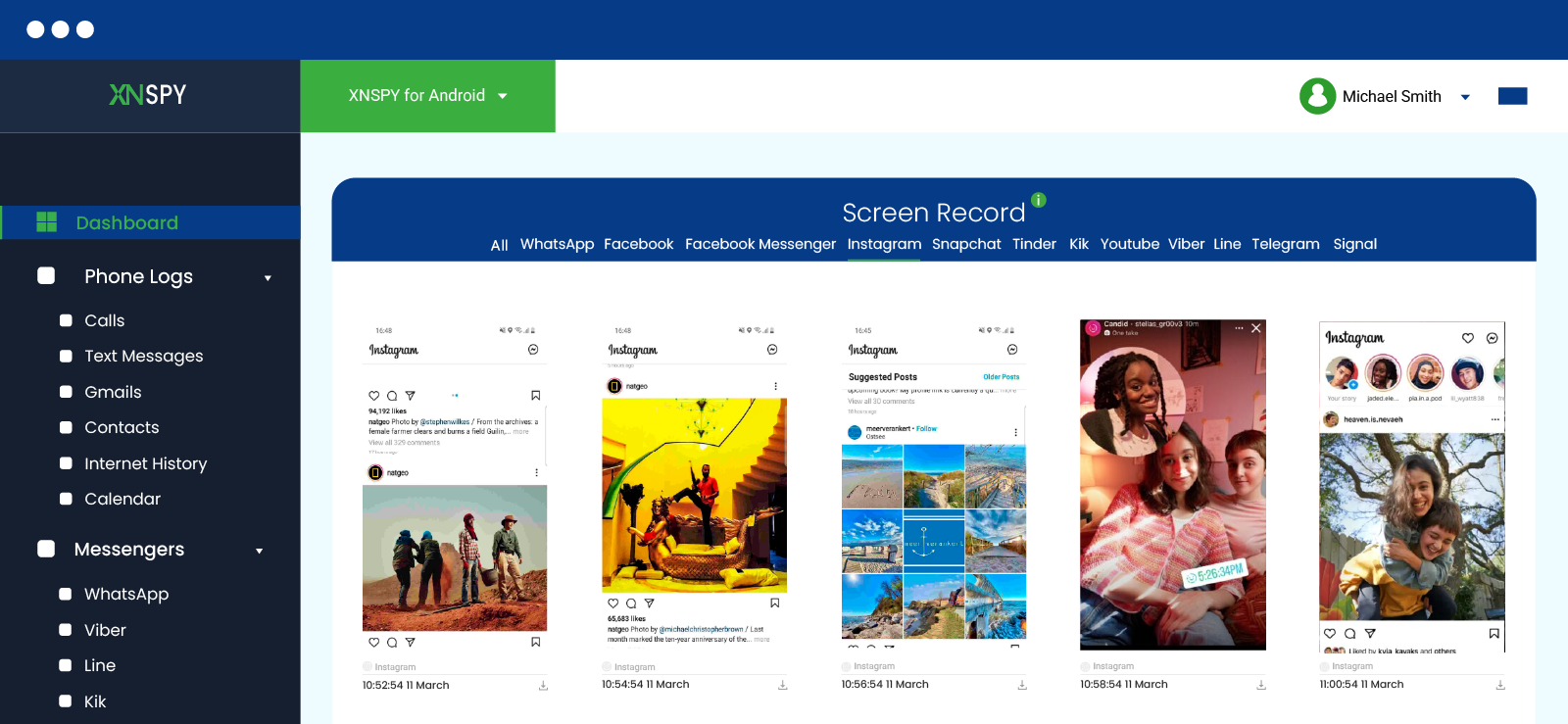
Xnspy is a phone monitoring app that also functions as a reliable Instagram tracking app for parents. The software is designed to help parents gain detailed insight into their child’s Instagram activity.
If you have Xnspy installed on your kid’s phone, it will continue to run in the background and collect all the Instagram-related activity using various features. All of this is done in stealth mode and while remaining low-resource intensive. Both functionalities help maintain discretion and also retain the device’s normal functions.
Once any new activity is recorded, Xnspy sends it to its web dashboard in real time for you to view.
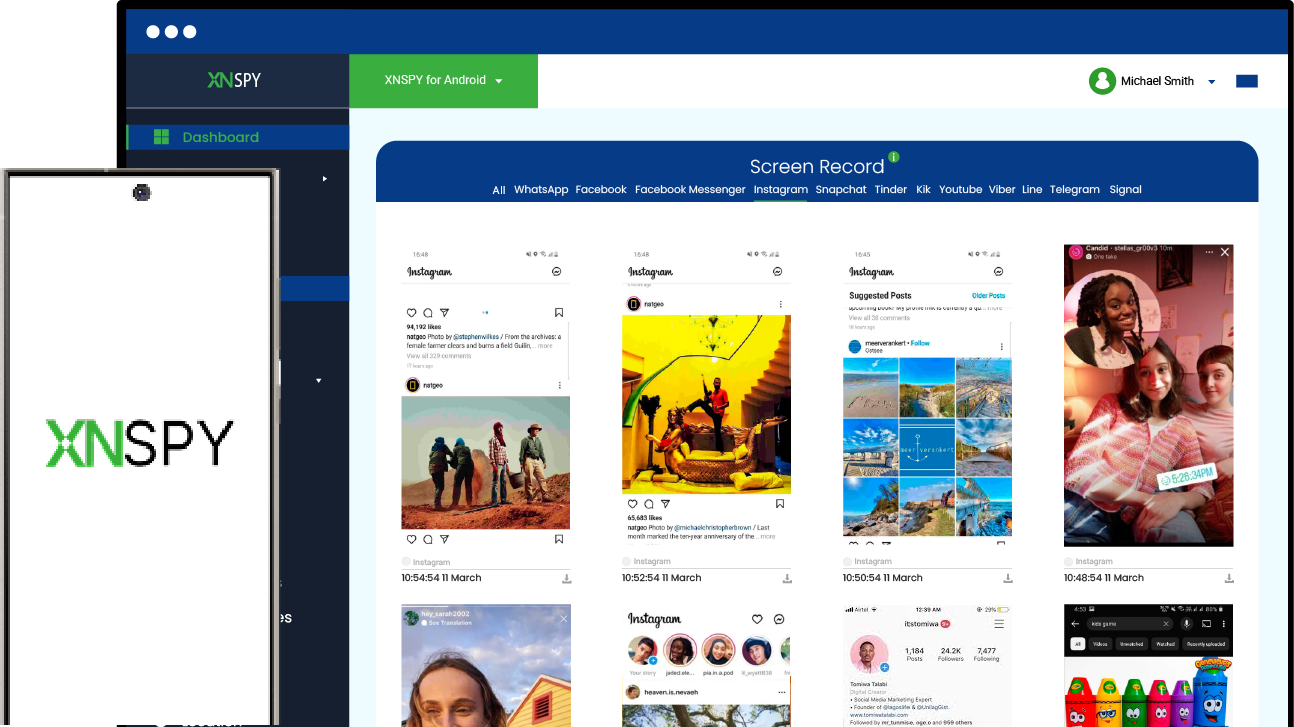
But what exactly is logged? Well, for starters, you can use Xnspy’s installed app feature to see whether your child has Instagram or not. After getting a confirmation, you can go to the screen time to find out exactly how long was spent on the app and how many times it was launched.
Then, you can check out the screen records that Xnspy takes every 5-10 seconds to track your teen’s visually captured Instagram activity. Within these screenshots, you can find their consumed content, likes, comments, stories, posts, and all other forms of interactions.
You can further view your child’s Instagram private messages in both a list and chat view, alongwith accurate timestamps.
To add more to the depth of insights provided, Xnspy also has keylogs of everything typed and searched for on the app. But if you do not have time for all of this, you can simply set up keyword alerts for specific terms and get notified every time the system detects them.
And, lastly, if the logs collected display any harmful patterns, you can remotely block Instagram for proper prevention.
Now, to use Xnspy for Instagram monitoring, you have to go through a few steps first:
- Use Xnspy’s official website to make a purchase.
- Wait for a confirmation email alongwith the app credentials.
- Once received, download Xnspy on the target phone.
- After completing the setup, look through the web dashboard for Instagram activity.

Xnspy: Complete Insights into Your Teen’s Instagram
Supervise their Instagram activity without missing any updates.
– See all private and group messages
– Access deleted activity logs immediately
– View consumed content and posts
– Receive alerts on watchlisted words
2. Set Up Instagram Family Center
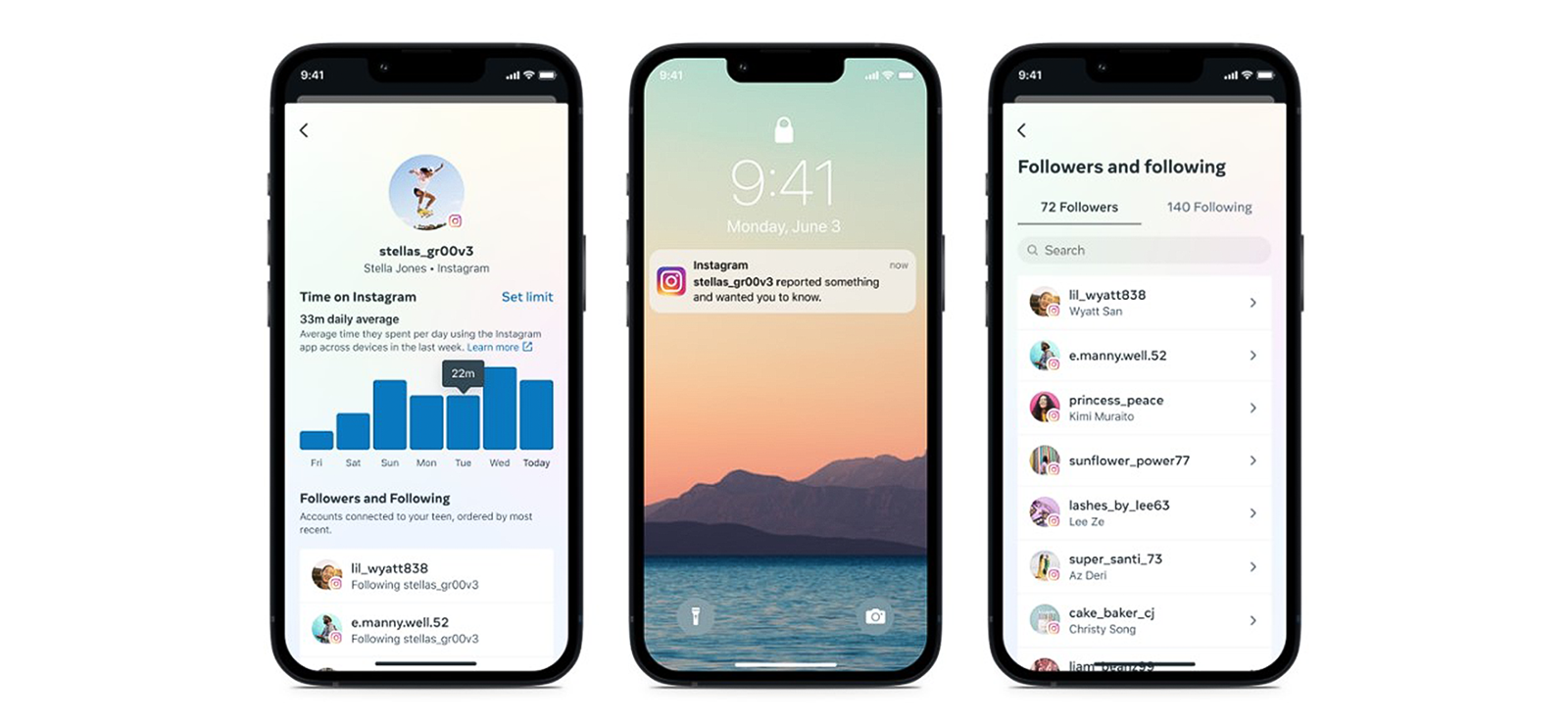
If you are reluctant to initially use a third-party app, Instagram Family Center can be another reliable option. The Family Center offers various features to help parents get some insight into their child’s Instagram activity.
The data that appears on the parent’s dashboard includes total screen time, accounts reported by the child, their followers and following list, and settings for sensitive content privacy.
Not only that, but parents can also set daily limits for overall Instagram usage that is monitored across multiple devices.
To begin, either the kid has to send an invitation or the parent has to send a request for supervision. Once accepted, parents can see all the aforementioned information, while teens can preview what the displayed data looks like on their parents’ Instagram Family Center dashboard.
However, note that with the current version of the Family Center, only one parent can supervise the child’s Instagram account.
Overall, while helpful for initial insights, the parental controls offered by Instagram cannot be solely relied on. Not only are the provided logs limited in presenting the true picture of a child’s Instagram activity, but the ability to monitor also depends entirely on the kid’s willingness.
Regardless, for those interested, here is how to put restrictions on Instagram using the Family Center:
- Make sure that you have your own Instagram account and your teen is under 18.
- Update both accounts to the latest version of Instagram.
- Go to Settings and Privacy and then the Family Center to create an invitation.
- Share the invite with your kid and wait for them to approve the request.
- Review their Instagram activity directly from the parent dashboard.
3. Use Frequently Used Devices
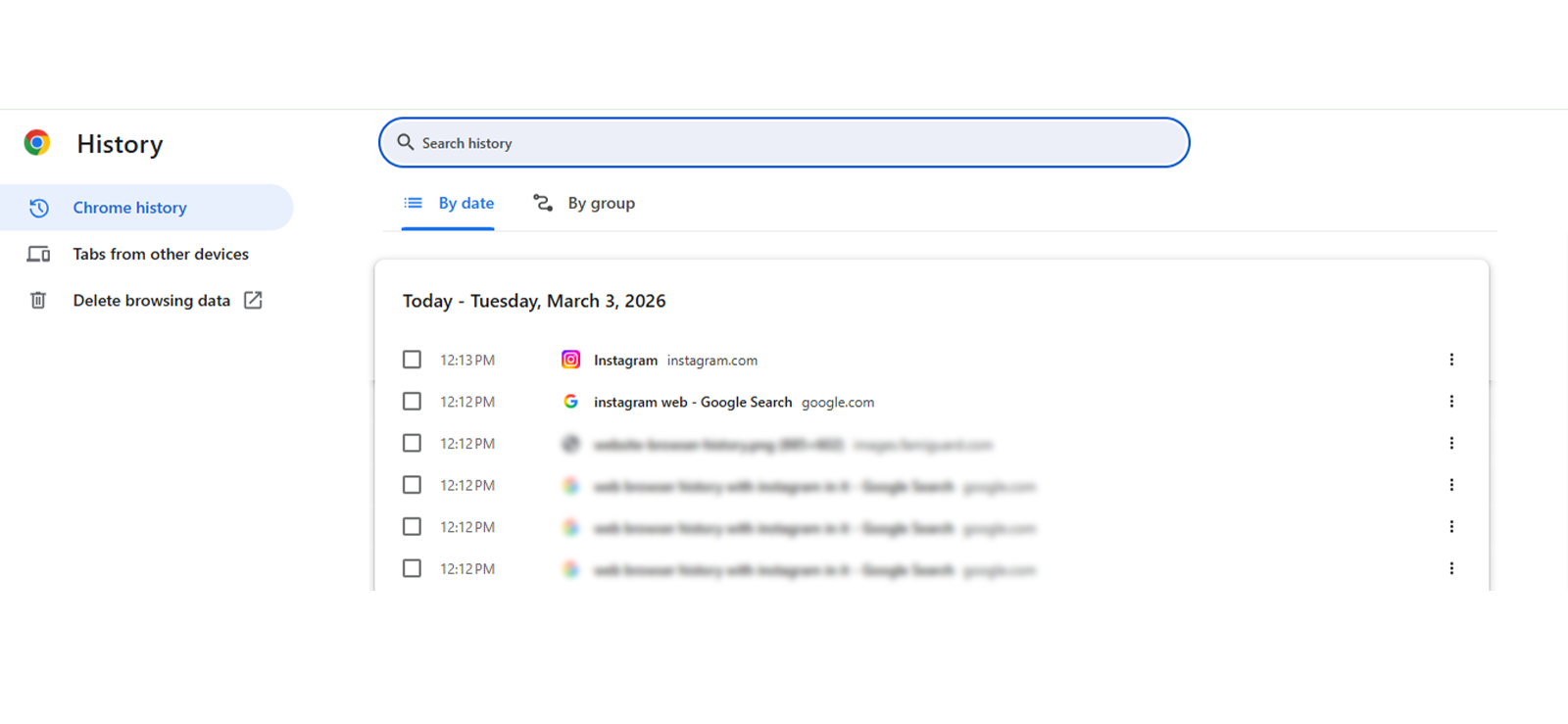
You are mistaken if you believe that your child relies on only a single device to use Instagram.
But in all honesty, their switching of devices does work in your favour. That is because, by accessing one of them, you can look for an active session or other clues they left behind.
For example, when autosaving for the Instagram stories and posts is enabled, you can look through their frequented device’s gallery for any insights. Moreover, you can check out their browser history in case they have used the Instagram web.
With all these clues, you might not be able to properly track your kid’s Instagram, but they can offer you grounds to supervise their activity more closely.
Let’s see how can parents monitor Instagram through their children’s frequently used devices:
- Look through all the devices your child frequently uses, such as their phone, tablet, or shared laptop.
- Open the Instagram app or visit Instagram.com to check whether their account is still logged in.
- If logged in, review visible profile details such as recent posts, followers, privacy settings, likes, etc.
- If not logged in, check the device’s gallery for autosaved Instagram stories.
- Alternatively, open the device’s browser history to look for recent activity on Instagram Web.

Did You Know?
Before you even start monitoring, you can see if they are active on Instagram.

4. Look Through Connected Accounts
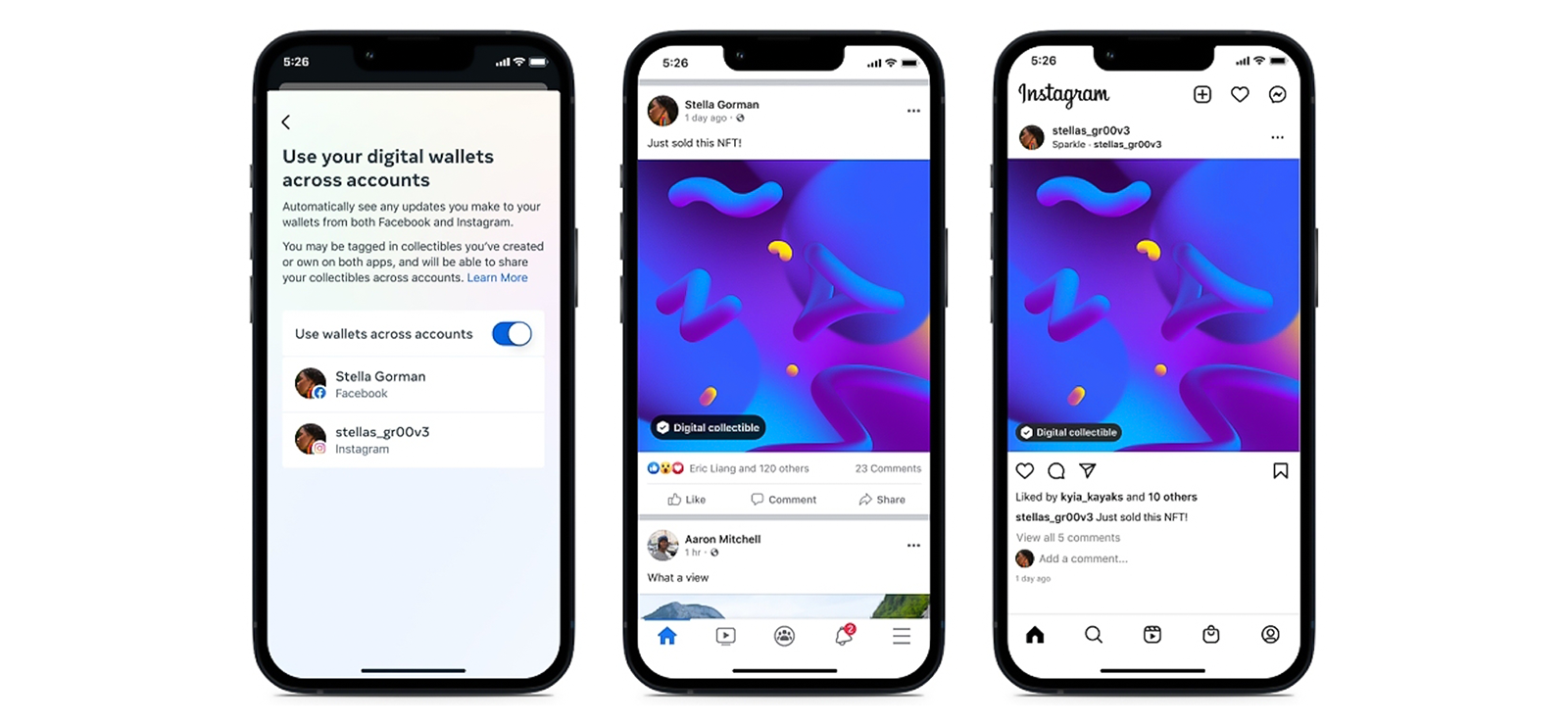
Now, what if you are not able to execute any of the methods due to a lack of access to your kid’s phone or Instagram account? Then, you have to switch things up a little bit.
We are all aware that Instagram falls under a larger social media group, Meta. That is why accounts on platforms like Facebook, WhatsApp, Thread, and Instagram can all be connected. You, as a parent, can therefore consider tracking other apps under Meta.
How so? If your child has linked their Instagram account to Facebook and enabled cross-posting, some posts or stories from Instagram may automatically appear on Facebook as well, helping you get some insights into their activity.
However, as is noticeable from the discussion so far, the method only provides visibility into the content that your kid chooses to share and does not reflect their full Instagram activity. If cross-linking is disabled or if you are not friends with them on Facebook either, then this method is rather limited.
Nonetheless, you can use the following steps to work with this method:
- Add your child to your Facebook or any other Meta account.
- Once a part of their Friends List, look through their shared content.
- Find cross-linked posts and stories labelled as shared from Instagram.
5. Request Instagram Data Download
The discussion of “is Instagram safe for teens?” is now behind us because a far more monumental question stands right in front: How can parents supervise their activity effectively?
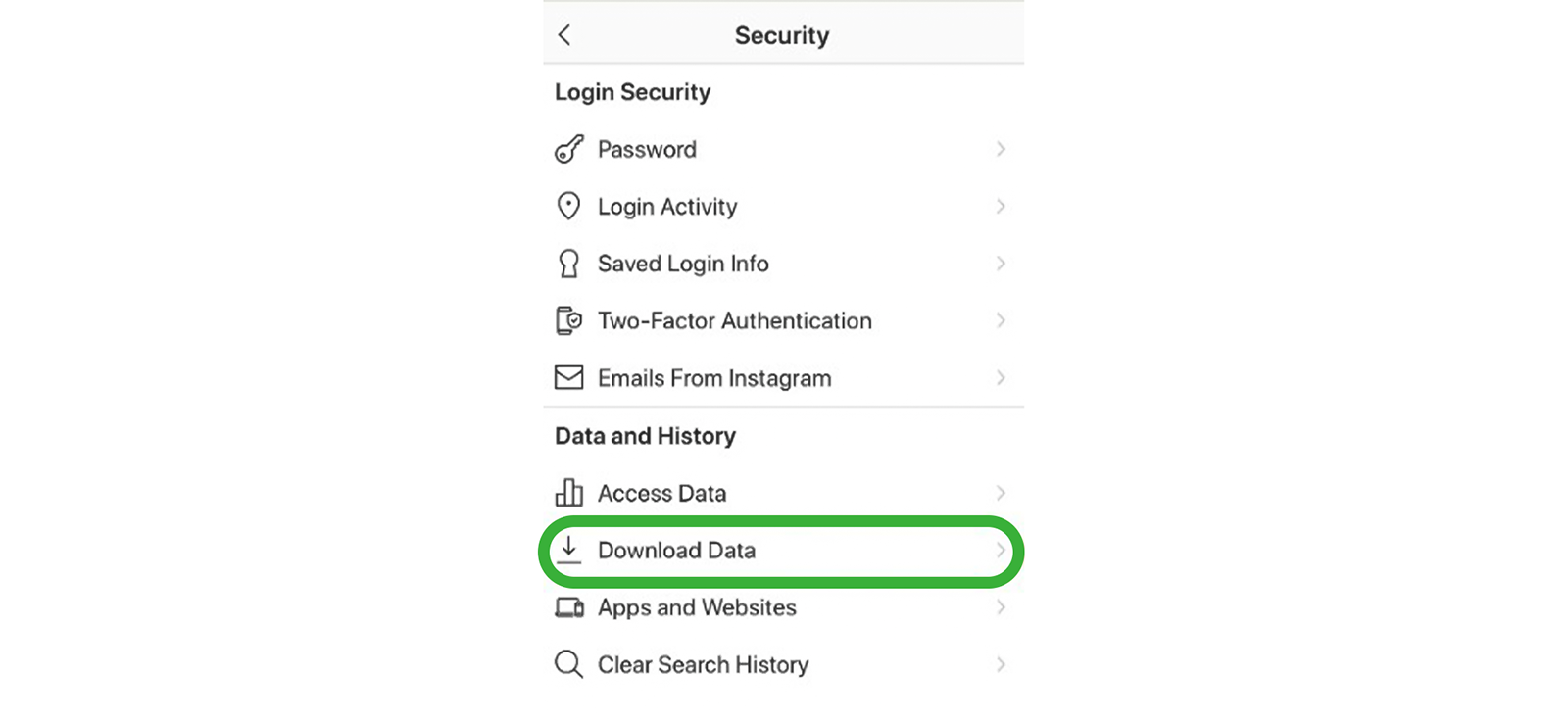
One final method to do so is direct Instagram account access. If you find your child’s Instagram account already logged in on a device, you can request a data download from within the account settings.
Instagram will then send a downloadable file to the email address associated with the account.
Overall, depending on your selection, the file may include account details, profile content, direct messages with timestamps, comments, followers and following lists, search history, login activity, and saved content.
But if you do not find their account already logged in or are not aware of their password, then this method is practically useless.
To execute this method for insights into your teen’s Instagram, follow the steps below:
- Open the Instagram app on the target device.
- See if your child’s account is logged in or use their login credentials to proceed.
- From their “Settings and Privacy,” go to the “Accounts Center.”
- Request a data download by selecting the required categories.
- Wait for Instagram to send a download link and review their overall activity.
FAQs
Does Instagram have parental controls?
Yes, Instagram does offer parental controls through its Family Center, but they are limited. Parents can view their kids’ screen time, followers and following lists, reported accounts, and manage certain sensitive content settings after supervision is approved by the teen. However, given the issues that reside on Instagram, these controls may not be sufficient and cannot be solely relied upon for complete child protection.
Can parents see the photos their child receives in Instagram DMs?
If received photos or videos are manually downloaded by the child from their Instagram, then they may appear in the frequently used device’s gallery, allowing parents to review them directly. On the other hand, an Instagram monitoring solution like Xnspy can be used to view exchanged media through gallery access and periodic screen records that capture media activity.
What signs show a child is misusing Instagram?
Several signs clearly indicate that a child is misusing their Instagram. Some of them include, but are not limited to, increased secrecy, multiple accounts, deletion of account activity, excessive usage, etc. Along with these signs, if you observe unusual interactions with strangers and participation in risky trends, then they are misusing their Instagram.
How to block Instagram on child’s phone?
For anyone concerned with how to put restrictions on Instagram, like blocking, they can use Xnspy. Once the app is installed on the target phone, it runs in the background and allows you to manage app access remotely through its web dashboard. From there, you can simply toggle the block option to restrict access to Instagram. In addition to blocking, Xnspy also provides insights into Instagram‑specific activity, helping you assess usage patterns and determine whether restricting the app is necessary.
What can parents see on Instagram Supervision?
Under Instagram Supervision, parents gain a structured overview of their teen’s account activity rather than full access. After supervision is activated on Instagram, they can review how much time their teen spends on the app, track who follows them and whom they follow, and view accounts their teen has reported. Parents can also manage daily time limits and receive alerts if supervision settings are modified. However, supervision does not provide access to private messages or a detailed watch history of the teen.
How can parents check the Instagram Reels their child watches or shares?
If you are wondering how to monitor your teen’s Instagram activity, including the Reels they watch or share, you have limited native options. One way is to check connected accounts under Meta Platforms. If your child has linked Instagram to Facebook and enabled cross‑posting, shared Reels may appear on their Facebook profile. However, this only shows content they choose to share publicly. For deeper insight, Xnspy can be used because it captures overall screen activity and app usage, helping parents review watched or shared Reels more consistently.
All Your Answers Are Now Just a Tap Away
Try out Xnspy to see all their phone activity remotely.
Leave a reply:
Your email address will not be published. Required fields are marked*
Jenny Nicole
Member since October 23, 2014
Jenny Nicole
Member since October 23, 2014
Jenny Nicole is a teen psychology and digital behavior specialist with an MSc Developmental Psychology & Psychopathology from King's College London, graduated 2017. Her work revolves around how adolescents communicate and make decisions in digital environments, particularly on social media and messaging platforms. Over the past 5 years, she has written extensively on teen smartphone behavior, online peer dynamics, the psychological impact of social media, and the need for oversight. Her work has helped parents and educators interpret not just what teens are doing online, but why they are doing it. Overall, she has not only authored over a hundred guides breaking down child psychology for parents but also regularly spoken at family safety and internet governance conferences across the UK and US.