
The complete monitoring experience for your phone
Get XNSPY and start tracking calls, texts, multimedia, locations and more on any phone!
Get Started Now Live DemoTinder is built for adults, and its minimum age requirement is 18. However, parents may still worry that a teen has created an account using false details. That concern is valid because dating apps can expose minors to strangers, inappropriate conversations, scams, catfishing, and unsafe offline interactions.
Therefore, when any warning signs appear, many parents start wondering how to find someone‘s Tinder profile remotely without relying only on suspicion. But that is where things get difficult, because Tinder does not offer a direct profile search feature.
That is why this guide focuses on 6 practical, parent-focused ways to check whether your child may be using Tinder.
Here’s What Each Tinder Search Method Does
- Tinder does not offer a direct profile search feature, but parents still need to check for possible use by their child due to the risks they may face on the app.
- Xnspy provides detailed visibility into Tinder activity on a monitored child’s phone through screen recordings.
- Google Search is a free public-trace method that can help find indexed Tinder-related results.
- Supervised email checking can reveal Tinder verification messages, subscription receipts, Match Group emails, or billing alerts.
- A Tinder URL check can help if the parent already knows or strongly suspects the exact handle.
- Discovery settings can narrow Tinder’s swipe feed by location, distance, and visible age range.
- Tinder Finder tools can collect public traces linked to a name, phone number, email address, image, or location.
Can You Search for Someone on Tinder: Here’s the Truth
No, searching for someone directly on Tinder is not possible because Tinder does not offer a manual profile search feature. You can view profiles shown through Discovery or people you have already matched with, but you cannot simply type in a name and find someone on Tinder.
Things get even trickier if the person has deactivated their account, uses a different name, limits their profile details, turns off Discovery, or uses premium visibility features such as Incognito Mode or profile hiding.
These settings can make a profile much harder to identify, even when you already have some details.
So, before discussing how can you look someone up on Tinder without having access to their phone as a parent, it is important to understand why you may need to look into this in the first place.
Why People Want to Know How to See if Someone is on Tinder
Not everyone searching for this topic is doing it out of curiosity. In many cases, the people trying to figure out how to search for someone on Tinder remotely are parents worried that their child may be using an adult dating app before they are old enough to handle the risks.
Note that Tinder is meant for users who are 18 or older, but a teen may still try to create an account with a false birth date, exposing themselves to many risks.
Therefore, for parents, the concern is not about invading privacy for no reason. It is about recognizing potential risks early and determining whether a real safety issue requires attention.
Don’t Miss These Helpful Reads

💬  Does Tinder Notify Screenshots? Answer, Tips, and 4 Best Ways
🛑 How to View Private Instagram Profiles Without the Target Phone
⚡  How to Find Someone’s Location on Snapchat
What the Testing Process Looked Like for These Tinder Search Methods
If I say that testing these methods required more than just checking whether they produced any results, it would not be a lie. While testing, I had to focus less on the results and more on whether each method could give parents something they could actually rely on.
So, I tested Xnspy, Google Search, linked email checks, Tinder URL searches, Discovery setting adjustments, and Tinder Finder tools under different conditions. Each method was judged on how clearly it helped identify possible Tinder use and how often the results were accurate.
- Accuracy of the results: Accuracy matters greatly because methods can return outdated or vague results if not handled carefully. Therefore, if a result showed only a name or a weak profile mention, I did not treat it as reliable.
- Information required: I also looked into how much information each method needed before it could work. That is because, while some methods look simple, their success can drop sharply when parents do not already have accurate starting details.
- Activity visibility: To make a clear distinction, I further checked whether a method could show actual Tinder activity or only point me to possible profiles.
- Repeatability: Lastly, I repeated each method enough times to see whether it worked consistently or only once by chance.
How to Find Someone on Tinder Discreetly: 6 Best Methods
If you are a parent wondering whether your child has a Tinder account, there are a few ways to check without accessing their phone. Below, I have discussed how to look someone up on Tinder using 6 different, tried-and-tested methods.
| Method | Success Rate | Best For | Starting Point | Evidence Strength | Main Limitation |
| Xnspy | 90% | Deep visibility into Tinder activity on a minor child’s monitored phone | Requires setup on the child’s phone | Strong (shows real screen activity) | Short sessions can reduce visibility |
| Google Search | 36% | Quick free public-trace checking | Needs name, location, school, or other identity clues | Weak to moderate (depends on indexed public results) | Results can be outdated or unrelated |
| Check Linked Email | 68% | Finding Tinder account traces through email | Needs access to a supervised email | Strong if found (receipts and verification emails are useful signs) | Useless if Tinder were linked to another email |
| Enter Tinder URL | 40% | Checking a possible Tinder handle directly | Needs the exact or highly likely handle | Moderate (useful only when the handle is correct) | Guesswork rarely works |
| Adjust Discovery Settings | 39% | Narrowing Tinder’s local swipe feed | Needs a Tinder account plus likely age/location details | Moderate (profile may appear if visible in Discovery) | No direct name search; algorithm controls results |
| Search on Tinder Finder | 33% | Secondary public lookup using name, phone, email, or image | Needs personal clues such as email, phone, image, or location | Weak to moderate (needs careful verification) | High false-match risk |
1. Use Xnspy
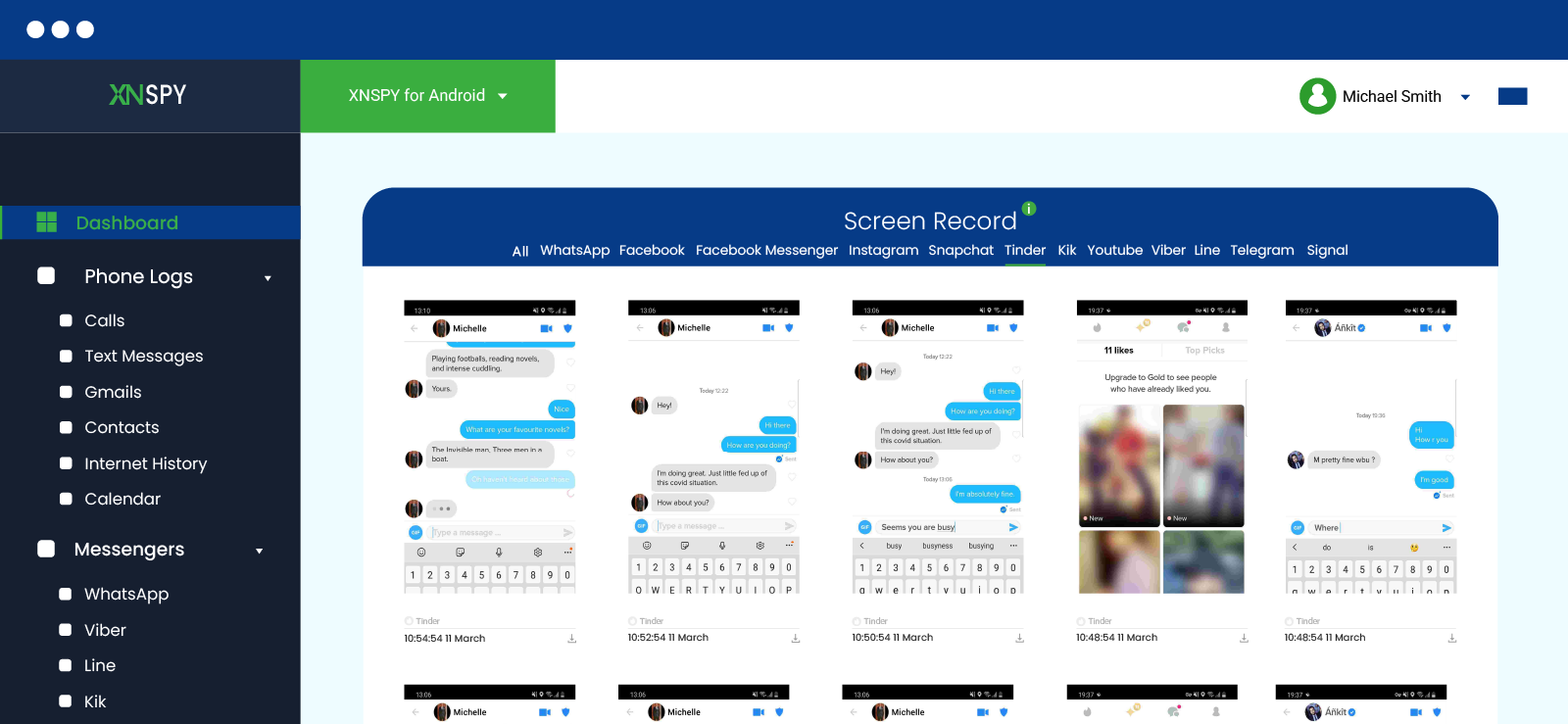
Xnspy is one of the more detailed options for parents who want to find someone on Tinder when that “someone” is their minor child and there is a genuine safety concern.
Instead of searching directly on Tinder, Xnspy works by showing activity from the child’s monitored phone after it has been properly set up.
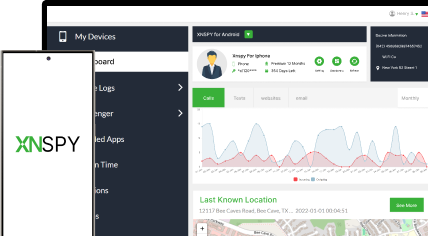
The app’s screen recording feature can capture periodic screenshots from supported apps, including Tinder. Therefore, if the dating app is being used, parents can see profile activity, matches, chats, swipe behavior, or other visible on-screen actions through the dashboard.
Here’s how to search someone on Tinder without joining using Xnspy:
- Open the screen recording section and check whether Tinder appears in the captured activity.
- Visit the Xnspy website, create an account, and choose a suitable plan.
- Set up Xnspy on the child’s phone according to the instructions provided after purchase.
- Complete the required configuration and log in to the Xnspy dashboard.
What My Testing Revealed
During testing, I found Xnspy more useful for confirming real Tinder activity because across 20 sessions, I received usable insights in 18. Therefore, the tested success rate came out to be 90%.
Overall, its performance remained strong with updates syncing consistently from the monitored device to the dashboard with near real-time visibility.
Moreover, I found the depth of insights particularly useful for parents because it provided a broader picture of device activity rather than a single snapshot.
That said, it was not perfect, as short sessions and poor internet connectivity reduced visibility in some checks.

Real-Time Tinder Monitoring Made Easy
Xnspy gives you insight into their Tinder messages, swipe activity, and more.
2. Try Google Search
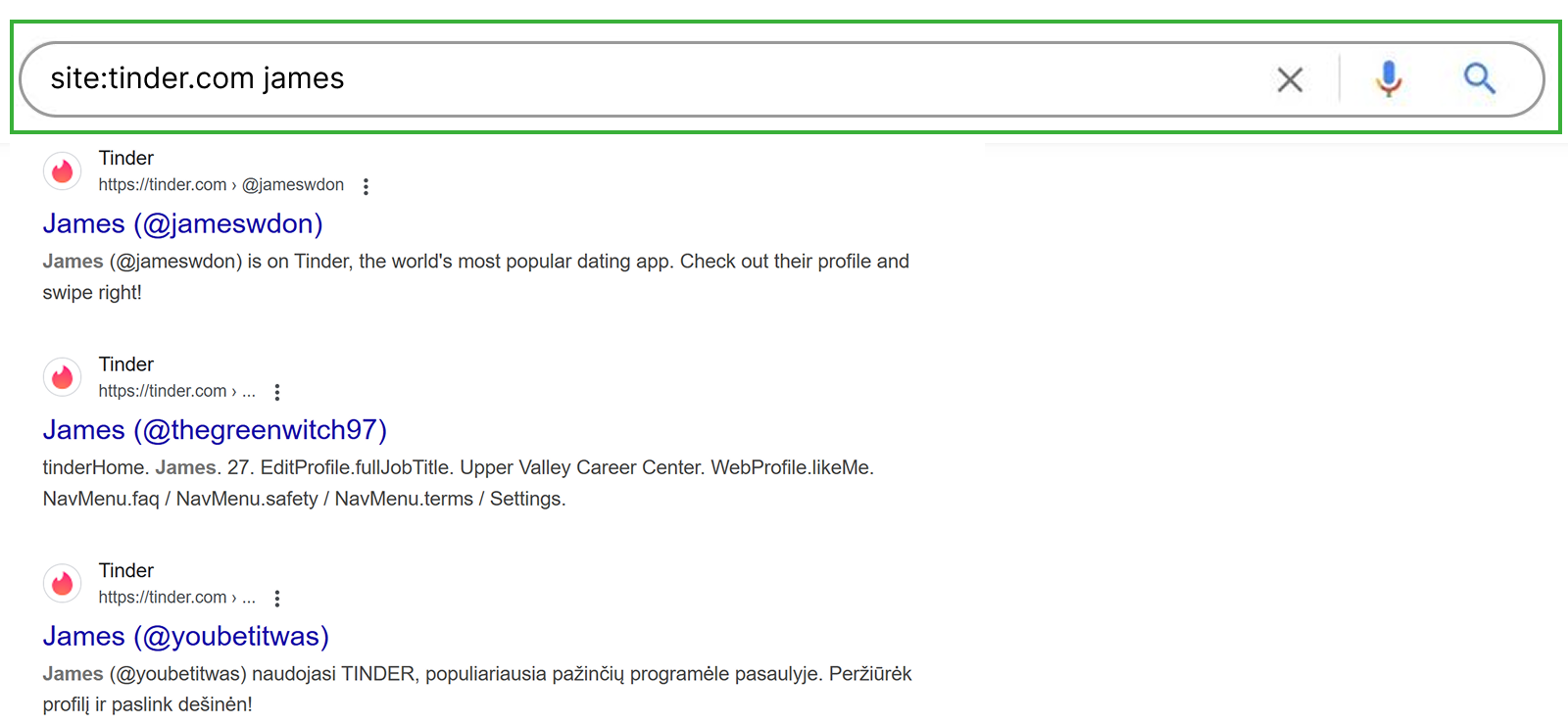
Google Search can help parents run a quick public check to see if someone is on Tinder. While the method does not open the platform’s private database, it still looks for public traces that may already be indexed on search engines.
The goal is that if your child used a name, photo, profile, or other detail that appears on a public Tinder web page or another Tinder-indexed page, Google may show a result.
However, Google Search is limited. It will not find hidden profiles, deleted accounts, private activity, or accounts using completely different details.
It also cannot confirm current Tinder use on its own, as search results may be outdated.
Let’s check how you can see someone’s Tinder account without the user knowing via Google search:
- Open Google on your browser.
- Type `site:tinder.com` followed by your child’s full name.
- Review results that point to a Tinder profile or Tinder-related public page.
- Check whether the details match carefully before assuming the profile belongs to your child.
What My Testing Revealed
In my experience, Google Search was the easiest method to try, but it was also one of the least consistent. I ran 25 searches using combinations of names and `site:tinder.com` operators. It returned potentially useful results in only 9 searches, giving it a tested success rate of 36%.
The best results came when I searched a full name alongside location-based or identity clues, such as city, school, or age. However, full names alone produced too many unrelated results.
Overall, the biggest limitation of this particular method was accuracy. Some results were outdated or too vague to confirm anything. So, I recommend treating this as a low-risk first check, not a complete confirmation method.
3. Check Linked Email

Tinder account setup involves phone and email verification. Therefore, if a child uses a family-managed email, there may be signs of Tinder activity.
The working mechanism here is different because you are not trying to browse Tinder; instead, you are checking whether the child’s email inbox and Google account contain records connected to Tinder. These records may include account verification messages, subscription receipts, app download history, and in-app purchase records.
Parents can check the linked email responsibly with these steps:
- Open the email inbox that the child is allowed to use under supervision.
- Search for terms like “Tinder,” “Match Group,” “verification,” “subscription,” “receipt,” etc.
- If you find a Tinder-related receipt or verification message, use it for a direct parent-child conversation.
What My Testing Revealed
I checked 19 account-trace points across inbox searches during testing, and found usable Tinder-related evidence in 13 of them. Therefore, the success rate of this method totaled around 68%.
Overall, the best results came from subscription receipts and verification messages that were sitting in their inboxes.
The main limitation, however, was that this method depended entirely on account connection. If Tinder were created with a different email, there was nothing useful to find in the family account.
4. Enter the Tinder URL

If you are wondering how to find out if someone is on Tinder without access to their phone, a Tinder URL check can be useful if you already have a possible handle.
That is because Tinder can be used on the web, and some profiles may be reachable through a browser-based profile URL.
This method works by testing whether a specific Tinder URL opens a profile page. Therefore, the URL has to be accurate for anything useful.
Here’s how you can use Tinder profile search secretly through a browser:
- Open Chrome, Safari, Firefox, Edge, or any other browser.
- Type `tinder.com/@handle` into the address bar.
- Replace `handle` with the exact profile handle you want to check.
- Press enter and see whether the browser opens a Tinder profile-related page.
What My Testing Revealed
While testing this method, when the handle was correct, the URL either opened something useful or showed enough of a Tinder-related page to continue checking. However, when the handle was even slightly wrong, there was nothing to work with.
For testing, I used a small set of known profile-style handles and their close variations. Exact matches were the only ones that gave meaningful results. Partial names, guessed spellings, shortened names, and small typing changes did not help.
In practical terms, I estimate a 40% success rate when a parent already has a likely handle. Without that starting point, the success rate drops sharply because the method does not help discover unknown profiles.

Did You Know?
You can not only find someone’s Tinder profile but also see deleted messages on Messenger without them knowing.

5. Adjust Discovery Settings
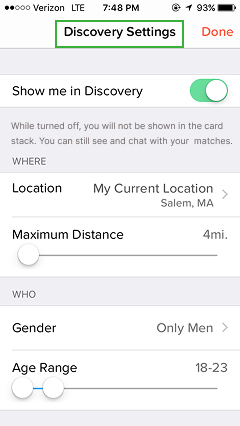
Tinder’s Discovery settings decide which profiles appear in a user’s swipe feed. These settings include distance, age range, gender preferences, sexual orientation, and profile visibility.
Parents can use their primary or secondary account to check whether a suspected underage profile appears in the local Discovery feed.
The working idea is that they adjust Discovery preferences to match the area and visible age range their child may have entered if they created a Tinder account using a false birth date.
This method can potentially reveal a visible profile if the child’s account is active, nearby, set to appear in Discovery, and matches the parent account’s Discovery preferences.
Let’s break down how to find someone on Tinder without them knowing as a parent, using Tinder discovery settings:
- Log in to your own primary or secondary Tinder account.
- Tap the profile icon and open Settings, then scroll to Discovery Settings.
- Adjust the age range, distance, and set other preferences only if they are relevant to narrowing the Discovery feed.
- Review the visible profile cards, and if you find your underage kid’s profile, report it to Tinder.
What My Testing Revealed
This method works more like narrowing a search window than running a direct search. I was not able to type in a name, phone number, email, or username. Instead, the only control I had was over the kind of profiles Tinder decided to show inside Discovery.
During testing, I noticed that narrowing the distance helped reduce irrelevant profiles when the search radius was kept small. Moreover, adjusting the age range only worked around the visible age displayed on the account rather than the child’s actual age.
Profile visibility was another major limitation, as the method returned no results if the account did not appear in Discovery. I also found that results were often unpredictable because Tinder’s algorithm still determines which profiles appear first.
Overall, I tested this method across 18 Discovery checks using different distance and age-range combinations, out of which it produced possible relevant profiles in 7 checks. Therefore, the success rate was 39%.
6. Search on Tinder Finder
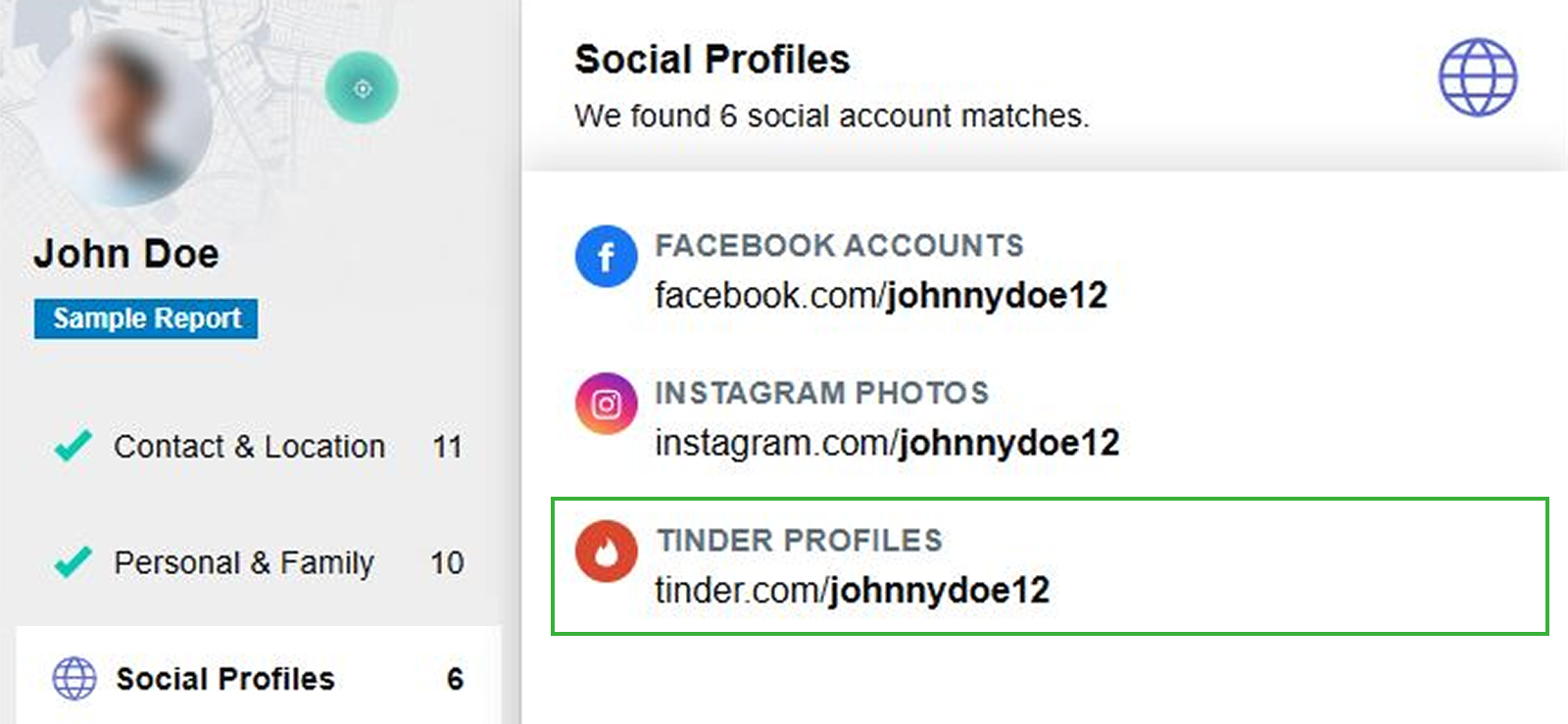
Tinder Finder tools are third-party lookup services that claim to help identify dating profiles using details such as a name, phone number, email, image, or location clues.
For parents, this method can be useful as a public-trace check to see whether a child’s details appear on dating-related pages or in social profile results.
However, these tools should not be treated as official Tinder search engines, as they do not provide direct access to Tinder’s private database.
Instead, they usually work by combining public records, search engine results, reverse image searches, social media traces, and data broker information. That means the results can be helpful but also outdated, incomplete, duplicated, or linked to the wrong person.
Here’s how to see if someone is on Tinder without joining by using a Tinder Finder:
- Choose a reputable lookup tool and enter information, such as a name, phone number, email, or image.
- Select social profile, dating profile, or web results if the tool offers categories.
- Review the matches carefully and verify whether they are your kid’s accounts.
- Ignore vague, outdated, or poorly matched results.
What My Testing Revealed
I treated Tinder Finder tools as a secondary verification method rather than a direct means of confirming a Tinder account.
The most useful results were those that showed more than one matching detail, such as a similar photo, city, age range, school, or a social profile connection. If a result showed only a name or a vague mention in a dating profile, I did not consider it strong enough to trust.
During testing, I ran 15 checks using a mix of free previews and paid lookup results. Only 5 results were sufficiently relevant to warrant further review, producing a practical success rate of 33%.
But note that the weak results usually came from common names, outdated data, missing profile images, or matches that looked similar but could not be clearly connected to the child.
The biggest thing I noticed was that these tools can save time by collecting public traces in one place, but they also create a high risk of false matches. For parents, that means a Tinder Finder should not be treated as proof on its own. It can point you toward something worth checking, but the result still needs to be verified carefully before reaching any conclusion.
FAQs
How to find someone on Tinder by phone number?
If you want to look up someone on Tinder by phone number, Tinder won’t let you search directly with that number. However, a Tinder Finder tool may help by checking public records, social traces, dating-profile mentions, or data-broker results linked to the number. However, these tools are not official Tinder search engines, so that the outcome can be outdated or incomplete.
How to search someone on Tinder without installing software?
To search for someone on Tinder, parents can first try Google Search by checking public Tinder-related results, or they can enter a possible Tinder URL in a browser. Both methods avoid app installation, but they cannot show private activity, hidden profiles, chats, or deleted accounts.
For deeper visibility, Xnspy can be a stronger option, but it does require installation on the child’s phone. Once set up, it can show Tinder activity through screen records and app-related insights.
How to see if someone is on Tinder without joining?
Parents can check a family-managed email account to see if someone is on Tinder without having to join Tinder. Using it, they can find Tinder verification messages, subscription receipts, billing notifications, or Match Group emails. Another option is to use a Tinder Finder tool, which searches public records associated with a name, phone number, email address, or image. However, Tinder Finder results are not always accurate and should be treated as possible leads rather than confirmation.
How to find out if someone is on Tinder for free?
To find out if someone is on Tinder for free, parents can start with a Google Search by typing site:tinder.com [name] and carefully reviewing any public results. They can also enter a possible Tinder URL in a browser if they already have a likely handle. Another free option is to adjust Discovery settings in their Tinder account to narrow the local swipe feed by distance and age range.
How to look someone up on Tinder if they use a different name?
If you are wondering how to search someone on Tinder when they are using a different name and that someone is your child, public methods may not help. Instead, you can first check an authorized family-managed email for Tinder notifications and messages. For a deeper look at Tinder activity, you can also set up Xnspy on your child’s phone to monitor their screen records and app insights.
Leave a reply:
Your email address will not be published. Required fields are marked*

Mike Everett
Member since October 20, 2014
Mike Everett
Member since October 20, 2014
Mike Everett is a consumer technology journalist with expertise in hands-on testing and evaluation of iOS and Android monitoring applications. With over 11 years in the industry, he focuses on how mobile monitoring tools perform in real-world conditions, including accuracy, feature reliability, device compatibility, and practical usability for parents.
He conducts live-device testing of monitoring apps to assess how well their features function beyond marketing claims. His work primarily includes comparative reviews, feature breakdowns, and buyer-focused guides designed to help parents understand which tools actually deliver usable results in everyday scenarios.