
The complete monitoring experience for your phone
Get XNSPY and start tracking calls, texts, multimedia, locations and more on any phone!
Get Started Now Live DemoIf you have ever tried to open someone’s TikTok Story and wondered, “Wait… will they know I watched this?”, you are in good company. TikTok Stories are one of those features where everything is quick and temporary, yet very visible.
For parents, that can feel a bit tricky because TikTok doesn’t treat Story views like something private or flexible. Instead, every view is directly tied to an account, and the person who posted the Story can usually see exactly who watched it.
So naturally, the question comes up: Is there actually a way to view TikTok Stories without being seen? The short answer is no, at least not officially.
When I looked into this more closely, one thing became clear pretty quickly: TikTok doesn’t really offer any “anonymous viewing” option. There is no switch or hidden setting for it. That said, there are still a few indirect ways parents can try to view TikTok story anonymously.
What You Need to Know in Under 60 Seconds
- TikTok Stories are built on a fully trackable system where every view is linked to a logged-in account
- There is no official setting or privacy toggle that allows anonymous Story viewing
- Any form of anonymity comes from indirect methods, not TikTok-native features
- Xnspy: Works at the device level by capturing screen activity and logs before Story views are registered
- Secondary Account: Uses a separate TikTok profile to isolate viewing activity from your main identity, but does not work for private accounts.
- Airplane Mode Method: Attempts offline viewing but often fails due to delayed syncing upon reconnection.
- Third-Party Tools: Offer inconsistent results and may introduce privacy or data security risks. Moreover, not suitable for private accounts.
Factors I Considered While Testing These TikTok Story Viewing Methods Without Being Seen
As a parent and someone who regularly breaks down how social platforms actually behave under the hood, I don’t rely on assumptions or surface-level explanations. I test everything in real conditions to see how it actually performs when apps behave unpredictably.
For this guide, I evaluated each method across multiple devices (Samsung Galaxy, Redmi, and an iPhone) and usage scenarios to understand how TikTok handles Story views under both normal and edge conditions.
Each method was tested over a 5–7 day period, with repeated trials to check consistency by taking the following points into account:
- Device Compatibility: I checked whether each method behaved differently across Android and iOS, especially in how TikTok logs Story views and syncs data between sessions.
- Reliability in Real Usage: I measured whether results stayed consistent across multiple attempts, rather than working once and failing under repeated use.
- View Detection Behavior: I observed whether Story views were still recorded after actions like reconnecting to the internet or closing the app.
- Setup Requirements: I assessed whether each method required prior access, installation steps, or account setup before it could realistically be used.
More Blogs Worth Your Time

🎞️  How to See TikTok Watch History: 5 Most Reliable Methods
🎵  How to See If Someone Is Active on TikTok: 5 Smart Ways
🚨  How to Watch TikTok Without App: 5 Simple Ways
⛔  How to Know If Someone Blocked You on TikTok: Signs & Methods
Understanding How TikTok Story Views Work
TikTok Stories are built on a very straightforward tracking system: every time you view a Story, the app registers that action at the account level, not just the device level. That means your TikTok user ID is attached to the view event and stored in the creator’s Story analytics for as long as the Story is active (24 hours).
From a technical standpoint, when you open a Story, the app sends a view request to TikTok’s backend servers, which logs metadata such as your account identifier, timestamp, and content ID. This is why creators can open their viewer list and see exactly who watched their Story in near real time.
There is no native privacy toggle to disable this logging behavior. Unlike profile views (which can sometimes be partially controlled in settings), Story views are always recorded when you are logged in. This is by design, as Stories are intended to function as high-transparency engagement content for creators.
Because of this architecture, any attempt at “anonymous viewing” does not come from TikTok itself. It only happens indirectly, either by removing account identity from the session or by accessing content outside the logged-in environment, both of which come with limitations.
Why Parents Need Anonymous TikTok Story Viewing Options: 5 Key Reasons
As a parent of three and someone who also spends a lot of time analyzing how social platforms work under the hood, I’ve noticed that on paper, TikTok stories look harmless. They’re just short updates that disappear in 24 hours.
But when you think about it, they’re also temporary pieces of content that leave no lasting record once they’re gone. That makes them very different from regular posts.
Now here’s the practical issue I’ve personally come across: when I view a Story from my own account, my name instantly appears in the viewer list. In real situations, that alone can change your child’s posting behavior. They might delete it instantly or hide stories from you the next time they post.
That’s where knowing how to view a story on TikTok anonymously becomes important, so you can:
1. Understand What They Share
In my experience analyzing how teens use TikTok, Stories are usually where the most informal content appears. They share everything from quick thoughts to daily updates. Seeing this context first helps parents understand behavior patterns without immediately changing how the child posts.
2. Avoid Influencing Natural Behavior
The moment a parent’s account appears in the viewer list, the dynamic changes. I’ve seen cases where even a single view leads to deleted Stories or tighter privacy settings. Anonymous viewing simply helps preserve a more natural snapshot of activity before it gets adjusted.
3. Capture Short-lived Context
Because Stories disappear in 24 hours, they often contain small but important context: mood shifts, interactions with peers, events your child has been to, and even trends they are interested in.
4. Identify Broader Usage Patterns
Now, teens don’t always use TikTok in a single-layered way. Many of them maintain multiple accounts or different audience circles. Watching Story patterns across these can sometimes highlight different types of content being shared on different accounts.
5. Understand the Social Environment
Stories often reflect interaction patterns and trending content engagement. For parents, this helps build awareness of the online social environment surrounding their child rather than focusing on individual actions.
How to View Someone’s TikTok Story Anonymously: 4 Techniques to Keep an Eye on Your Child
After trial and error and real-life testing, I have come up with the following 4 methods as the most reliable workarounds for viewing TikTok stories anonymously.
| Method | Works | Require Prior Access | Detection Risk | Success Rate | Key Limitation |
| Xnspy | Yes | Yes, one-time device access | None | 90–95% | Needs for you to access the target device once |
| Secondary Account | Conditional | Yes (account setup) | Low | 70–85% | Needs separate profile management and doesn’t work for private accounts |
| Airplane Mode Method | Limited | No | Medium | <30% | Sync often reveals a view later |
| Third-Party Tools | Inconsistent | No | None | 20–40% | Not valid for private accounts |
1. Using Xnspy
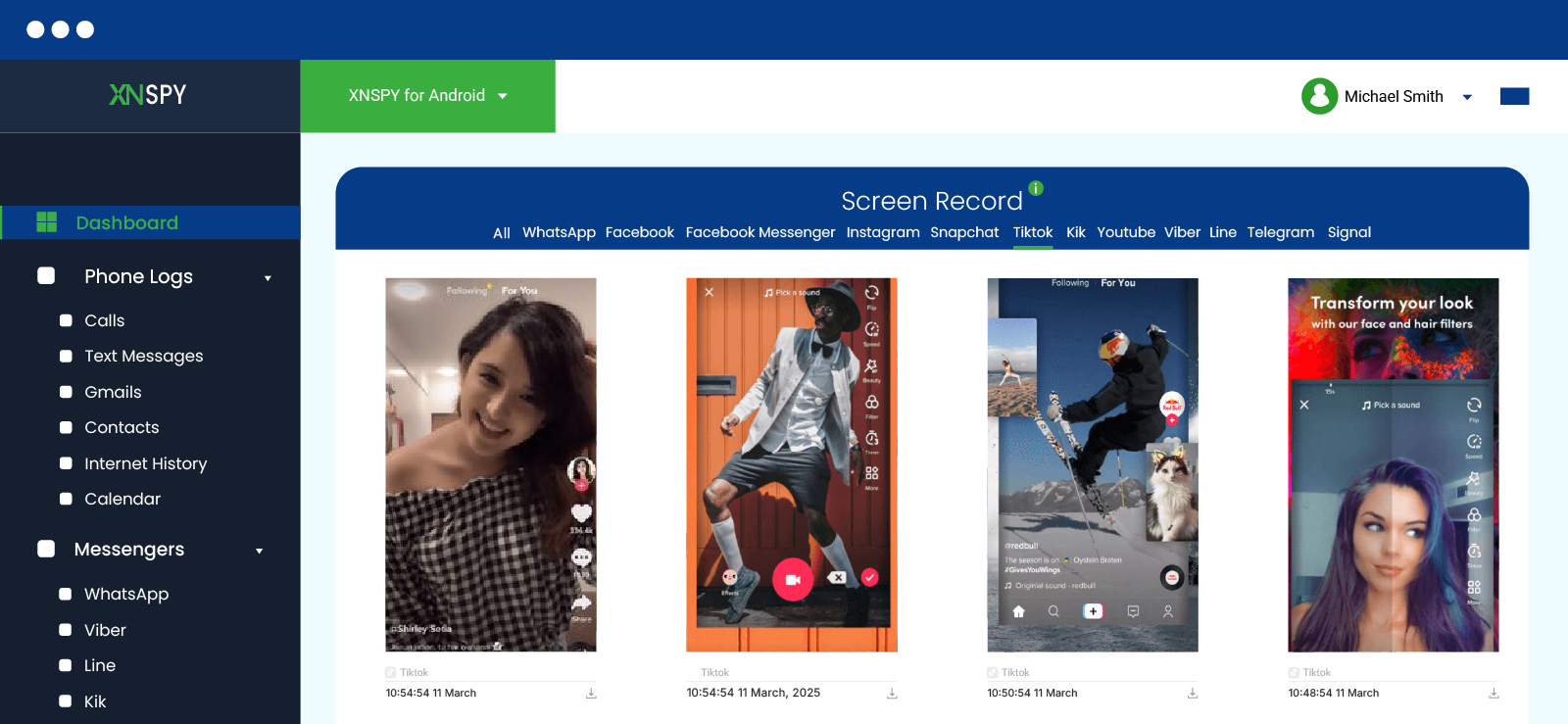
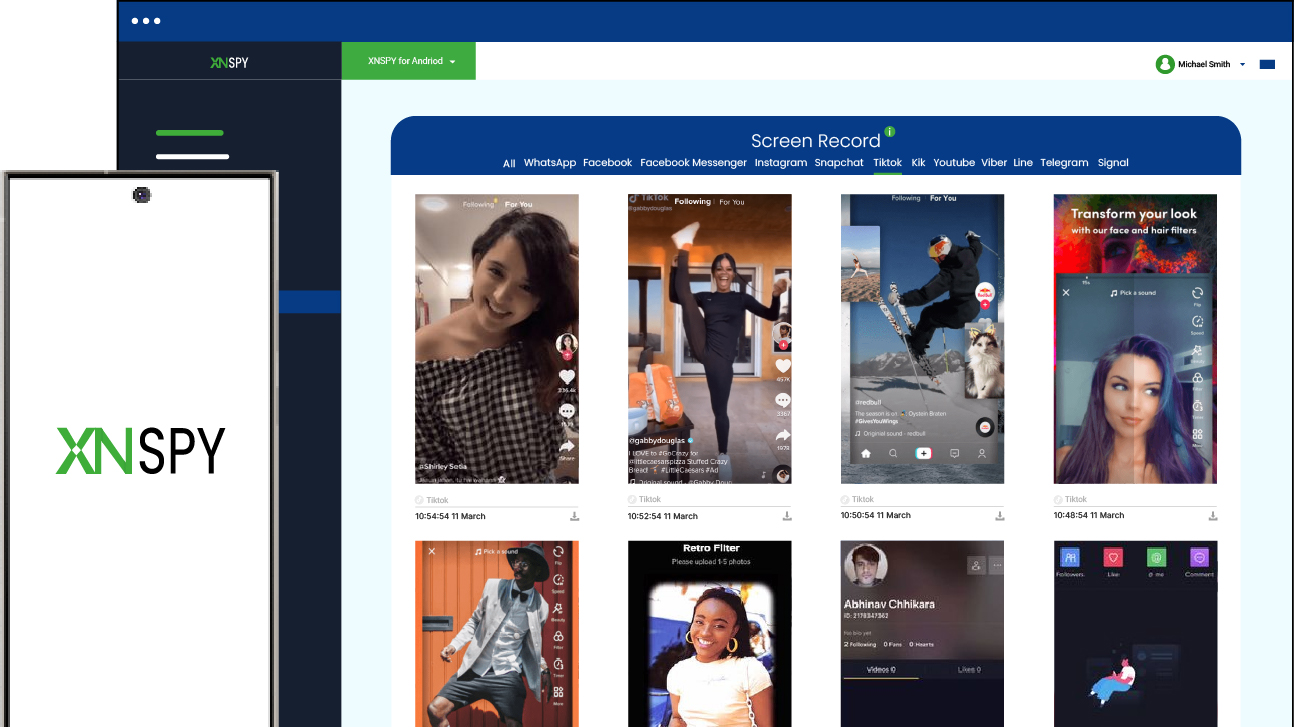
If you want consistent visibility into your child’s TikTok activity, using a device-level monitoring tool like Xnspy is one of the most technically reliable options. Unlike workaround-based methods that depend on browser behavior or app caching, this approach works directly at the device layer, meaning it records activity as it happens.
Xnspy functions by capturing periodic screenshots along with other activity logs directly from the phone and syncing them to a secure online dashboard. Because the monitoring occurs in discretion as your child uploads the story, you don’t have to worry about the view being recorded at all.
Xnspy supports both Android and iOS devices, although the setup process varies slightly between the two platforms. Once configured, it runs quietly in the background and uploads activity logs to the parent dashboard in real-time.
If you want to know how to watch TikTok story anonymously using Xnspy, follow these steps:
- Subscribe to Xnspy and create a parent dashboard account.
- Access your child’s phone for the one-time installation and setup process.
- Grant the necessary permissions during installation.
- Allow the device to sync activity data with the online dashboard.
- Log in to your dashboard to review TikTok activity logs and screen recordings.
How Did This Method Work Out for Me?
I tested this method on one Samsung Galaxy Android phone and my own iPhone over a period of about five days. The setup process took roughly 4-6 minutes on Android and around 7-8 minutes on iOS due to additional configuration steps.
Once installed, screen recordings started appearing in the dashboard within 2–3 minutes of device activity. Screen recording sessions were uploaded periodically, and in several cases, I could see TikTok sessions that included Story uploading behavior.
What I found most notable was stability. Unlike other methods that broke after app updates, this method continued to function normally during testing.
Overall, in my testing environment, this method provided the most consistent visibility into device activity, though it requires initial access to the device to set up properly.

Need More Than Workarounds? Try Xnspy!
Get more reliable results with Xnspy.
– See TikTok activity as it happens
– Get screen recordings and activity logs
– Bypass TikTok’s Story viewer system
– Track usage patterns across apps
2. Creating a Secondary TikTok Account
One of the most stable and widely used methods to view TikTok story anonymously is creating a secondary account. Instead of attempting to hide your identity, this approach isolates your viewing activity into a separate profile that is not linked to your main identity.
TikTok only registers the account used to view the Story, not the person behind it. This makes the method effective for reducing direct identity exposure, especially when monitoring public accounts.
To use this method:
- Create a new TikTok account using a separate email address.
- Avoid linking phone contacts or syncing personal data.
- Do not use identifiable profile details such as real name or photo.
- Search for the target account manually.
- View Stories exclusively through this secondary profile
How Did This Method Work Out for Me?
To see if this actually works, I tested this method on a spare Redmi Android phone that I had lying around at home. The method remained fairly consistent, but only for public-account scenarios.
With private accounts, success dropped to near zero unless I followed the targeted account on the app, which significantly limits its usefulness in those situations.
Overall, it performed well for public profiles with standard settings, but its effectiveness decreased sharply when any additional privacy layer was involved.
3. Turning the Airplane Mode On

If you don’t want to create additional accounts or install applications and still know how to view someone’s TikTok story anonymously, the airplane mode method might be for you. It is based on the idea that disconnecting from the internet prevents TikTok from sending view data to its servers. In theory, this creates a window where content can be viewed offline without being registered.
However, modern apps often cache activity and sync it once connectivity is restored. So, doing so required careful steps like the following:
- Load the TikTok Story while connected to the internet
- Activate airplane mode before interaction
- View the Story offline
- Close the app fully
- Clear the app cache
- Restore the internet
How Did This Method Work Out for Me?
When I tested this method, I did so across multiple TikTok accounts: my own, the account I made to test the previous method, and my wife’s. Moreover, I tested it on both my iPhone and my wife’s Android Galaxy Phone. In my findings, the results were inconsistent.
Out of around 12 test attempts, only 3 to 4 instances actually prevented my username from appearing in the Story viewer list. In the remaining cases, once the phone reconnected to the internet, TikTok’s background synchronization pushed the view data to the server, and the account owner could still see that the Story had been viewed.
What I found particularly interesting was that clearing the cache did not always prevent this. While cache clearing removes temporary files stored by the app, TikTok may still maintain pending activity logs or session data that sync once connectivity resumes.
The only real advantage of this method is its simplicity. It requires no additional tools, accounts, or setup, so anyone can attempt it quickly.
However, because the method depends on app caching behavior, device OS handling, and TikTok’s sync timing, it cannot be considered reliable. In my tests, it worked less than 30% of the time, which makes it more of an experimental workaround than a dependable solution.

Did You Know?
There are many apps that let you anonymously view TikTok.

4. Trying a Third-Party TikTok Viewing Tool

Third-party viewer tools claim to provide anonymous access by acting as intermediaries between the user and TikTok’s servers. These tools often market themselves as “100% anonymous,” but their actual reliability varies significantly.
Most rely on unstable data scraping techniques or outdated endpoints.
To know how to view TikTok story anonymously using third-party tools:
- Open your browser
- Search for a
- Enter TikTok username or profile link
- Attempt to load Stories via external tool
- View results if available
How Did This Method Work Out for Me?
I tested several third-party TikTok viewing tools, and the results were highly inconsistent. Out of roughly 6 different tools I tried, only 3 were able to load public profiles reliably, and even then, Stories did not always appear. In several cases, the tool simply returned an error or failed to fetch any content at all.
Another issue I noticed was the heavy presence of pop-ups, redirects, and aggressive advertising. A few platforms requested unnecessary permissions or attempted to push additional downloads, which immediately raised my concerns about data collection and user privacy.
All in all, the main advantage is convenience. Most tools only require pasting a TikTok profile link, and the interface is straightforward even for non-technical users.
However, I found the trade-off to be quite significant. Many of these services operate without clear transparency about how data is handled, and are unable to view data for private accounts.
FAQs
How to watch TikTok story anonymously if your teen has multiple accounts?
If your teen manages multiple TikTok accounts, anonymity becomes slightly more complex because each account may have different privacy settings and audiences. The most practical approach is to view Stories through methods that do not rely on your primary TikTok account, such as using a monitoring tool like Xnspy. This app helps you view stories at the initial level when your child is posting them and does not depend on the platform or its policies at all.
How to view a story on TikTok anonymously when using a web browser?
In practice, TikTok does not consistently allow Story viewing without a logged-in account, even on a web browser. While you can open public profiles in incognito or private mode, Story content is usually restricted behind TikTok’s authentication system. This means that without signing in, Stories often will not load at all, or they will redirect to login. So, even if you try to open it in the browser’s incognito mode, this method will not yield any results.
How do I unview someone’s story on TikTok?
Once a TikTok Story has been viewed while logged into an account, there is no built-in option to remove or undo that view. TikTok records Story viewers on the creator’s viewer list for the duration of the Story’s 24-hour lifespan. Deleting your account or clearing app data does not remove the view either. The only reliable way to remain anonymous is to avoid viewing Stories through your logged-in account in the first place.
How to see TikTok story anonymously if your kid deletes it quickly?
Since TikTok Stories automatically disappear after 24 hours and can also be deleted earlier by the user, timing plays an important role. Methods that rely on browser access or manual viewing may miss the content if it is removed quickly. Tools that record device activity or screen interactions in real time, like Xnspy, tend to capture Stories more reliably because the content is logged when it appears, even if it is deleted shortly afterward.
How to check TikTok story anonymously if your child uses a second phone?
If your child uses a second device, viewing their Stories anonymously depends on whether you can access that device or the account itself. Browser-based methods and secondary TikTok accounts may still work for public profiles, but they provide limited visibility. In situations involving multiple devices, approaches that monitor device-level activity or screen sessions tend to provide clearer insight into how TikTok is being used across different phones.
Leave a reply:
Your email address will not be published. Required fields are marked*
Stephen Hawks
Member since February 26, 2026
Stephen Hawks
Member since February 26, 2026
Stephen Hawks is a mobile app security and digital privacy analyst with over 12 years of experience evaluating mobile monitoring technologies, device tracking applications, smartphone data security risks, and more. He is particularly passionate about how monitoring apps function, what data they access, and how securely that data is stored.
Previously working as an IT forensics consultant, he specialized in analyzing app-level data exposure and digital evidence patterns on smartphones. Today, he focuses exclusively on mobile monitoring tools and tracking applications, with an emphasis on real-world performance and security vulnerabilities.
Moreover, he holds industry certifications including CompTIA Security+ and Certified Ethical Hacker (CEH).